

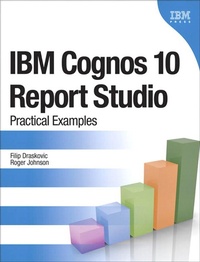
IBM Cognos 10 Report Studio
Practical Examples
1st Edition
Published on 18. October 2011
320 pages
978-0-13-265694-8 (ISBN)
Description

IBM Cognos 10 is the next generation of the leading performance management, analysis, and reporting standard for mid- to large-sized companies. One of the most exciting and useful aspects of IBM Cognos software is its powerful custom report creation capabilities. After learning the basics, report authors in the enterprise need to apply the technology to reports in their actual, complex work environment. This book provides that advanced know how. Using practical examples based on years of teaching experiences as IBM Cognos instructors, the authors provide you with examples of typical advanced reporting designs and complex queries in reports. The reporting solutions in this book can be directly used in a variety of real-world scenarios to provide answers to your business problems today. The complexity of the queries and the application of design principles go well beyond basic course content or introductory books. IBM Cognos 10 Report Studio: Practical Examples will help you find the answers to specific questions based on your data and your business model. It will use a combination tutorial and cookbook approach to show real-world IBM Cognos 10 Report Studio solutions. If you are still using IBM Cognos 8 BI Report Studio, many of the examples have been tested against this platform as well. The final chapter has been dedicated to showing those features that are unique to the latest version of this powerful reporting solution.
More details
Series
Edition
1. Auflage
Language
English
Place of publication
Armonk
United States
Publishing group
Pearson Education (US)
Target group
College/higher education
File size
14,56 MB
ISBN-13
978-0-13-265694-8 (9780132656948)
Copyright in bibliographic data and cover images is held by Nielsen Book Services Limited or by the publishers or by their respective licensors: all rights reserved.
Schweitzer Classification
Other editions
Additional editions
Book
11/2011
IBM Press
€59.51
Shipment within 15-20 days
Persons
Filip Draskovic has spent his professional career, which covers the past 11 years, living and breathing IBM Cognos. For the first 8 years of his career, he had been an IBM Cognos consultant and developed his skills applying IBM Cognos Business Intelligence and Planning solutions in multiple industries. Wanting to do something different, he spent the next 3 years as a Cognos trainer teaching public and private IBM Cognos courses in IBM's offices around North America. Following his desire to constantly gain new experiences and knowledge, he is currently filling the role of an IBM Cognos client technical professional. You can find him today in Toronto's financial district. At home, with his wife, he is enjoying raising their son and daughter.
Roger Johnson is a learning consultant on IBM Cognos technologies delivering a wide variety of courses focusing on the needs of his learners. His education experience has been honed over years of work in training software professionals, college students, and many types of technology users. After he started his career as a computer programmer, a coworker said, "Hey, you do community theater productions. You would make a good trainer." With those words, his career took a different direction. Over the next 20 years, he never moved too far from either technology or education. As a learner, he has masters degrees in Systems Management and Education. Currently, he is researching the end-user adoption of technology as his doctoral dissertation at Capella University. He calls Orlando home, but is regularly seen around North America delivering any number of IBM Cognos courses. When he is home, he enjoys the time he gets to spend with family, and his dogs keep him busy jogging around the lake.
Roger Johnson is a learning consultant on IBM Cognos technologies delivering a wide variety of courses focusing on the needs of his learners. His education experience has been honed over years of work in training software professionals, college students, and many types of technology users. After he started his career as a computer programmer, a coworker said, "Hey, you do community theater productions. You would make a good trainer." With those words, his career took a different direction. Over the next 20 years, he never moved too far from either technology or education. As a learner, he has masters degrees in Systems Management and Education. Currently, he is researching the end-user adoption of technology as his doctoral dissertation at Capella University. He calls Orlando home, but is regularly seen around North America delivering any number of IBM Cognos courses. When he is home, he enjoys the time he gets to spend with family, and his dogs keep him busy jogging around the lake.
Content
About the Authors xvi Foreword by Erin Pyka xvii
Preface xviii
Chapter 1 Creating Consumer-Friendly Reports 1
Highlight Selected Text 1
Design 2
Step-by-Step 2
Avoiding Query Macros 10
Design 12
Step-by-Step 13
Complex Crosstab Calculations 20
Design 20
Step-by-Step 21
Summary 24
Chapter 2 Matching the Report to the Analysis 27
The Dashboard 28
Design 28
Step-by-Step 29
Prompting from an Entire Hierarchy 45
Design 45
Step-by-Step 45
Additional Dimensional Functions 58
Design 58
Step-by-Step 59
Master-Detail Report from Two Separate Lists 70
Design 70
Step-by-Step 70
Configuring the Interactive Dashboard 82
Scenario 82
Design 82
Step-by-Step 82
Summary 89
Chapter 3 Understanding the Report Hierarchy 91
Layout Library 91
Design 92
Step-by-Step 92
Using the Layout Library 100
Design 100
Step-by-Step 101
Inheriting Formatting 109
Design 109
Step-by-Step 110
Inheriting Structure 120
Design 120
Step-by-Step 120
Creating the Briefing Book 127
Design 127
Step-by-Step 127
Summary 140
Chapter 4 Overriding the Data Model 141
Creating a Union 142
Design 142
Step-by-Step 143
Joining SQL and Model Queries 156
Design 156
Step-by-Step 157
Summary 172
Chapter 5 Additional Examples 175
Using HTML to Enhance Functionality 176
Final Product 176
Design 176
Step-by-Step 177
Integrating Multiple Queries into a Complex Report 187
Final Product 188
Design 188
Step-by-Step 189
Summary 199
Chapter 6 New Techniques in Version 10 201
Using Active Reports to Replace HTML Code 202
Design 203
Step-by-Step 203
Adding Local Data Sources to Reports 207
Design 207
Step-by-Step 208
New Charting Options and Active Reports 220
Design 220
Step-by-Step 221
Statistical Analysis 247
Design 247
Step-by-Step 249
Summary 268
Index 271
Preface xviii
Chapter 1 Creating Consumer-Friendly Reports 1
Highlight Selected Text 1
Design 2
Step-by-Step 2
Avoiding Query Macros 10
Design 12
Step-by-Step 13
Complex Crosstab Calculations 20
Design 20
Step-by-Step 21
Summary 24
Chapter 2 Matching the Report to the Analysis 27
The Dashboard 28
Design 28
Step-by-Step 29
Prompting from an Entire Hierarchy 45
Design 45
Step-by-Step 45
Additional Dimensional Functions 58
Design 58
Step-by-Step 59
Master-Detail Report from Two Separate Lists 70
Design 70
Step-by-Step 70
Configuring the Interactive Dashboard 82
Scenario 82
Design 82
Step-by-Step 82
Summary 89
Chapter 3 Understanding the Report Hierarchy 91
Layout Library 91
Design 92
Step-by-Step 92
Using the Layout Library 100
Design 100
Step-by-Step 101
Inheriting Formatting 109
Design 109
Step-by-Step 110
Inheriting Structure 120
Design 120
Step-by-Step 120
Creating the Briefing Book 127
Design 127
Step-by-Step 127
Summary 140
Chapter 4 Overriding the Data Model 141
Creating a Union 142
Design 142
Step-by-Step 143
Joining SQL and Model Queries 156
Design 156
Step-by-Step 157
Summary 172
Chapter 5 Additional Examples 175
Using HTML to Enhance Functionality 176
Final Product 176
Design 176
Step-by-Step 177
Integrating Multiple Queries into a Complex Report 187
Final Product 188
Design 188
Step-by-Step 189
Summary 199
Chapter 6 New Techniques in Version 10 201
Using Active Reports to Replace HTML Code 202
Design 203
Step-by-Step 203
Adding Local Data Sources to Reports 207
Design 207
Step-by-Step 208
New Charting Options and Active Reports 220
Design 220
Step-by-Step 221
Statistical Analysis 247
Design 247
Step-by-Step 249
Summary 268
Index 271
