

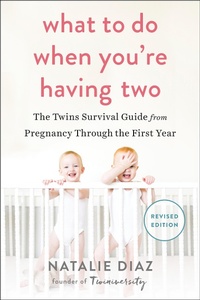
What to Do When You're Having Two
The Twins Survival Guide from Pregnancy Through the First Year
Published on 3. December 2013
288 pages
978-1-101-63160-7 (ISBN)
Description

The creator of Twiniversity delivers an essential update to her must-have manual to having twins, now with expanded info on twin pregnancy and tandem breastfeeding, and advice on the best gear to help save your sanity.
With almost two times as many sets of twins today as there were forty years ago, What to Do When You're Having Two has quickly become the definitive resource for expectant and new parents of multiples.
A mom of fraternal twins and a world-renowned expert on parenting multiples, author Natalie Diaz launched Twiniversity, the world's leading global resource for twin parenting information and support online. Now, with her expanded edition of What to Do, she includes new information on breastfeeding, gear, sleep, and having two when you already have one, as well as:
• creating your twin birth plan,
• maintaining a realistic sleep schedule,
• managing tandem breastfeeding,
• stocking up on what you'll need (and knowing what high-tech products are now available and what's a waste of money), and
• building a special bond with each of your twins.
Accessible, informative, and humorous, What to Do When You're Having Two is the must-have manual for every parent of twins.
With almost two times as many sets of twins today as there were forty years ago, What to Do When You're Having Two has quickly become the definitive resource for expectant and new parents of multiples.
A mom of fraternal twins and a world-renowned expert on parenting multiples, author Natalie Diaz launched Twiniversity, the world's leading global resource for twin parenting information and support online. Now, with her expanded edition of What to Do, she includes new information on breastfeeding, gear, sleep, and having two when you already have one, as well as:
• creating your twin birth plan,
• maintaining a realistic sleep schedule,
• managing tandem breastfeeding,
• stocking up on what you'll need (and knowing what high-tech products are now available and what's a waste of money), and
• building a special bond with each of your twins.
Accessible, informative, and humorous, What to Do When You're Having Two is the must-have manual for every parent of twins.
More details
Other editions
Additional editions
Natalie Diaz
What to Do When You're Having Two
The Twins Survival Guide from Pregnancy Through the First Year
Book
12/2013
Avery Publishing Group Inc.,U.S.
€21.50
Shipment within 3-4 weeks
Person
Founder of the Twiniversity website and director of the Manhattan Twins Club, Natalie Diaz has been featured widely in the media. She lives in New York City with her husband and their seven-year-old fraternal twins.
