

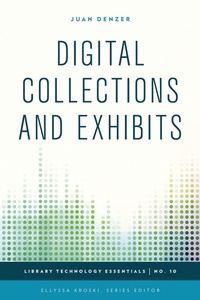
Digital Collections and Exhibits
1st Edition
Published on 22. July 2015
132 pages
978-1-4422-4376-7 (ISBN)
Description

Today's libraries are taking advantage of cutting-edge technologies such as flat panel displays using touch, sound, and hands-free motions to design amazing exhibits using everything from simple computer hardware to advanced technologies such as the Microsoft Kinect. Libraries of all types are striving to add new interactive experiences for their patrons through exciting digital exhibits, both online and off. Digital Collections and Exhibits takes away the mystery of designing stunning digital exhibits to spotlight library treasures by walking the reader through implementation projects that are sure to astound and impress.
This collection of easy-to-follow instructions will give readers the knowledge and confidence to create and design their very own extraordinary digital exhibits. Readers will learn:
How to Create a Digital Exhibit Using Omeka.netHow to Create a Hands-Free Digital Exhibit Showcase with Microsoft KinectHow to Create a Digital Exhibit Using Open ExhibitsHow to Create 3D Objects and Add them to Online Exhibits
This collection of easy-to-follow instructions will give readers the knowledge and confidence to create and design their very own extraordinary digital exhibits. Readers will learn:
How to Create a Digital Exhibit Using Omeka.netHow to Create a Hands-Free Digital Exhibit Showcase with Microsoft KinectHow to Create a Digital Exhibit Using Open ExhibitsHow to Create 3D Objects and Add them to Online Exhibits
More details
Series
Edition
1. Auflage
Language
English
Place of publication
New York
United States
Publishing group
Bloomsbury Publishing Plc
Illustrations
12 b/w photos; 2 tables
ISBN-13
978-1-4422-4376-7 (9781442243767)
Copyright in bibliographic data and cover images is held by Nielsen Book Services Limited or by the publishers or by their respective licensors: all rights reserved.
Schweitzer Classification
Other editions
Additional editions
Juan Denzer
Digital Collections and Exhibits
Book
07/2015
Rowman & Littlefield Publishers
€68.80
Shipment within 10-20 days
Juan Denzer
Digital Collections and Exhibits
Book
07/2015
Rowman & Littlefield Publishers
€124.60
Shipment within 10-20 days
Person
Juan Denzer is a Library Systems Specialist at Binghamton University in Binghamton, New York. He is a graduate of Binghamton University where he received a bachelor's degree in Computer Science in 2004. He is currently working on this master's degree in Library and Information Science at Buffalo University online.
Before working in the library, Juan worked in the private sector as a Systems Administrator and Developer. He has developed several custom-applications for companies that include an automated-security entry system for a 24 hours gym, a fully automated Ebay listing system, and an inventory-loading system for a small trucking company that supports the Raymond Corporation in Greene NY.
Juan have taken his vast knowledge of computer systems and developing software to the library community. He uses it to educate and train faculty and staff. Juan also uses his passion for technology and libraries to give national presentations across the country. Some of the library conferences that he has presented at include Computers in Libraries, IDS Project,and Internet Librarian. He was also invited to speak at the ELI Educause Annual Meeting for his work with the Leap Motion device and Rare Books. He is currently working on an exciting new invention he created called the AR Magic Book, which will help present digital collection in libraries and museums in a whole new way. http://library2.binghamton.edu/news/ARMB/
Before working in the library, Juan worked in the private sector as a Systems Administrator and Developer. He has developed several custom-applications for companies that include an automated-security entry system for a 24 hours gym, a fully automated Ebay listing system, and an inventory-loading system for a small trucking company that supports the Raymond Corporation in Greene NY.
Juan have taken his vast knowledge of computer systems and developing software to the library community. He uses it to educate and train faculty and staff. Juan also uses his passion for technology and libraries to give national presentations across the country. Some of the library conferences that he has presented at include Computers in Libraries, IDS Project,and Internet Librarian. He was also invited to speak at the ELI Educause Annual Meeting for his work with the Leap Motion device and Rare Books. He is currently working on an exciting new invention he created called the AR Magic Book, which will help present digital collection in libraries and museums in a whole new way. http://library2.binghamton.edu/news/ARMB/
Content
Foreword by Ellyssa Kroski
Preface
Acknowledgments
Chapter One: An Introduction to Digital Collections and Exhibits
Chapter Two: Getting Started with Digital Collections and Exhibits
Chapter Three: Tools and Applications
Chapter Four: Library Examples and Case Studies
Chapter Five: Step-by-Step Library Projects for Digital Collections and Exhibits
Chapter Six: Tips and Tricks
Chapter Seven: Future Trends
Chapter Eight: Recommended Reading
Index
About the Author
Preface
Acknowledgments
Chapter One: An Introduction to Digital Collections and Exhibits
Chapter Two: Getting Started with Digital Collections and Exhibits
Chapter Three: Tools and Applications
Chapter Four: Library Examples and Case Studies
Chapter Five: Step-by-Step Library Projects for Digital Collections and Exhibits
Chapter Six: Tips and Tricks
Chapter Seven: Future Trends
Chapter Eight: Recommended Reading
Index
About the Author
