

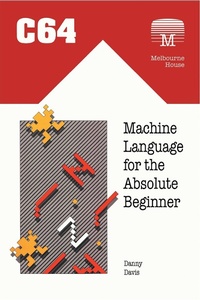
C64 Machine Language for the Absolute Beginner
Published on 31. March 2022
184 pages
978-1-78982-543-5 (ISBN)
Description

First published in 1984, this user-friendly guide to the Commodore 64 helped many owners of the much-loved home computer understand their machine to a whole new level. The details within the book enabled users to take their first steps in programming machine code even without prior coding experience. To this day it remains a highly useful guide for those interested in retro games programming on the classic machine. * * *As the original publisher Melbourne House wrote:This book will enable the user to learn machine language the easy way - no computer jargon. A straightforward approach with many examples.Complied exclusively for Commodore 64 users, COMMODORE 64 MACHINE LANGUAGE FOR THE ABSOLUTE BEGINNER offers complete instruction in 6502 machine language.If you are frustrated by the limitations of BASIC and want to write faster, more powerful, space-saving programs or subroutines, then this book is for you.Even with no previous experience of computer languages, the easy-to-understand 'no jargon' format of this book will enable you to discover the power of the Commodore 64's own language.Each chapter includes specific examples of machine language applications that can be demonstrated and used on your own Commodore 64.Includes an assembly language programming aid program which allows you to enter machine language programs with immediate confirmation of correct instruction.This book gives you everything you need to write machine language programs for your Commodore 64.
More details
Other editions
Additional editions
Danny Davis
C64 Machine Language for the Absolute Beginner
Book
03/2022
Acorn Books
€22.70
Shipment within 3-4 weeks
Content
- Cover
- Contents
- Front Matter
- Title Page
- Publisher Info
- C64 Machine Language for the Absolute Beginner
- Foreward
- Chapter 1- Introduction to Machine Language
- Using a machine language program
- Memory addressing
- Summary
- Chapter 2- Basics of Machine Language Programming
- The registers
- Addressing modes
- Assembly language
- Screen memory
- Summary
- Chapter 3- Introdcution to Hexadecimal
- Binary
- Why hexadecimal?
- Absolute addressing
- Converting hexadecimal to decimal
- Summary
- Chapter 4- Introduction to ALPA
- Summary
- Chapter 5- Microprocessor Equipment
- Storing numbers
- Adding numbers
- Two byte addition
- Subtracting numbers
- Summary
- Chapter 6- Program Control
- Sprites
- Looping using JMP
- Infinite loops
- Comparing numbers
- Relative addressing
- Summary
- Chapter7- Counting, Looping and Pointing
- Counting to control a loop
- The X and Y Registers
- Using the x registers as a counter
- Using the Y registers as an index
- Summary
- Chapter 8- Using Information Stored in Tables
- Displaying characters as graphics
- Graphics memory
- Register transfer instructions
- Summary
- Chapter 9- Processor Status Codes
- BCD Representation
- Summary
- Chapter 10- Logical Operators and Bit Manipulators
- Changing bits within memory
- Rotating bits within a byte
- Clever multiplication
- Summary
- Chapter 11- Details of Program Control
- Program counter
- Stack control structure
- Subroutines and the stack
- Summary
- Chapter 12- Dealing with the Operating System
- The Kernal
- CLI
- RTI
- Summary
- Appendices
- Appendix 1- 6510 Instruction codes
- Appendix 2- 6510 Microprocessor registers
- Appendix 3- Hexadecimal to decimal conversion table
- Appendix 4- Relative branch and two's complement numbering tables
- Appendix 5- Commodore 64 memory map
- Appendix 6- The screen chip
- Appendix 7- The sound chip
- Appendix 8- CIA interface chip
- Appendix 9- Memory usage directory
- Appendix 10- Operating system routines
- Appendix 11- Table of screen codes
- Appendix 12- Current key pressed
- Appendix 13- ALPA
- Appendix 14 Screen codes
- Glossary
- Back Matter
- Also availables
