

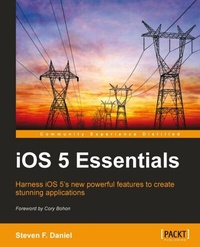
iOS 5 Essentials
Harness iOS 5's new powerful features to create stunning applications
Published on 13. January 2025
252 pages
978-1-84969-227-4 (ISBN)
Description

Harness iOS 5\'s new powerful features to create stunning applications with this book and ebook
Key Features
Integrate iCloud, Twitter and AirPlay into your applications.
Lots of step-by-step examples, images and diagrams to get you up to speed in no time with helpful hints along the way.
Each chapter explains iOS 5's new features in-depth, whilst providing you with enough practical examples to help incorporate these features in your apps
From the author of Xcode 4 iOS development.
Book DescriptionBuilding on the phenomenal success of its predecessor iOS 5 includes over 200 new user features as well as an updated SDK containing over 1,500 new APIs. iOS 5 looks set to reinforce the iPhone's dominance in the smartphone market. iOS 5 Essentials will help you learn how to build simple, yet powerful iOS 5 applications incorporating iCloud Storage, Twitter, Core Image and Newsstand integration. You will start by learning about what's new in iOS 5. You'll look at the iCloud Storage APIs, Automatic Reference Counting, Twitter and AirPlay integration, how to use the various Core Image filters using the Cocoa framework, and the new features of the iOS 5 SDK. After this, you'll jump straight in and create applications using Xcode and Interface Builder using the new storyboard layout. We then finish up by learning how to make your applications run smoothly using the Xcode instruments.What you will learn
Write applications that have the ability to store user documents wirelessly.
Push changes to all devices and computers at the same time, using the iCloud Storage APIs.
Integrate and Tweet directly from your applications using the new Tweet sheet.
Include your current location and host photos on Twitter by using the Twitter Framework APIs.
Learn how to use the AirPlay feature to wirelessly stream videos to Apple TV.
Learn how to use the Core Image Framework to create amazing image effects to enhance photos and videos.
Understand how to debug OpenGL ES applications using Xcode 4.
Learn how to use instruments to make your applications run smoothly.
Who this book is forIf you ever wanted to learn about the latest features of iOS 5 and learn how to incorporate Twitter, iCloud and Core Image framework effects functionality into your applications, then this book is for you. You should have a good knowledge of programming experience with Objective-C, and have used Xcode 4. iPhone programming experience is not required.
Key Features
Integrate iCloud, Twitter and AirPlay into your applications.
Lots of step-by-step examples, images and diagrams to get you up to speed in no time with helpful hints along the way.
Each chapter explains iOS 5's new features in-depth, whilst providing you with enough practical examples to help incorporate these features in your apps
From the author of Xcode 4 iOS development.
Book DescriptionBuilding on the phenomenal success of its predecessor iOS 5 includes over 200 new user features as well as an updated SDK containing over 1,500 new APIs. iOS 5 looks set to reinforce the iPhone's dominance in the smartphone market. iOS 5 Essentials will help you learn how to build simple, yet powerful iOS 5 applications incorporating iCloud Storage, Twitter, Core Image and Newsstand integration. You will start by learning about what's new in iOS 5. You'll look at the iCloud Storage APIs, Automatic Reference Counting, Twitter and AirPlay integration, how to use the various Core Image filters using the Cocoa framework, and the new features of the iOS 5 SDK. After this, you'll jump straight in and create applications using Xcode and Interface Builder using the new storyboard layout. We then finish up by learning how to make your applications run smoothly using the Xcode instruments.What you will learn
Write applications that have the ability to store user documents wirelessly.
Push changes to all devices and computers at the same time, using the iCloud Storage APIs.
Integrate and Tweet directly from your applications using the new Tweet sheet.
Include your current location and host photos on Twitter by using the Twitter Framework APIs.
Learn how to use the AirPlay feature to wirelessly stream videos to Apple TV.
Learn how to use the Core Image Framework to create amazing image effects to enhance photos and videos.
Understand how to debug OpenGL ES applications using Xcode 4.
Learn how to use instruments to make your applications run smoothly.
Who this book is forIf you ever wanted to learn about the latest features of iOS 5 and learn how to incorporate Twitter, iCloud and Core Image framework effects functionality into your applications, then this book is for you. You should have a good knowledge of programming experience with Objective-C, and have used Xcode 4. iPhone programming experience is not required.
All prices
More details
Edition
Digital original
Language
English
Place of publication
Birmingham
United Kingdom
Edition type
Digital original
File size
11,01 MB
ISBN-13
978-1-84969-227-4 (9781849692274)
Copyright in bibliographic data and cover images is held by Nielsen Book Services Limited or by the publishers or by their respective licensors: all rights reserved.
Schweitzer Classification
Other editions
Additional editions
Steven Daniel | Steven F. Daniel
IOS 5 Essentials
Book
01/2011
Packt Publishing
€50.70
Shipment within 3-4 weeks
Person
Daniel Steven F. :
Steven F. Daniel is the CEO and founder of GENIESOFT STUDIOS, a software development company based in Melbourne, Victoria, that focuses primarily on developing games and business applications for the iOS, Android, and Mac OS X platforms. He is an experienced software engineer with more than 17 years' experience and is extremely passionate about making people employable by helping them use their existing skills in iOS, Android, and Xamarin to get the job done. He is a member of the SQL Server Special Interest Group (SQLSIG), CocoaHeads, and the Java Community. He was the co-founder and Chief Technology Officer (CTO) at SoftMpire Pty Ltd., a company focused primarily on developing business applications for the iOS and Android platforms.
Steven F. Daniel is the CEO and founder of GENIESOFT STUDIOS, a software development company based in Melbourne, Victoria, that focuses primarily on developing games and business applications for the iOS, Android, and Mac OS X platforms. He is an experienced software engineer with more than 17 years' experience and is extremely passionate about making people employable by helping them use their existing skills in iOS, Android, and Xamarin to get the job done. He is a member of the SQL Server Special Interest Group (SQLSIG), CocoaHeads, and the Java Community. He was the co-founder and Chief Technology Officer (CTO) at SoftMpire Pty Ltd., a company focused primarily on developing business applications for the iOS and Android platforms.
Content
Table of Contents

