

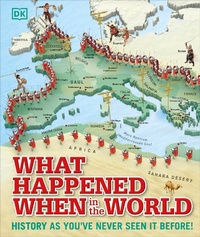
What Happened When in the World
History as You've Never Seen it Before!
Published on 1. April 2015
160 pages
978-0-241-42849-8 (ISBN)
Description

Step back in time to discover the incredible past on planet Earth.
This captivating children's atlas gives a complete history of the life and times of our world, shown in a series of stunning, specially commissioned 3D maps.
Discover the impact of global events over millennia and centuries past. Wrap up warm for a trip to the Ice Age, wonder at the invention of the wheel, show your support at the French Revolution, and blast off for the Moon landings. This round the world trip begins with the first humans and cities before visiting the Egyptian pharaohs and experiencing the rise of the Roman Empire. You'll travel through time right up until recent history, including World War II and the Space Age.
From ancient times to the 21st century, these colourful, detailed maps pinpoint exactly
when and where the most important events and movements in history happened, as well as the part they all played in shaping the world today.
What Happened When in the World is the ultimate unique atlas and the ideal gift for anyone and everyone who wants to know more about the world.
This captivating children's atlas gives a complete history of the life and times of our world, shown in a series of stunning, specially commissioned 3D maps.
Discover the impact of global events over millennia and centuries past. Wrap up warm for a trip to the Ice Age, wonder at the invention of the wheel, show your support at the French Revolution, and blast off for the Moon landings. This round the world trip begins with the first humans and cities before visiting the Egyptian pharaohs and experiencing the rise of the Roman Empire. You'll travel through time right up until recent history, including World War II and the Space Age.
From ancient times to the 21st century, these colourful, detailed maps pinpoint exactly
when and where the most important events and movements in history happened, as well as the part they all played in shaping the world today.
What Happened When in the World is the ultimate unique atlas and the ideal gift for anyone and everyone who wants to know more about the world.
More details
Series
Language
English
Place of publication
London
United Kingdom
Publishing group
Dorling Kindersley Ltd
Target group
Children/juvenile
Interest Age: From 9 to 12 years
Product notice
Fixed format
File size
99,96 MB
ISBN-13
978-0-241-42849-8 (9780241428498)
Copyright in bibliographic data and cover images is held by Nielsen Book Services Limited or by the publishers or by their respective licensors: all rights reserved.
Schweitzer Classification
Other editions
Additional editions
Book
03/2023
DK Children
€21.50
Shipment within 15-20 days
