

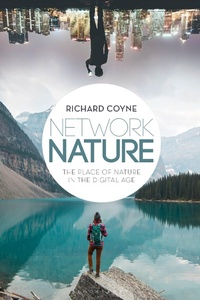
Network Nature
The Place of Nature in the Digital Age
1st Edition
Published on 5. April 2018
264 pages
978-1-350-02949-1 (ISBN)
Description

How do people avoid the stresses of the digital age? Urban dwellers must now turn to nature to recover, restore and rebalance after the stresses brought on by relentless digital connectivity. It is easy to task nature as the cure, with technology as the ailment.
In Network Nature, Richard Coyne challenges the definitions of both the natural and the artificial that support this time-worn narrative of nature's benefits. In the process, he attacks the counter-claim that nature must succumb to the sovereignty of digital data. Covering a spectrum of issues and concepts, from big data and biohacking to animality, numinous spaces and the post-digital, he draws on the rich field of semiotics as applied to natural systems and human communication, to enhance our understanding of place, landscape and architecture in a digital world.
In Network Nature, Richard Coyne challenges the definitions of both the natural and the artificial that support this time-worn narrative of nature's benefits. In the process, he attacks the counter-claim that nature must succumb to the sovereignty of digital data. Covering a spectrum of issues and concepts, from big data and biohacking to animality, numinous spaces and the post-digital, he draws on the rich field of semiotics as applied to natural systems and human communication, to enhance our understanding of place, landscape and architecture in a digital world.
More details
Edition
1. Auflage
Language
English
Place of publication
London
United Kingdom
Publishing group
Bloomsbury Publishing PLC
Target group
Professional and scholarly
Illustrations
35 bw illus
ISBN-13
978-1-350-02949-1 (9781350029491)
Copyright in bibliographic data and cover images is held by Nielsen Book Services Limited or by the publishers or by their respective licensors: all rights reserved.
Schweitzer Classification
Other editions
Additional editions
Book
10/2019
Bloomsbury Visual Arts
€62.08
Shipment within 15-20 days
Book
04/2018
Bloomsbury Visual Arts
€178.27
Shipment within 15-20 days
Person
Richard Coyne is Professor of Architectural Computing at the Edinburgh School of Architecture and Landscape Architecture, the University of Edinburgh, UK.
Content
Introduction
Chapter 1: Tuning in to nature
Chapter 2: The book of nature
Chapter 3: Reproducing nature
Chapter 4: Digital autochthony
Chapter 5: Contested places
Chapter 6: Zoo-space
Chapter 7: Refuge
Chapter 8: Numinous places
Chapter 9: The machine stops
Coda
Notes
References
Index
Chapter 1: Tuning in to nature
Chapter 2: The book of nature
Chapter 3: Reproducing nature
Chapter 4: Digital autochthony
Chapter 5: Contested places
Chapter 6: Zoo-space
Chapter 7: Refuge
Chapter 8: Numinous places
Chapter 9: The machine stops
Coda
Notes
References
Index
