

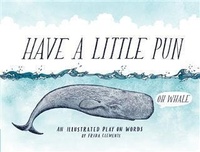
Have a Little Pun
An Illustrated Play on Words
Published on 11. August 2015
80 pages
978-1-4521-4783-3 (ISBN)
Description

A delightfully illustrated collection of puns for grownups to giggle and groan over....
Artist Frida Clements playfully combines colorfully detailed flora and fauna drawings with funny (and occasionally risqué) hand-lettered wordplay in this collection of beautifully illustrated puns. Honey, bee yourself! Gopher it. Don't be koi. Like puns? That's coo, says the pigeon. Hate puns? Birch, please. Bringing a giggle (and sometimes a groan) with each inspired page, this clever volume makes a lovely and lighthearted read for fans of witty humor and illustration. Having a bad hare day? Feeling a little antsy? What the hail, just dill with it, and for fox sake, have a little pun.
Artist Frida Clements playfully combines colorfully detailed flora and fauna drawings with funny (and occasionally risqué) hand-lettered wordplay in this collection of beautifully illustrated puns. Honey, bee yourself! Gopher it. Don't be koi. Like puns? That's coo, says the pigeon. Hate puns? Birch, please. Bringing a giggle (and sometimes a groan) with each inspired page, this clever volume makes a lovely and lighthearted read for fans of witty humor and illustration. Having a bad hare day? Feeling a little antsy? What the hail, just dill with it, and for fox sake, have a little pun.
More details
Other editions
Additional editions

Book
08/2015
Chronicle Books
€33.61
Article in reprint
Person
Frida Clements is a Seattle-based illustrator and graphic designer who keeps an ever-growing list of puns with her wherever she goes.
Content
- Cover
- Title
- Copyright
- Contents
- Introduction
- Have a Little Pun
- Acknowledgments
- About the Author
- Chronicle Ebooks
