

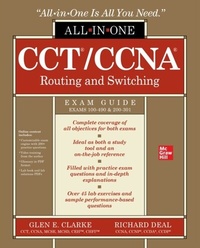
CCT/CCNA Routing and Switching All-in-One Exam Guide (Exams 100-490 & 200-301)
1st Edition
Published on 1. January 2021
944 pages
978-1-260-46978-3 (ISBN)
Available for download
Description

This new All-in-One Exam Guide covers every topic on the current version of Cisco's CCT and CCNA examsTake the 2020 versions of the Cisco Certified Technician (CCT) and Cisco Certified Network Associate (CCNA) exams with complete confidence using the detailed information contained in this highly effective self-study system. Written by a pair of Cisco networking professionals and training experts, CCT /CCNA Routing and Switching All-in-One Exam Guide (Exams 100-490 & 200-301) fully explains all subjects covered on both exams and contains practice questions that mirror those on the live test in tone, format, and content. Beyond fully preparing you for the challenging exam, the book also serves as a valuable on-the-job reference.Covers all topics on both exams, including: Network fundamentals OSI modelTCP/IP protocol suiteSubnetting and VLSMCisco device and IOS basicsCisco device managementSwitchingStatic and dynamic routingIP services and IPv6WirelessSecurity fundamentalsImplementing security on Cisco devicesAutomation and programmability
More details
Other editions
Additional editions
Glen Clarke | Richard Deal
CCT/CCNA Routing and Switching All-in-One Exam Guide (Exams 100-490 & 200-301)
Book
02/2021
McGraw-Hill Education
€49.51
Article exhausted; check different version
Content
- Intro
- Cover
- Title Page
- Copyright Page
- Dedication
- Contents
- Acknowledgments
- Introduction
- Chapter 1 Network Fundamentals
- Introduction to Networks
- Network Characteristics
- Networking Components
- Network Locations
- Local Area Networks
- Wide Area Networks
- Common Network Services and Devices
- Types of Services
- Network Infrastructure Components
- Collision Domains and Broadcast Domains
- Exercise 1-1: Identifying Network Components
- Network Design Models
- Network Topologies
- Physical vs. Logical Topologies
- Fully and Partially Meshed Topologies
- Types of Cabling
- Copper Cabling
- Fiber
- Access Methods
- CSMA/CD
- CSMA/CA
- Token Passing
- Network Architectures
- Ethernet
- Fast Ethernet
- Gigabit Ethernet
- 10-Gigabit Ethernet
- Serial, Optical, and Other Architectures
- GBICs
- Troubleshooting Interface and Cable Issues
- Virtualization Fundamentals
- Chapter Review
- Quick Review
- Questions
- Answers
- Chapter 2 OSI Reference Model
- Layers of the OSI Reference Model
- Layer 7: The Application Layer
- Layer 6: The Presentation Layer
- Layer 5: The Session Layer
- Layer 4: The Transport Layer
- Layer 3: The Network Layer
- Layer 2: The Data Link Layer
- Layer 1: The Physical Layer
- Devices
- Exercise 2-1: Mixing and Matching OSI Model Definitions
- Encapsulation and De-encapsulation
- Going Down the Protocol Stack
- Going Up the Protocol Stack
- Layers and Communication
- Chapter Review
- Quick Review
- Questions
- Answers
- Chapter 3 TCP/IP Protocol Suite
- The TCP/IP Model
- Application Layer
- Transport Layer
- Internet Layer
- Network Access Layer
- Transport Layer Protocols
- Transmission Control Protocol
- User Datagram Protocol
- Internet Layer Protocols
- Internet Protocol
- Internet Control Message Protocol
- Address Resolution Protocol
- Exercise 3-1: Identifying TCP/IP Protocols
- Chapter Review
- Quick Review
- Questions
- Answers
- Chapter 4 IP Addressing Basics
- Configuring TCP/IP
- IP Address
- Subnet Mask
- Exercise 4-1: Identifying Remote Systems
- Default Gateway
- TCP/IP Addressing
- Understanding Binary
- Exercise 4-2: Converting Decimal to Binary
- Exercise 4-3: Converting Binary to Decimal
- Address Classes
- Exercise 4-4: Identifying Address Classes
- Loopback Address
- Private Addresses
- Invalid IP Addresses for Hosts
- Exercise 4-5: Understanding Valid Addresses
- Addressing Schemes
- TCP/IP Ports
- Configuring IP Address Settings
- Manual Configuration vs. DHCP
- Configuring TCP/IP on Systems
- Verify IP Address Settings
- Understanding the Pathway of Communication
- Exercise 4-6: Analyzing the Pathway to Communication
- Chapter Review
- Quick Review
- Questions
- Answers
- Chapter 5 Subnetting and VLSM
- Understanding Subnetting
- Subnetting Class A Networks
- Subnetting Class B Networks
- Subnetting Class C Networks
- Exercise 5-1: Subnetting an IP Addresses
- Subnetting Shortcuts
- Exercise 5-2: Subnetting Using the Shortcut Method
- Classful vs. Classless Addressing
- IP Subnet Zero
- Variable Length Subnet Masks
- Exercise 5-3: Using VLSM on a Network
- Route Summarization
- Advantages of Summarization
- Classless Interdomain Routing (CIDR)
- Exercise 5-4: Additional Subnetting Practices
- Chapter Review
- Quick Review
- Questions
- Answers
- Chapter 6 Cisco Device Basics
- Working with Cisco Devices and Software
- Types of Cisco Devices
- Identifying Device Model Numbers and Serial Numbers
- Common Components on Cisco Devices
- Using Cisco Software
- Working with Ports on Cisco Devices
- Working with Cisco Hardware
- Types of Cisco Device Cables
- Exercise 6-1: Identifying Cisco Device Components
- Understanding Memory Types
- Read-Only Memory (ROM)
- Flash Memory
- Volatile RAM (VRAM)
- Nonvolatile RAM (NVRAM)
- Exercise 6-2: Identifying Memory Types
- Administering the Cisco Device
- Using the CLI
- Web-based Tools
- Starting the Cisco Device
- Boot Process
- Bootstrap Program
- System Configuration Dialog
- Service-Related Tasks for Technicians
- Using a Text Editor
- Launching a Command Prompt
- Configuring NIC Settings
- Connecting to the Console Port
- Using Terminal Emulator Software
- Connect and Verify the Status of the Device Interface
- Chapter Review
- Quick Review
- Questions
- Answers
- Chapter 7 Cisco IOS Basics
- Command-Line Interface
- IOS Differences
- Interacting with IOS
- CLI Access Modes
- IOS Basics
- Command Abbreviation and Completion
- Context-Sensitive Help
- Error Messages
- Entering Commands
- IOS Feature Example
- Basic IOS Configuration
- Accessing Configuration Mode
- Device Identification
- Subconfiguration Modes
- Line Configuration
- Interface Configuration
- Exercise 7-1: Basic Router Configuration
- Basic IOS Security Configuration
- Physical and Environmental Threats
- Passwords
- Exercise 7-2: Configuring Passwords
- Configuring Banners
- Exercise 7-3: Setting Banners
- IOS Operation and Verification
- Show and Debug Command Overview
- Running and Startup Configuration
- Device Version Information
- Interface Information
- Exercise 7-4: Viewing Your Configuration
- Chapter Review
- Quick Review
- Questions
- Answers
- Chapter 8 Cisco Device Management
- Router Configuration Files
- Saving Configuration Files
- Restoring Configuration Files
- Creating and Deleting Configuration Files
- Configuration File Nomenclature
- Review of Configuration Files
- Exercise 8-1: Manipulating Your Routerâ?Ts Configuration Files
- Changes in Your Network
- Adding Devices
- Changing Devices
- IOS Image Files
- Naming Conventions for IOS Images
- Before Upgrading the IOS Image
- Exercise 8-2: Installing TFTP Software
- Backing Up an IOS Image
- Upgrading an IOS Image
- Exercise 8-3: Backing Up and Restoring Device Configuration and IOS
- Remote Access to Your Cisco Device
- SSH vs. Telnet Access
- Telnet Configuration
- Exercise 8-4: Configuring Telnet on the Cisco Device
- SSH Configuration
- Configuration Registers and Password Recovery
- Configuration Registers
- Password Recovery
- Exercise 8-5: Using the Password Recovery Procedure
- Troubleshooting and Debugging
- Local ARP Table
- Cisco Discovery Protocol
- Using LLDP
- Layer 3 Connectivity Testing
- Layer 7 Connectivity Testing
- Debug Overview
- Exercise 8-6: Using the Routerâ?Ts Troubleshooting Tools
- Licensing Cisco Devices
- Installing Licenses
- Licensing Verification
- Managing Licenses
- Chapter Review
- Quick Review
- Questions
- Answers
- Chapter 9 Switching Basics
- Understanding Switch Features
- Switch Functions
- Exercise 9-1: Verifying the Loop Avoidance Feature
- Operation Modes
- Identifying Switch Components
- Chassis and Physical Ports
- LEDs and Display Modes
- Basic Switch Configuration
- Initial Configuration Dialog
- Basic Settings
- Exercise 9-2: Configuring a Switch
- MAC Address Table
- Static MAC Addresses
- Exercise 9-3: Working with the MAC Address Table
- Interface Configuration
- Configuring Ports
- Exercise 9-4: Configuring Interfaces on a Switch
- Understanding Port Security
- Exercise 9-5: Configuring Port Security on a Cisco Switch
- Working with VLANs
- Subnets and VLANs
- Scalability
- VLANs and Traffic Types
- VLAN Membership
- VLAN Connections
- Access Ports
- Trunk Ports for Interswitch Connectivity
- Configuring Trunks
- Creating VLANs
- Basic Troubleshooting of VLANs and Trunks
- Exercise 9-6: Configuring VLANs
- Chapter Review
- Quick Review
- Questions
- Answers
- Chapter 10 Advanced Switching Features
- VLAN Trunking Protocol
- VTP Modes
- VTP Messages
- VTP Pruning
- Management VLAN
- Configuring VTP
- Exercise 10-1: Working with VTP
- Spanning Tree Protocol
- Bridge Protocol Data Units
- Root Switch
- Root Port
- Designated Port
- Port States
- Layer 2 Convergence
- Per-VLAN Spanning Tree+ (PVST+)
- Simple STP Example
- Rapid Spanning Tree Protocol
- Additional Port Roles
- RSTP BPDUs
- RSTP Convergence Features
- RSTP Configuration
- PVST+ and RSTP Optimization
- STP Troubleshooting
- Exercise 10-2: Monitoring STP
- EtherChannels
- EtherChannel Overview
- EtherChannel Configuration
- Exercise 10-3: Working with EtherChannel
- Chapter Review
- Quick Review
- Questions
- Answers
- Chapter 11 Introduction to Routing
- Understanding Routing
- Routing Concepts
- Interface Configuration
- Viewing the Routing Table
- Configuring Static Routing
- Exercise 11-1: Configuring Cisco Routers
- Understanding Dynamic Routing
- Routing Metrics
- Configuring a Routing Protocol
- Distance Vector Protocols
- Link State Protocols
- Hybrid Protocols
- The Routing Process
- Types of Routes
- Selecting a Route
- Routing Troubleshooting Commands
- The clear ip route Command
- The show ip protocols Command
- The show ip route Command
- The debug ip &protocol& Command
- Router-on-a-Stick
- Subinterface Configuration
- Interface Encapsulation
- Router-on-a-Stick Example Configuration
- Router High Availability
- Problems of Traditional Default Gateway Redundancy Solutions
- Hot Standby Router Protocol
- Other Protocols
- Chapter Review
- Quick Review
- Questions
- Answers
- Chapter 12 OSPF Routing
- OSPF Overview
- Hierarchical Design: Areas
- Metric Structure
- OSPF Operation
- Router Identities
- Finding Neighbors
- Designated and Backup Designated Routers
- Sharing Routing Information
- OSPF Configuration
- Loopback Interfaces
- Default Route Propagation
- OSPF Metric Values
- OSPF Authentication
- OSPF Troubleshooting
- The show ip protocols Command
- The show ip route Command
- The show ip ospf Command
- The show ip ospf database Command
- The show ip ospf interface Command
- The show ip ospf neighbor Command
- The debug ip ospf adj Command
- The debug ip ospf events Command
- The debug ip ospf packet Command
- Exercise 12-1: Configuring OSPF
- Chapter Review
- Quick Review
- Questions
- Answers
- Chapter 13 IP Services
- Understanding Network Services
- Hostname Resolution
- Network Time Protocol
- Simple Network Management Protocol
- Other Network Services
- Exercise 13-1: Configuring Hostname Resolution
- Configuring DHCP Services
- Understanding DHCP
- DHCP Server Configuration
- DHCP Relay Configuration
- Exercise 13-2: Configuring DHCP Services
- Network Address Translation
- Running Out of Addresses
- Private Addresses
- Address Translation
- Address Translation Types
- Implementing NAT
- Port Address Translation
- Advantages of Address Translation
- Disadvantages of Address Translation
- NAT Configuration
- PAT Configuration
- Address Translation Verification
- Exercise 13-3: Configuring NAT Overloading
- Address Translation Troubleshooting
- Quality of Service
- Forwarding Per-Hop Behavior and QoS Terminology
- Logging and Syslog
- Logging Messages
- Logging Severity Levels
- Logging Configuration
- Logging Verification
- Logging CLI Example
- Working with NetFlow
- NetFlow Architecture
- NetFlow Configuration
- NetFlow Verification
- Chapter Review
- Quick Review
- Questions
- Answers
- Chapter 14 IPv6
- Necessity of IPv6
- Growth Issues
- IPv6 Features
- IPv6 Addressing
- IPv6 Address Format
- Calculating Hex Addresses
- Types of IPv6 Addresses
- IPv6 Enhancements
- IPv6 Header
- ICMPv6
- Address Assignment
- Static Address Assignment
- DHCPv6
- Stateless Autoconfiguration
- Routing and IPv6
- Supported Routing Protocols
- IPv6 Configuration
- Enabling IPv6 and Assigning Addresses
- IPv6 Static Routing
- RIPng
- OSPFv3
- EIGRP for IPv6
- Exercise 14-1: Configuring IPv6 Static Routing
- Exercise 14-2: Configuring OSPFv3 Routing
- Chapter Review
- Quick Review
- Questions
- Answers
- Chapter 15 Wireless Networking
- Introducing Wireless
- Wireless Concepts
- Wireless Network Types
- Wireless Terminology
- Wireless Standards
- Channels
- Wireless Security Protocols
- Cisco Wireless Architectures
- Wireless Architectures
- Wireless Security Practices
- Positioning of WLC
- AP Modes
- Management Access Connections
- Configuring Wireless with a GUI
- WLAN Creation
- Security Settings
- QoS Profiles
- Advanced Wireless LAN Settings
- Configuring RADIUS/TACACS+
- Chapter Review
- Quick Review
- Questions
- Answers
- Chapter 16 Security Fundamentals
- Understanding Threats and Attack Types
- Fundamentals of Security
- Vulnerabilities and Exploits
- Common Vulnerabilities
- Malicious Software
- Mitigating Attacks
- Exercise 16-1: Matching Security Terms
- Attack Types
- Authentication and Authorization Concepts
- Authentication
- Authorization
- Accounting
- AAA Services
- Password Policy Elements
- Password Complexity
- Password Policy
- Account Lockout Policy
- Account and Password Management
- Remote Access and VPNs
- VPN Overview
- Remote Administration Protocols
- Implementing a Security Program
- User Awareness
- Employee Training
- Physical Access Control
- Chapter Review
- Quick Review
- Questions
- Answers
- Chapter 17 Implementing Security on Cisco Devices
- Configuring Device Passwords
- Enable Password and Secret
- Securing the Console and Auxiliary Port
- Securing VTY Ports
- Exercise 17-1: Configuring Passwords on the Cisco Routers
- Configuring Users
- Exercise 17-2: Creating Users on Cisco Devices
- Encrypting Passwords
- Exercise 17-3: Encrypting Passwords on Cisco Devices
- Configuring SSH
- Exercise 17-4: Enforcing SSH for Remote Administration
- Configure Layer 2 Security Features
- Disable Unused Ports
- Port Security
- DHCP Snooping
- Dynamic ARP Inspection
- Implementing Access Control Lists
- ACL Overview
- ACL Processing
- Creating an ACL
- Matching on Addresses: Wildcard Masks
- Activating an ACL
- Standard Numbered ACLs
- Exercise 17-5: Configuring Standard Numbered ACLs
- Extended Numbered ACLs
- Named ACLs
- ACL Remarks
- Access List Verification
- ACL Changes
- Understanding ACL Placement
- Standard ACLs
- Extended ACLs
- Chapter Review
- Quick Review
- Questions
- Answers
- Chapter 18 Automation and Programmability
- Introduction to Automation
- Traditional vs. Controller-based Networking
- Benefits of Automation
- Understanding Planes
- Software-Defined Networking
- Software-Defined Architectures
- Separation of Planes
- Campus Device Management vs. Cisco DNA Center
- North-bound and South-bound APIs
- Exchanging Data
- REST-based APIs
- Data Formats
- Configuration Management Technologies
- Chapter Review
- Quick Review
- Questions
- Answers
- Appendix A Exam Readiness Checklists: 100-490 & 200-301
- CCT Certification Exam (100-490)
- CCNA Certification Exam (200-301)
- Appendix B About the Online Content
- System Requirements
- Your Total Seminars Training Hub Account
- Privacy Notice
- Single User License Terms and Conditions
- TotalTester Online
- Other Book Resources
- Video Training from the Author
- Downloadable Content
- Technical Support
- Glossary
- Index

