

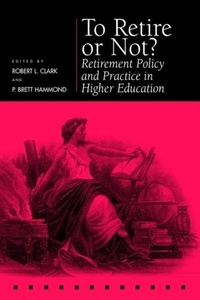
To Retire or not?
Retirement Policy and Practice in Higher Education
1st Edition
Published on 13. June 2017
192 pages
978-1-5128-2163-5 (ISBN)
Description

What impact has the end of mandatory retirement had on colleges and universities as well as on the academic job market? From the Wharton School, To Retire or Not? outlines the critical issues associated with faculty aging, retirement policy, and human resource needs in higher education over the next decades.
More details
Series
Language
English
Place of publication
Pennsylvania
United States
Target group
College/higher education
Illustrations
36 tables
36 tables
ISBN-13
978-1-5128-2163-5 (9781512821635)
Copyright in bibliographic data and cover images is held by Nielsen Book Services Limited or by the publishers or by their respective licensors: all rights reserved.
Schweitzer Classification
Other editions
Additional editions
Robert L. Clark | P. Brett Hammond
To Retire or not?
Retirement Policy and Practice in Higher Education
Book
11/2000
University of Pennsylvania Press
€74.50
Shipment within 10-20 days
Persons
Robert L. Clark is Professor of Economics and Business at North Carolina State University. P. Brett Hammond is Director of Corporate Projects at the Teachers Insurance Annuity Association-College Retirement Equities Fund (TIAA-CREF).
Content
- Cover
- Contents
- Preface
- 1. Introduction: Changing Retirement Policies and Patterns in Higher Education
- 2. Faculty Retirement at Three North Carolina Universities
- 3. Age-Based Retirement Incentives for Tenured Faculty Members: Satisfying the Legal Requirements
- 4. Survey of Early Retirement Practices in Higher Education
- 5. Cornell Confronts the End of Mandatory Retirement
- 6. The University of California Voluntary Early Retirement Incentive Programs
- 7. Ending Mandatory Retirement in Two State Universities
- 8. Intangible and Tangible Retirement Incentives
- 9. Faculty Retirement: Reflections on Experience in an Uncapped Environment
- 10. Reflections on an Earlier Study of Mandatory Retirement: What Came True and What We Can Still Learn
- List of Contributors
- Index
- A
- B
- C
- D
- E
- F
- G
- H
- I
- J
- K
- L
- M
- N
- O
- P
- Q
- R
- S
- T
- U
- V
- W
- Y
