

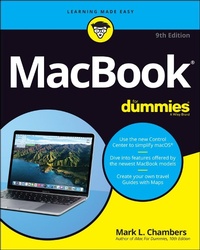
MacBook For Dummies
9th Edition
Published on 26. March 2021
432 pages
978-1-119-77567-6 (ISBN)
Description

Learn how to drive the coolest laptop on the planet
You took the plunge, paid extra, and--even though it looks and feels like perfection--have that fleeting doubt: is my MacBook really worth the investment? You'll be pleased to know that the answer is totally yes, and MacBook For Dummies is the ultimate way to learn the thousand and one reasons why the MacBook Pro or Air you now own is a modern masterpiece--as well as the ten thousand and one (and counting) things you can do with it. With its super-smooth performance, top-shelf LED screen, rugged reliability, and powerful, trouble-free operating system, you're going to have a lot of fun.
Keeping jargon to a minimum, Mark L. Chambers--prolific tech author and all-round Mac whiz--gives you a friendly, step-by-step welcome to everything MacBook, from reviewing the hardware and powering up for the first time to getting familiar with files, security settings, launching apps, and entering the digital netherworld of iCloud. Then, with the basics reassuringly in place, you can begin your journey to power-user mastery in whatever areas of MacBook-ing you're most interested in, from doing the accounts in Numbers to perfecting that soon-to-be-released cinematic classic (with original score) using iMovie and GarageBand.
* Get familiar with the latest macOS, Big Sur
* Communicate with Messages and FaceTime
* Stream music, movies, and TV shows
* Manage and edit photos and video clips
Whether you're a PC convert, Mac veteran, or completely new to the astonishing potential of the MacBook world, you'll find everything you need to get the most out of the technical marvel that's now at your command.
You took the plunge, paid extra, and--even though it looks and feels like perfection--have that fleeting doubt: is my MacBook really worth the investment? You'll be pleased to know that the answer is totally yes, and MacBook For Dummies is the ultimate way to learn the thousand and one reasons why the MacBook Pro or Air you now own is a modern masterpiece--as well as the ten thousand and one (and counting) things you can do with it. With its super-smooth performance, top-shelf LED screen, rugged reliability, and powerful, trouble-free operating system, you're going to have a lot of fun.
Keeping jargon to a minimum, Mark L. Chambers--prolific tech author and all-round Mac whiz--gives you a friendly, step-by-step welcome to everything MacBook, from reviewing the hardware and powering up for the first time to getting familiar with files, security settings, launching apps, and entering the digital netherworld of iCloud. Then, with the basics reassuringly in place, you can begin your journey to power-user mastery in whatever areas of MacBook-ing you're most interested in, from doing the accounts in Numbers to perfecting that soon-to-be-released cinematic classic (with original score) using iMovie and GarageBand.
* Get familiar with the latest macOS, Big Sur
* Communicate with Messages and FaceTime
* Stream music, movies, and TV shows
* Manage and edit photos and video clips
Whether you're a PC convert, Mac veteran, or completely new to the astonishing potential of the MacBook world, you'll find everything you need to get the most out of the technical marvel that's now at your command.
More details
Other editions
Additional editions
Person
Mark L. Chambers has written more than thirty computer books. His recent titles include Macs For Seniors For Dummies, 4th Edition and iMac For Dummies, 10th Edition. Mark is currently a full-time author and tech editor--and an unabashed Mac fan.
Content
Introduction 1
Part 1: Tie Myself Down with a Desktop? Preposterous! 5
Chapter 1: Hey, It Really Does Have Everything I Need 7
Chapter 2: Turning On Your Portable Powerhouse 29
Chapter 3: The MacBook Owner's Introduction to macOS Big Sur 41
Part 2: Shaking Hands with macOS Big Sur 83
Chapter 4: What's New in macOS Big Sur? 85
Chapter 5: A Nerd's Guide to System Preferences 89
Chapter 6: Sifting Through Your Stuff 111
Chapter 7: Using Reminders, Notes, Notifications, and Maps 121
Part 3: Connecting and Communicating 135
Chapter 8: Let's Go on Safari! 137
Chapter 9: iCloud Is Made for MacBooks 157
Chapter 10: Your Laptop Goes Multiuser 165
Chapter 11: Working Well with Networks 185
Part 4: Living the iLife 205
Chapter 12: The Multimedia Joys of Music and TV 207
Chapter 13: Focusing on Photos 231
Chapter 14: Making Film History with iMovie 251
Chapter 15: Recording Your Hits with GarageBand 271
Part 5: Getting Productive and Maintaining Your MacBook 289
Chapter 16: Desktop Publishing with Pages 291
Chapter 17: Creating Spreadsheets with Numbers 305
Chapter 18: Building Presentations with Keynote 321
Chapter 19: When Good Mac Laptops Go Bad 335
Chapter 20: Adding New Stuff to Your Laptop 355
Chapter 21: Tackling the Housekeeping 367
Part 6: The Part of Tens 381
Chapter 22: Ten Laptop Rules to Follow 383
Chapter 23: Ten Things to Avoid Like the Plague 391
Index 399
Part 1: Tie Myself Down with a Desktop? Preposterous! 5
Chapter 1: Hey, It Really Does Have Everything I Need 7
Chapter 2: Turning On Your Portable Powerhouse 29
Chapter 3: The MacBook Owner's Introduction to macOS Big Sur 41
Part 2: Shaking Hands with macOS Big Sur 83
Chapter 4: What's New in macOS Big Sur? 85
Chapter 5: A Nerd's Guide to System Preferences 89
Chapter 6: Sifting Through Your Stuff 111
Chapter 7: Using Reminders, Notes, Notifications, and Maps 121
Part 3: Connecting and Communicating 135
Chapter 8: Let's Go on Safari! 137
Chapter 9: iCloud Is Made for MacBooks 157
Chapter 10: Your Laptop Goes Multiuser 165
Chapter 11: Working Well with Networks 185
Part 4: Living the iLife 205
Chapter 12: The Multimedia Joys of Music and TV 207
Chapter 13: Focusing on Photos 231
Chapter 14: Making Film History with iMovie 251
Chapter 15: Recording Your Hits with GarageBand 271
Part 5: Getting Productive and Maintaining Your MacBook 289
Chapter 16: Desktop Publishing with Pages 291
Chapter 17: Creating Spreadsheets with Numbers 305
Chapter 18: Building Presentations with Keynote 321
Chapter 19: When Good Mac Laptops Go Bad 335
Chapter 20: Adding New Stuff to Your Laptop 355
Chapter 21: Tackling the Housekeeping 367
Part 6: The Part of Tens 381
Chapter 22: Ten Laptop Rules to Follow 383
Chapter 23: Ten Things to Avoid Like the Plague 391
Index 399
