

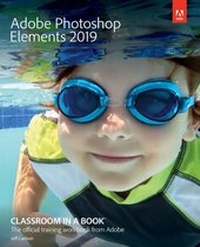
Adobe Photoshop Elements 2019 Classroom in a Book
1st Edition
Published on 14. December 2018
320 pages
978-0-13-529953-1 (ISBN)
Description

Adobe Photoshop Elements 2019 Classroom in a Book is the most thorough and comprehensive way for you to master Adobe's industry-leading consumer-targeted photo-editing software. Each chapter in this step-by-step, lesson-based guide contains a project that builds on your growing knowledge of the program, while end-of-chapter review questions reinforce each lesson. You will learn the basics of editing your images with Photoshop Elements and learn how to best use the program's many new features.
This edition covers many new and improved features in Adobe Photoshop Elements 2019, from the Auto Curate feature that makes it easier than ever to organize and find your photos by analyzing your library to present just the best images, to a revamped slide show, and new tools that will help you make complex selections in moments or improve a portrait by opening closed eyes. New exercises explore enhancements in the Organizer, an improved selection workflow, and several of the latest guided edits. You'll discover new tools that let you expand your creativity. And you'll learn how to print, export, and share your images.
This edition covers many new and improved features in Adobe Photoshop Elements 2019, from the Auto Curate feature that makes it easier than ever to organize and find your photos by analyzing your library to present just the best images, to a revamped slide show, and new tools that will help you make complex selections in moments or improve a portrait by opening closed eyes. New exercises explore enhancements in the Organizer, an improved selection workflow, and several of the latest guided edits. You'll discover new tools that let you expand your creativity. And you'll learn how to print, export, and share your images.
More details
Language
English
Place of publication
Boston
United States
Publishing group
Pearson Education (US)
Target group
Professional and scholarly
ISBN-13
978-0-13-529953-1 (9780135299531)
Copyright in bibliographic data and cover images is held by Nielsen Book Services Limited or by the publishers or by their respective licensors: all rights reserved.
Schweitzer Classification
Other editions
Additional editions
John Evans | Katrin Straub
Adobe Photoshop Elements 2019 Classroom in a Book
Book
07/2019
Addison Wesley
€51.00
Shipment within 15-20 days
John Evans | Katrin Straub
Adobe Photoshop Elements 2018 Classroom in a Book
Book
12/2017
Addison Wesley
€47.00
Shipment within 15-20 days
Person
Jeff Carlson is a columnist for the Seattle Times and a contributing editor at TidBITS, and writes for publications such as DPReview, CreativePro, and Macworld. He is the author of the books Take Control of Your Digital Photos, Take Control of Your Digital Storage, and Take Control of Lightroom CC, among many other titles, including several editions of Photoshop Elements: Visual QuickStart Guide. He also co-hosts the podcast PhotoActive and leads photography workshops in the Pacific Northwest. He believes there's never enough coffee, and does his best to test that theory.
Content
1 A Quick Tour of Photoshop Elements
2 Importing and Sorting Photos
3 Tagging, Grouping, and Searching Photos
4 Image Editing Background and Basics
5 Working With Color and Making Selections
6 Fixing Lighting and Exposure Problems
7 Reframing, Retouching, and Recomposing Images
8 Combining Images
9 Getting Creative
10 Printing, Sharing, and Exporting
2 Importing and Sorting Photos
3 Tagging, Grouping, and Searching Photos
4 Image Editing Background and Basics
5 Working With Color and Making Selections
6 Fixing Lighting and Exposure Problems
7 Reframing, Retouching, and Recomposing Images
8 Combining Images
9 Getting Creative
10 Printing, Sharing, and Exporting
