

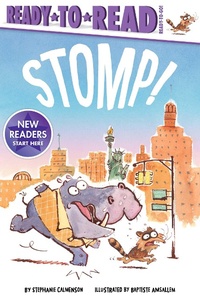
Stomp!
Ready-to-Read Ready-to-Go!
Published on 27. September 2022
32 pages
978-1-6659-1660-8 (ISBN)
Description

Best friends Ziggy and Zak are on a madcap race through New York City in this fun-filled Ready-to-Read Ready-to-Go storybook!
Do not stomp.
Do not shout.
Breathe in.
Breathe out.
When Ziggy and Zak run into one obstacle after another on their way to a big city show, Ziggy becomes stomping mad! But with help from the Statue of Liberty, he calms down and gets to enjoy the surprise waiting just around the corner. This funny book shows readers how to stay calm and carry on when faced with life's frustrations.
Each Ready-to-Go! Ready-to-Read includes a note to parents explaining what their child can expect, a guide at the beginning for readers to become familiar with the words they will encounter in the story, and reading comprehension questions at the end. Each Ready-to-Go! story contains around 100 words and features sight words, rhyming words, and repetition to help children reinforce their new reading skills. In this book, readers will learn thirty-five sight words, and fourteen words from seven word families. So come on and get reading!
Do not stomp.
Do not shout.
Breathe in.
Breathe out.
When Ziggy and Zak run into one obstacle after another on their way to a big city show, Ziggy becomes stomping mad! But with help from the Statue of Liberty, he calms down and gets to enjoy the surprise waiting just around the corner. This funny book shows readers how to stay calm and carry on when faced with life's frustrations.
Each Ready-to-Go! Ready-to-Read includes a note to parents explaining what their child can expect, a guide at the beginning for readers to become familiar with the words they will encounter in the story, and reading comprehension questions at the end. Each Ready-to-Go! story contains around 100 words and features sight words, rhyming words, and repetition to help children reinforce their new reading skills. In this book, readers will learn thirty-five sight words, and fourteen words from seven word families. So come on and get reading!
More details
Other editions
Additional editions
Book
09/2022
Simon & Schuster
€6.50
Shipment within 3-4 weeks
