

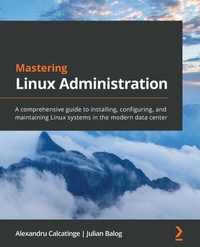
Mastering Linux Administration
A comprehensive guide to installing, configuring, and maintaining Linux systems in the modern data center
Published on 23. September 2024
772 pages
978-1-78995-360-2 (ISBN)
Description

Develop advanced skills for working with Linux systems on-premises and in the cloud
Key Features
Become proficient in everyday Linux administration tasks by mastering the Linux command line and using automation
Work with the Linux filesystem, packages, users, processes, and daemons
Deploy Linux to the cloud with AWS, Azure, and Kubernetes
Book DescriptionLinux plays a significant role in modern data center management and provides great versatility in deploying and managing your workloads on-premises and in the cloud. This book covers the important topics you need to know about for your everyday Linux administration tasks. The book starts by helping you understand the Linux command line and how to work with files, packages, and filesystems. You'll then begin administering network services and hardening security, and learn about cloud computing, containers, and orchestration. Once you've learned how to work with the command line, you'll explore the essential Linux commands for managing users, processes, and daemons and discover how to secure your Linux environment using application security frameworks and firewall managers. As you advance through the chapters, you'll work with containers, hypervisors, virtual machines, Ansible, and Kubernetes. You'll also learn how to deploy Linux to the cloud using AWS and Azure. By the end of this Linux book, you'll be well-versed with Linux and have mastered everyday administrative tasks using workflows spanning from on-premises to the cloud. If you also find yourself adopting DevOps practices in the process, we'll consider our mission accomplished.What you will learn
Understand how Linux works and learn basic to advanced Linux administration skills
Explore the most widely used commands for managing the Linux filesystem, network, security, and more
Get to grips with different networking and messaging protocols
Find out how Linux security works and how to configure SELinux, AppArmor, and Linux iptables
Work with virtual machines and containers and understand container orchestration with Kubernetes
Work with containerized workflows using Docker and Kubernetes
Automate your configuration management workloads with Ansible
Who this book is forIf you are a Linux administrator who wants to understand the fundamentals and as well as modern concepts of Linux system administration, this book is for you. Windows System Administrators looking to extend their knowledge to the Linux OS will also benefit from this book.
Key Features
Become proficient in everyday Linux administration tasks by mastering the Linux command line and using automation
Work with the Linux filesystem, packages, users, processes, and daemons
Deploy Linux to the cloud with AWS, Azure, and Kubernetes
Book DescriptionLinux plays a significant role in modern data center management and provides great versatility in deploying and managing your workloads on-premises and in the cloud. This book covers the important topics you need to know about for your everyday Linux administration tasks. The book starts by helping you understand the Linux command line and how to work with files, packages, and filesystems. You'll then begin administering network services and hardening security, and learn about cloud computing, containers, and orchestration. Once you've learned how to work with the command line, you'll explore the essential Linux commands for managing users, processes, and daemons and discover how to secure your Linux environment using application security frameworks and firewall managers. As you advance through the chapters, you'll work with containers, hypervisors, virtual machines, Ansible, and Kubernetes. You'll also learn how to deploy Linux to the cloud using AWS and Azure. By the end of this Linux book, you'll be well-versed with Linux and have mastered everyday administrative tasks using workflows spanning from on-premises to the cloud. If you also find yourself adopting DevOps practices in the process, we'll consider our mission accomplished.What you will learn
Understand how Linux works and learn basic to advanced Linux administration skills
Explore the most widely used commands for managing the Linux filesystem, network, security, and more
Get to grips with different networking and messaging protocols
Find out how Linux security works and how to configure SELinux, AppArmor, and Linux iptables
Work with virtual machines and containers and understand container orchestration with Kubernetes
Work with containerized workflows using Docker and Kubernetes
Automate your configuration management workloads with Ansible
Who this book is forIf you are a Linux administrator who wants to understand the fundamentals and as well as modern concepts of Linux system administration, this book is for you. Windows System Administrators looking to extend their knowledge to the Linux OS will also benefit from this book.
All prices
More details
Edition
Digital original
Language
English
Place of publication
Birmingham
United Kingdom
Target group
Professional and scholarly
US School Grade: College Graduate Student
Edition type
Digital original
Product notice
Reflowable
File size
38,45 MB
ISBN-13
978-1-78995-360-2 (9781789953602)
Copyright in bibliographic data and cover images is held by Nielsen Book Services Limited or by the publishers or by their respective licensors: all rights reserved.
Schweitzer Classification
Other editions
New editions
Alexandru Calcatinge | Julian Balog
Mastering Linux Administration
Take your sysadmin skills to the next level by configuring and maintaining Linux systems
E-Book
09/2024
2nd Edition
Packt Publishing
from
€29.99
Available for download
Additional editions
Alexandru Calcatinge | Julian Balog
Mastering Linux Administration
A comprehensive guide to installing, configuring, and maintaining Linux systems in the modern data center
Book
06/2021
Packt Publishing
€54.90
Shipment within 3-4 weeks
Persons
Calcatinge Alexandru :
Alexandru Calcatinge is an open-minded architect with a background in computer science and mathematics. He is a senior university lecturer with a PhD in urban planning from Ion Mincu University of Architecture and Urban Planning and a postgraduate degree in DevOps from Caltech's Center for Technology and Management Education (CTME). He teaches students about architectural programming and development and open source technologies. He has authored five books on architecture and urban planning and numerous scientific articles on urban and rural development. Alex was certified as a Linux trainer in 2017. He loves the DevOps philosophy and the possibilities that cloud technologies bring for the future. He is also a certified programming analyst, computer network administrator, trainer, designer, and life coach.Balog Julian :
Julian Balog is a senior software engineer with more than 15 years of experience in the industry. Currently, his work primarily focuses on application delivery controllers, containerized workflows, networking, and security. With a never-ending passion for Linux and open-source technologies, Julian is always in pursuit of learning new things while solving problems and making things work through simple, efficient, and practical engineering. He lives with his wife, two children, and an Aussie-doodle in the greater Seattle area, Washington.
Alexandru Calcatinge is an open-minded architect with a background in computer science and mathematics. He is a senior university lecturer with a PhD in urban planning from Ion Mincu University of Architecture and Urban Planning and a postgraduate degree in DevOps from Caltech's Center for Technology and Management Education (CTME). He teaches students about architectural programming and development and open source technologies. He has authored five books on architecture and urban planning and numerous scientific articles on urban and rural development. Alex was certified as a Linux trainer in 2017. He loves the DevOps philosophy and the possibilities that cloud technologies bring for the future. He is also a certified programming analyst, computer network administrator, trainer, designer, and life coach.Balog Julian :
Julian Balog is a senior software engineer with more than 15 years of experience in the industry. Currently, his work primarily focuses on application delivery controllers, containerized workflows, networking, and security. With a never-ending passion for Linux and open-source technologies, Julian is always in pursuit of learning new things while solving problems and making things work through simple, efficient, and practical engineering. He lives with his wife, two children, and an Aussie-doodle in the greater Seattle area, Washington.
Content
Table of Contents
Installing Linux and Setting up the Environment
Linux Structure, Basic Commands, Files and Text Editors
Linux Software Management
Managing User Accounts and Permissions
Working with Processes, Signals, Services and Disks
Linux Server Setup and Remote Administration
Basic Networking with Linux: TCP/IP and Network Configuration
Configuring Servers: Print, Web, FTP, Samba, NFS, E-Mail, DNS, DHCP
Securing Linux: AppArmor, SELinux, PAM, Cryptography, iptables, firewalls
Disaster recovery, diagnostics and troubleshooting
Short Introduction to Cloud Computing
Working with Containers and Virtual Machines
Orchestration with Kubernetes
Deploying to the Cloud: OpenStack, AWS, Azure
Infrastructure and Automation with Ansible
Installing Linux and Setting up the Environment
Linux Structure, Basic Commands, Files and Text Editors
Linux Software Management
Managing User Accounts and Permissions
Working with Processes, Signals, Services and Disks
Linux Server Setup and Remote Administration
Basic Networking with Linux: TCP/IP and Network Configuration
Configuring Servers: Print, Web, FTP, Samba, NFS, E-Mail, DNS, DHCP
Securing Linux: AppArmor, SELinux, PAM, Cryptography, iptables, firewalls
Disaster recovery, diagnostics and troubleshooting
Short Introduction to Cloud Computing
Working with Containers and Virtual Machines
Orchestration with Kubernetes
Deploying to the Cloud: OpenStack, AWS, Azure
Infrastructure and Automation with Ansible
