

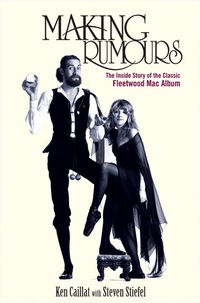
Making Rumours
The Inside Story of the Classic Fleetwood Mac Album
1st Edition
Published on 5. March 2012
384 pages
978-1-118-28236-6 (ISBN)
Description

Inside the making of one of the biggest-selling albums of all time: Fleetwood Mac's Rumours Fleetwood Mac's classic 1977 Rumours album topped the Billboard 200 for thirty-one weeks and won the Album of the Year Grammy. More recently, Rolling Stone named it the twenty-fifth greatest album of all time and the hit TV series Glee devoted an entire episode to songs from Rumours, introducing it to a new generation. Now, for the first time, Ken Caillat, the album's co-producer, tells the full story of what really went into making Rumours-from the endless partying and relationship dramas to the creative struggles to write and record "You Make Loving Fun," "Don't Stop," "Go Your Own Way," "The Chain," and other timeless tracks.
Tells the fascinating, behind-the-music story of the making of Fleetwood Mac's Rumours, written by the producer who saw it all happen
Filled with new and surprising details, such as Stevie Nicks and Lindsey Buckingham's screaming match while recording "You Make Loving Fun," how the band coped with the pressures of increasing success, how the master tape nearly disintegrated, and the incredible attention paid to even the tiniest elements of songs, from Lindsey playing a chair to Mick breaking glass
Includes eighty black-and-white photographs
Tells the fascinating, behind-the-music story of the making of Fleetwood Mac's Rumours, written by the producer who saw it all happen
Filled with new and surprising details, such as Stevie Nicks and Lindsey Buckingham's screaming match while recording "You Make Loving Fun," how the band coped with the pressures of increasing success, how the master tape nearly disintegrated, and the incredible attention paid to even the tiniest elements of songs, from Lindsey playing a chair to Mick breaking glass
Includes eighty black-and-white photographs
More details
Edition
1. Auflage
Language
English
Place of publication
New York
United States
File size
7,37 MB
ISBN-13
978-1-118-28236-6 (9781118282366)
Copyright in bibliographic data and cover images is held by Nielsen Book Services Limited or by the publishers or by their respective licensors: all rights reserved.
Schweitzer Classification
Other editions
Additional editions
Book
05/2012
Wiley
€29.90
Shipment within 15-20 days
Book
04/2012
Turner Publishing Company
€22.40
Shipment within 10-20 days
Persons
Ken Caillat coproduced Fleetwood Mac's classic 1977 album, Rumours, for which he won the Grammy for Album of the Year. He also produced the group's Tusk, Mirage, and Live albums, as well as their box set, The Chain. He has worked on albums with everyone from George Carlin, engineering his epochal Class Clown, to the London Symphony Orchestra. He is the father of Grammy-winning singer Colbie Caillat, and he produced her number one album, Breakthrough. Steven Stiefel has written several books, including contributions to two by LL Cool J. He also works as a magazine writer and editor. His fiction has appeared in the Georgia Review and McSweeney's.
Content
Foreword by Colbie Caillat ix Foreword by John Shanks xi
Preface xiii
1. Ken's Wild Ride 1
2. Starting Rumours 23
3. Go Your Own Way 50
4. Oh, Daddy 73
5. You Make Lovin' Fun 101
6. Songbird and Gold Dust Woman 118
7. Don't Stop 136
8. Fleetwood Mac Comes Alive! 160
9. "I Quit!" 193
10. The Boys Are Back in Town 209
11. "You're Fired!" 233
12. Fleetwood Mac Explodes 267
13. The Chain: Keep Us Together 299
14. The Final Mix 324
Epilogue 345
Acknowledgments 349
Index 353
Preface xiii
1. Ken's Wild Ride 1
2. Starting Rumours 23
3. Go Your Own Way 50
4. Oh, Daddy 73
5. You Make Lovin' Fun 101
6. Songbird and Gold Dust Woman 118
7. Don't Stop 136
8. Fleetwood Mac Comes Alive! 160
9. "I Quit!" 193
10. The Boys Are Back in Town 209
11. "You're Fired!" 233
12. Fleetwood Mac Explodes 267
13. The Chain: Keep Us Together 299
14. The Final Mix 324
Epilogue 345
Acknowledgments 349
Index 353
