

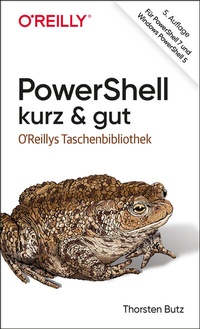
PowerShell - kurz & gut
Für PowerShell 7 und Windows PowerShell 5
5th Edition
Published on 2. February 2021
224 pages
978-3-96010-405-6 (ISBN)
Available for download
Description

Der kompakte Schnellstart für die PowerShell 7
Handlich und übersichtlich: ideal zum Nachschlagen der PowerShell-Features
Themen sind Objektorientierung und Pipelining, Systemadministration, Webservices, Remoteadministration
Zeigt die Unterschiede zwischen PowerShell 7 und Windows PowerShell 5
Expertenwissen vom deutschen PowerShell-Kenner Thorsten Butz
Die PowerShell ist in der Version 7 zu einer plattformunabhängigen Lösung für Windows, Linux und MacOS gereift. Längst ist sie mehr als ein Werkzeug zur Windowsadministration. Sie verfolgt einen für eine Scriptsprache einzigartigen Ansatz: Objektorientierung und Pipeling kombiniert sie mit einer einprägsamen, leicht erlernbaren Skriptsprache. Gleichzeitig erweitert sich mit PowerShell 7 der Anwendungsbereich spürbar - ihre Verwendung in Microsoft 365, Azure, AWS und GoogleCloud beschleunigt die Entwicklung zu einer flexibel erweiterbaren Shell.
Thorsten Butz beschreibt in diesem Buch die Grundlagen der PowerShell 7. Sie lernen, Skripte zu schreiben, den Funktionsumfang der Shell zu erweitern und Befehle remote auszuführen. Ein besonderes Augenmerk liegt hierbei auf der Kompatibilität zur Windows PowerShell 5 und möglichen Besonderheiten, die sich im Zusammenspiel mit älteren Schnittstellen ergeben.
More details
Other editions
Additional editions
Book
02/2021
5th Edition
O'Reilly
€14.90
Available immediately

Book
01/2021
O'Reilly
€19.90
Article exhausted; check different version
Person
Thorsten Butz ist langjähriger Microsoft Certified Trainer und Consultant. Er begann seine Karriere als Netzwerkspezialist und Unix-Enthusiast beim Provider Network. Seit Windows 2000 begleitet er intensiv Microsofts Server-Technologien, mit dem besonderen Augenmerk auf Interoperabilität und Automation.
Content
- Intro
- Über dieses Buch
- Kapitel 1: Microsofts (R)Evolution
- Das lange Leben der Windows PowerShell 5
- Kapitel 2: Hallo PowerShell!
- Was ist ein Cmdlet?
- Objektorientierung und Pipeline
- Kapitel 3: Installieren und Aktualisieren der PowerShell
- Installation von PowerShell 7 unter Windows
- Windows Package Manager (WinGet)
- Chocolatey
- Dotnet tool
- Installation von PowerShell 7 unter Linux
- Installation der PowerShell unter macOS
- Update auf Windows PowerShell 5.1
- Installation von Visual Studio Code
- Installation des Windows Terminal
- Kapitel 4: Das Hilfesystem
- Kapitel 5: Die Grundlagen der PowerShell
- Cmdlets und Aliasse
- Objektorientierung
- Provider
- Umgebungsvariablen
- Einfache Formatierungen
- Zeichenfolgen: Strings
- Variablen
- Typbezeichner und Typkonvertierung
- Type Accelerator
- Mengenlehre: Arrays & Co.
- Array versus Arraylist
- Assoziative Arrays: Hash Tables
- Kapitel 6: Operatoren
- Vergleichsoperatoren
- Kapitel 7: Flusskontrolle
- Die Anweisungen if, elseif und else
- Die Anweisung switch
- Die for-Schleife
- Die foreach-Schleife
- Schleifen mit while, do, until
- Ablaufsteuerung mit break und continue
- Kapitel 8: Pipelining
- ForEach-Object
- Where-Object
- Calculated Properties
- Kapitel 9: Verwalten von Fehlern
- Nonterminating Errors
- Terminating Errors
- Ein- und Ausgabeumleitung: Streams
- Write-Host
- Kapitel 10: Den Funktionsumfang der PowerShell erweitern
- Snap-ins und Module
- Snap-ins
- Module
- RSAT
- Paketverwaltung
- Der Unterbau: OneGet und NuGet
- Erste Schritte: Aktualisieren und Konfigurieren
- Die PowerShell Gallery
- Kapitel 11: Vom Skript zum Modul
- Execution Policies (Ausführungsrichtlinien)
- Profile
- Eigene Skripte schreiben
- Argumente übergeben
- Einfache und erweiterte Funktionen
- Vom Cmdlet zum eigenen Modul
- Kapitel 12: Eigene Datentypen und Klassen
- Rückgriff auf das .NET Framework
- Eigene Objekte erstellen
- Klassen
- Kapitel 13: Reguläre Ausdrücke
- RegEx-Grundlagen: sehr kurz
- Verbotene Zeichen
- Zeichenklassen
- Quantifizierer
- Gruppierungen
- Anker
- Text modifizieren
- Reguläre Ausdrücke vermeiden
- Beispielgetriebenes Parsen
- Kapitel 14: (W)MI
- WMI-Cmdlets (DCOM)
- CIM-Cmdlets (WS-Man)
- CDXML
- Kapitel 15: Entfernte Rechner verwalten
- Integrierte Remoting-Funktionen
- PowerShell Remoting mittels WinRM
- Implicit Remoting
- Fallstricke und Einschränkungen
- PowerShell Remoting mittels SSH
- Kapitel 16: Hintergrundaufträge: Jobs
- Kapitel 17: Überblick über die Integration in Produkte
- Active Directory
- Microsoft Exchange
- Snap-in oder Modul? - Implizites Remoting!
- Installation der Verwaltungstools unter Windows 10
- Microsoft 365 (Office 365)
- Azure Active Directory
- Azure
- Azure File Share
- Azure VM
- Kapitel 18: Webservices nutzen
- REST-APIs
- Übrigens ...
- Kapitel 19: Die Evolution der PowerShell
- PowerShell 1
- PowerShell 2
- PowerShell 3
- PowerShell 4
- PowerShell 5
- PowerShell 6
- Kapitel 20: Neuerungen in PowerShell 7
- Geschwindigkeitsverbesserungen
- Gruppieren, sortieren, formatieren
- Verbesserte Fehlermeldungen
- Neue Operatoren
- Ternary Operator ?:
- Pipeline Chain Operators ??, ||
- Null-coalescing Operator ??
- Null-conditional Assignment Operator ??=
- Null-conditional Member Access Operators ?. ,?[] (Experimentell)
- Kompatibilitätsschicht
- Anhang: Windows PowerShell: Desired State Configuration (DSC)
- Die DSC-Konfiguration
- Die DSC-Ressourcen
- Der Local Configuration Manager
- Erweiterbarkeit
- Die Zukunft der DSC
- Index
