

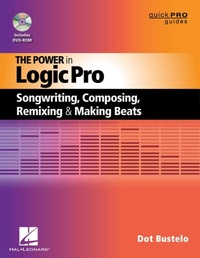
The Power in Logic Pro
Songwriting, Composing, Remixing and Making Beats
1st Edition
Published on 1. April 2012
178 pages
978-1-4768-1354-7 (ISBN)
Description

This book is the first choice for any artist seeking quick, fun, easy-to-digest insight into the depth of Logic, from early Emagic retro Logic secrets to the latest power tools and GUI enhancements added since Logic's acquisition by Apple, Inc. Whether you have just gotten started with Logic or have used it for years, you will find this guide a must-have for your studio.
Dot Bustelo provides the powerful methodology for creating in Logic that she has shared with countless high-profile bands and Grammy Award-winning producers and engineers. Find out why musicians over the years have sworn Logic "grooves better."
Bustelo's signature approach to teaching Logic will get you up and running quickly. Once you're started, she'll help you move beyond the basics to discover a professional-level Logic workflow, taught through highly musical examples that expose Logic's essential features and powerful production tools. You'll find many of the tips, tricks, and insider techniques that powered Logic to its industry-leading status as the best tool for unleashing creativity in songwriting, composing, making beats, and remixing.
Dot Bustelo provides the powerful methodology for creating in Logic that she has shared with countless high-profile bands and Grammy Award-winning producers and engineers. Find out why musicians over the years have sworn Logic "grooves better."
Bustelo's signature approach to teaching Logic will get you up and running quickly. Once you're started, she'll help you move beyond the basics to discover a professional-level Logic workflow, taught through highly musical examples that expose Logic's essential features and powerful production tools. You'll find many of the tips, tricks, and insider techniques that powered Logic to its industry-leading status as the best tool for unleashing creativity in songwriting, composing, making beats, and remixing.
More details
Series
Edition
1. Auflage
Language
English
Place of publication
Milwaukee
United States
ISBN-13
978-1-4768-1354-7 (9781476813547)
Copyright in bibliographic data and cover images is held by Nielsen Book Services Limited or by the publishers or by their respective licensors: all rights reserved.
Schweitzer Classification
Other editions
Additional editions
Book
04/2014
Hal Leonard Corporation
€29.70
Shipment within 15-20 days
Person
Dot Bustelo (New York, NY'), 'an internationally recognized Logic consultant, lecturer, producer, and New York-based music industry marketing specialist, cultivates strategic relationships by bringing together musicians and technology. As the Logic Pro artist relations liaison, product specialist, and stage demonstrator for a decade, and as a contributing member of the Apple Worldwide Product Marketing team, Bustelo supported a wide range of #1 charting and emerging producers, artists, and engineers, including the Killers, Maroon 5, John Legend, M.I.A., Mike Elizondo, RedOne, and T-Pain. In her spare time, Bustelo produces Perfect Project (www.perfectproject.net) with licenses to Nokia, Sony PlayStation, NBC, Dell Computer, and BasicLux Compilations.
Content
- Intro
- Title Page
- Copyright Page
- Contents
- Preface
- Methodology for This Book
- Acknowledgments
- Introduction: Becoming One with Logic
- Chapter 1: Setting Up Your Logic Studio
- Preparing to Launch
- Connecting External Audio
- Communicating with MIDI
- Adding Third-Party Software Instruments
- Chapter 2: A Five-Minute Tour of the Arrange Window
- Introducing the Arrange Window
- Understanding the Track List and Track Header
- The Transport
- The Media Area: Apple Loops, Audio Bin, Library, and Browser
- The Bar Ruler, Toolbar and Tool Menus
- Essentials of the Mixer and Other Editors
- Dual Channel Strip, Channel Strip Settings, and the Inspector
- Chapter 3: Writing Your First Track in Logic
- Programming Drums
- Quantizing Basics
- Selecting the Right Sound for Your Synth Part
- Recording While Viewing Notation
- Saving Your Project the Right Way
- A Few Tricks to Help Your Creative Process
- Chapter 4: Essential Audio Recording and Mixing in Logic
- Recording Audio
- Mixing Your Music
- Chapter 5: Navigating and Editing Made Simple
- Know Your Navigation Tools
- Editing in Logic
- Chapter 6: The Secret to Learning Logic: Key Commands
- Creating Custom Key Commands
- Finding Out What a Key Command Is Assigned To
- Loading Key Command Sets
- Printing (and Memorizing) the Key Commands
- Chapter 7: Creating with Logic's Software Instruments
- Loading, Tweaking, and Saving Channel Strip Settings
- The EXS24 Sampler: The Workhorse of Logic
- The Futuristic ES2 Synth
- Ultrabeat: Unlocking the Beat Machine and Drum Sampler
- Sculpture's Otherworldly and Cinematic Sounds
- EVOC 20's Retro Character
- External MIDI, ReWire, and a Special Plug-In for Hardware Synths
- Using Third-Party Software Instruments
- Controlling Synth Parameters from Knobs and Sliders
- Chapter 8: Amazing Things to Do with Apple Loops
- What Is an Apple Loop? (Blue Versus Green Loops)
- Auditioning and Using Loops in Your Project
- Musical Tags and the Search Engine
- Hit Songs Using Apple Loops
- Tricks with Green Apple Loops
- Making Your Own Apple Loops
- Third-Party Apple Loop Libraries
- Setting the Key (Changing Pitch)
- Chapter 9: Remixing and Making Beats
- It's All About Timing (and Stretching)
- Importing and Exporting Vocals for Remixing
- Flex Audio ("Elastic Audio")
- Making Beats with Live Drummers
- What Varispeed Is for Anyway
- How Logic Swings: Groove Templates
- DJ and Electronic Music Tricks
- Making a Sampler Instrument Out of a Drum Loop
- Retro Logic Groove Tricks
- Chapter 10: Especially for Composers (and Arrangers in the Modern World)
- Tapping into the Score Editor
- Film Scoring Hurdles of SMPTE and Sync
- Classic and Modern Arranging Techniques
- Chapter 11: Good Housekeeping (and Other Smart Practices)
- Managing Your Logic Project
- Understanding How to Bounce
- Project Templates
- Setting Up Patch Names for Analog Keyboards: Multi-Instruments
- Backing Up Your Presets and Settings
- Marker Text "TelePrompter" on Second Monitor
- Making Notes in Your Project
- Optimizing Your System Performance
- Chapter 12: Troubleshooting
- Best Practices
- Avoiding Latency While Recording and System Overloads
- Problems with Third-Party Plug-Ins
- Audio MIDI Setup Utility
- Trashing Your Logic Preferences
- Miscellaneous Troubleshooting Tricks
- Facing a Logic Song Corruption
- Slaving Your MPC
- At the End of the Day
- Appendix A: Dot's Key Commands in Logic
- Appendix B: The Video Tutorials
