

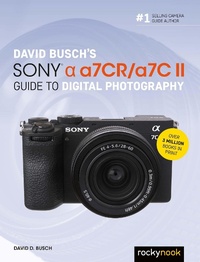
David Busch's Sony Alpha a7CR/a7C II Guide to Digital Photography
Published on 30. May 2024
448 pages
979-8-88814-197-7 (ISBN)
Description

David Busch's Sony Alpha a7CR/a7C II Guide to Digital Photography is the most comprehensive resource and reference for Sonys ultra-compact full frame mirrorless cameras. Both pack large sensor image quality and low light performance into the worlds smallest full-frame cameras with in-body five-axis image stabilization. Whether you choose the ultra-high 60MP resolution a7CR, or workhorse 33MP a7C II, these cameras make the perfect companion for travel, landscape, sports, or fine arts photography under the most demanding conditions.With fast, sensor-based phase detect autofocus (with real-time tracking of people, animals, birds, aircraft, and vehicles), the a7CR/a7C II have all the tools needed to take incredible still images and capture compelling 4K and full HD movies and video blogs. This book will show you how to master those features as you explore the world of digital photography and hone your creativity with your new camera.Filled with detailed how-to steps and full-color illustrations, David Busch's Sony Alpha a7CR/a7C II Guide to Digital Photography covers every feature of these cameras in depth, from taking your first photos through advanced details of setup, exposure, lens selection, lighting, and more, and relates each feature to specific photographic techniques and situations. Also included is the handy camera roadmap chapter, an easy-to-use visual guide to the camera's features and controls. Learn when to use every option and, more importantly, when not to use them, by following the authors recommended settings for each menu entry. With best-selling photographer and mentor David Busch as your guide, you'll quickly have full creative mastery of your cameras capabilities, whether you're shooting on the job, as an advanced enthusiast exploring full frame photography for the first time, or are just out for fun. Start building your knowledge and confidence, while bringing your vision to light with the Sony a7CR or a7C II.
More details
Other editions
Additional editions
Book
11/2024
Rocky Nook
€41.50
Shipment within 10-20 days
E-Book
05/2024
Rocky Nook
€35.49
Available for download
Content
- Cover
- Title Page
- Copyright
- Dedication
- Acknowledgments
- About the Author
- Contents
- Preface
- Introduction
- Chapter 1. Meet Your Sony Alpha a7C II/a7CR
- Your Out-of-Box Experience
- Initial Setup
- Battery Included
- Charging the Battery
- Mounting a Lens
- Turn on the Power
- Adjusting the Diopter Setting
- Inserting a Memory Card
- Menu Navigation Quick Start
- Formatting a Memory Card
- Selecting a Shooting Mode
- Intelligent Auto/Scenes Selection
- Other Modes
- Choosing a Metering Mode
- Choosing a Focus Mode
- Selecting a Focus Area
- Other Settings
- Adjusting White Balance and ISO
- Using the Self-Timer
- Quick Start to Movie Making
- Reviewing the Images You've Taken
- Transferring Files to Your Computer
- Wireless File Transfer
- Chapter 2. Your Camera Roadmap
- Using Cross-References
- Front View
- The Sony a7C II/a7CR's Business End
- Accessing Settings
- For Viewfinder Function Menu
- Shooting Function Menu
- Main Menu Adjustments
- Introducing the Touch Screen/Pad
- Touch Options
- Data Displays
- Going Topside
- Underneath Your Sony a7C II/a7CR
- Chapter 3. Nailing the Optimum Exposure
- Getting a Handle on Exposure
- Equivalent Exposure
- Calculating Exposure
- Correctly Exposed
- Overexposed
- Underexposed
- The Importance of ISO
- Choosing a Metering Method
- Multi Metering
- Center-Weighted Metering
- Spot Metering
- Entire Screen Averaging
- Highlight-Weighted Metering
- Choosing an Exposure Mode
- Aperture Priority (A) Mode
- Shutter Priority (S) Mode
- Program Auto (P) Mode
- Making Exposure Value Changes
- Manual Exposure (M) Mode
- Using ISO Auto
- Exposure Bracketing
- Continuous Bracketing
- Single Bracketing
- White Balance Bracketing
- DRO Bracketing
- Dealing with Digital Noise
- High ISO Noise
- Long Exposure Noise
- Using Dynamic Range Optimizer
- Working with HDR
- Bracketing and Merge to HDR
- Exposure Evaluation with Histograms
- The Live Histogram
- The Playback Histograms
- Tonal Range
- Histogram Basics
- Understanding Histograms
- Fine-Tuning Exposure
- Chapter 4. Mastering Autofocus Options
- Getting into Focus
- Contrast Detection
- Phase Detection
- Comparing the Two Hybrid Components
- Focus Modes and Options
- Focus Pocus
- Adding Circles of Confusion
- Your Focus Mode Options
- Focus or Release Priority?
- Focus Magnified
- Choosing the AF Area
- Moving the Focus Area
- Tracking and Focusing on Subjects, Faces, and Eyes
- Subject Recognition Overview
- Making Your Subject Recognition Settings
- Magic Autofocus-Set and Forget
- Your AF-C to AF-S Switch
- Understanding Aperture Drive in AF
- Using Manual Focus
- Back-Button Focus
- Activating Back-Button Focus
- Chapter 5. Advanced Techniques
- Exploring Ultra-Fast Exposures
- Long Exposures
- Continuous Shooting
- Customizing White Balance
- Shockless White Balance
- Fine-Tuning Preset White Balance
- Setting a Custom White Balance
- Setting White Balance by Color Temperature
- Interval Shooting
- Interval Shooting Checklist
- Settings Recap
- Viewing Your Interval Sequences
- Time-Lapse Movies
- Star Trails
- Focus Bracketing
- Freaky Focus
- Focus Bracket How-To
- Pixel Shift (a7CR Only)
- Capturing Your Images
- Processing Your Pixel-Shift Exposures
- Chapter 6. My Menu, Main Menu, and Shooting Menu
- Menu Navigation
- My Menu Tab
- Main Menu Tab
- Shooting Menu Tab
- 1. Image Quality
- JPEG/HEIF Switch
- File Format
- RAW File Type
- JPEG Quality
- JPEG/HEIF Image Size
- Aspect Ratio
- (Movie) File Format
- Movie Settings
- S&Q Settings
- Time-lapse Settings
- Log Shooting Setting
- Proxy Settings
- APS-C/S35mm Shooting
- Long Exposure NR/High ISO NR
- HLG Still Image
- Color Space
- Lens Compensation
- 2. Media
- Format
- Recover Image Database
- Display Media Information
- 3. File
- File/Folder Settings/File
- Select Recording Folder
- Create New Folder
- IPTC Information
- Copyright Info
- Write Serial Number
- 4. Shooting Mode
- Exposure Control Type
- Introduction to Memory Registers
- Recall Camera Setting
- Camera Settings Memory
- Auto/Scene Selection
- Shoot Mode
- Register Custom Shooting Set
- 5. Drive Mode
- Drive Mode
- Bracket Settings
- Interval Shooting Functions
- Pixel Shift Multi Shooting (a7CR Only)
- 6. Shutter/Silent
- Silent Mode Settings
- Shutter Type
- Release w/o Lens
- Release w/o Card
- Anti-Flicker Settings
- Movie Settings
- 7. Image Stabilization
- SteadyShot
- (Movies) SteadyShot
- SteadyShot Adjustments
- Focal Length
- 8. Zoom
- Zoom
- Zoom Range
- Custom Key Zoom Speed
- Remote Zoom Speed
- Using Zoom
- 9. Shooting Display
- Grid Line Display/Grid Line Type
- Live View Display Settings
- Emphasized Record Display
- 10. Marker Display (Stills/Movies)
- Aspect Marker
- Aspect Marker Type
- Aspect Marker Level
- Shooting Option (Movies)
- Self-timer
- Auto Framing Settings
- Chapter 7. Exposure/Color Menu
- 1. Exposure
- BULB Timer Settings
- Auto Slow Shutter
- ISO
- ISO Range Limit
- Auto/Manual Switch Setting
- ISO Auto Minimum Shutter Speed
- 2. Exposure Compensation
- Exposure Compensation
- Exposure Step
- Exposure Standard Adjustment
- 3. Metering
- Metering Mode
- Face Priority in Multi Metering
- Spot Metering Point
- Autoexposure Lock with Shutter
- 4. Flash
- Flash Mode
- Flash Compensation
- Exposure Compensation Settings
- Wireless Flash
- Red Eye Reduction
- External Flash Settings
- Register Flash Shooting Settings
- 5. White Balance
- White Balance
- Priority Settings in AWB
- Shutter AWB Lock
- Shockless White Balance
- 6. Color/Tone
- D-Range Optimizer
- Creative Look
- Picture Profile
- Select LUT
- Manage User LUTs
- Soft Skin Effect
- 7. Zebra Display
- Zebra Display
- Zebra Level
- Chapter 8. Focus and Playback Menus
- Focus Menu Tab
- 1. AF/MF
- Focus Mode
- Priority Set in AF-S/Priority Set in AF-C
- AF Tracking Sensitivity
- AF Transition Speed
- AF Subject Shift Sensitivity
- AF Assist
- AF Illuminator
- Aperture Drive in AF
- AF with Shutter
- Full Time DMF
- Pre-AF
- 2. Focus Area
- Focus Area
- Focus Area Limit
- Switch Vertical/Horizontal AF Area
- Focus Area Color
- AF Area Registration
- Delete Registered AF Area
- AF Area Auto Clear
- Area Display During Tracking
- AF-C Area Display
- Phase Detection Area
- Circulation of Focus Point
- AF Frame Movement Amount
- 3. Subject Recognition
- Subject Recognition in Autofocus
- Recognition Target
- Recognition Target Selection Setting
- Right/Left Eye Selection
- Subject Recognition Frame Display
- Face Memory
- Registered Face Priority
- 4. Focus Assistant
- Focus Map
- Auto Magnifier in Manual Focus
- Focus Magnifier
- Focus Magnifier Time
- (Stills) Initial Focus Magnification
- (Movie) Initial Focus Magnification
- AF in Focus Magnification
- 5. Peaking Display
- Peaking Display
- Peaking Level
- Peaking Color
- Playback Tab
- 1. Playback Target
- View Mode
- 2. Magnification
- Enlarge Image
- Enlarge Initial Magnification
- Enlarge Initial Position
- 3. Selection/Memo
- Protect
- Rating
- Rating Settings (Custom Key)
- 4. Delete
- Delete
- Delete Pressing Twice
- Delete Confirmation
- 5. Edit
- Crop
- Rotate
- Photo Capture
- JPEG/HEIF Switch
- 6. Viewing
- Continuous Playback for Interval
- Playback Speed for Interval
- Slide Show
- 7. Playback Option
- Image Index
- Display as Group
- Display Rotation
- [Playback] Focus Frame Display
- Aspect Marker Display
- Display Specified Time Image
- Image Jump Setting
- Chapter 9. Network and Setup Menus
- Network Menu Tab
- 1. Smartphone Connect/PC Remote
- Smartphone Connection
- PC Remote Function
- Select on Camera and Send
- Reset Transfer Status
- Connect While Power Off
- Remote Shooting Settings
- 2. FTP Transfer
- FTP Transfer Function
- 3. Streaming
- USB Streaming
- 4. Wi-Fi
- Wi-Fi Connect
- WPS Push/Access Point Settings
- Registering Manually
- Wi-Fi Frequency Band
- Display Wi-Fi Information
- SSID/PW Reset
- 5. Bluetooth
- Bluetooth Settings
- Pairing
- Manage Paired Device
- Bluetooth Remote Control
- Display Device Address
- 6. Wired LAN
- (LAN) IP Address Setting
- Display Wired LAN Info
- 7. USB-LAN Tethering
- USB-LAN Connection/Disconnection
- Tethering Connection
- 8. Network Option
- Airplane Mode
- Edit Device Name
- Import Root Certificate
- Access Authenticity Settings
- Access Authenticity Information
- Reset Network Settings
- Setup Menu Tab
- 1. Area/Date (Stills/Movies)
- Language
- Area/Date/Time Setting
- NTSC/PAL Selector
- 2. Reset/Save Settings
- Setting Reset
- Save/Load Settings
- 3. Operation Customize
- Custom Key/Dial Settings
- Custom Key/Dial Settings
- Custom Key Settings (Playback)
- Function Menu Settings
- Different Settings for Stills/Movies
- Display (Screen Display) Settings
- (Movie) Record with Shutter
- Zoom Ring Rotate
- 4. Dial Customize
- (Stills) Custom Key/Dial Settings/(Movies) Custom Key/Dial Settings
- My Dial Settings
- Av/Tv Rotate
- Function Ring (Lens)
- Dial/Wheel Lock
- 5. Touch Operation
- Touch Operation
- Touch Panel/Pad
- Touch Panel Settings
- Touch Pad Settings
- 6. Accessibility
- Screen Reader
- Enlarge Screen
- 7. Finder/Monitor
- Select Finder/Monitor
- Monitor Brightness
- Viewfinder Brightness
- Finder Color Temperature
- Display Quality
- Finder Frame Rate
- Monitor Flip Direction
- 8. Display Option
- TC/UB Display Settings
- Gamma Display Assist
- Gamma Display Assist Type
- Display LUT
- (Images) Remaining Shooting Display
- Auto Review
- Shooting Mode Selection Screen
- 9. Power Setting Option
- Auto Monitor Off
- Power Save Start Time
- Power Save By Monitor
- Auto Power Off Temperature
- 10. Sound Option
- Volume Settings
- 4 Channel Audio Monitoring
- Audio Signal (Shooting)/Audio Signal (Start/End)
- 11. USB
- USB Connection Mode
- USB LUN Setting
- USB Power Supply
- 12. External Output
- HDMI Resolution
- HDMI Output Settings
- HDMI Information Display
- CTRL FOR HDMI
- 13. Setup Option
- Video Light Mode
- Anti-dust Function
- Auto Pixel Mapping/Pixel Mapping
- Version
- Certification Logo (Non-US/Canada Models Only)
- Display Serial Number
- Privacy Notice
- Chapter 10. Movie-Making Basics
- Vloggers and Streamers
- Setting Up Auto Framing
- Some Fundamentals
- First Things First
- Preparing to Shoot Video
- Steps During Movie Making
- More About Frame Rates and Bit Rates
- Frame Rates
- Bit Rates
- Choosing Metering/Exposure Modes
- Stop That!
- Choosing an Autofocus Mode
- Tracking in Video
- Tips for Movie Making
- Composition
- Lighting for Video
- Audio
- Lens Craft
- Chapter 11. Advanced Video Features
- More on Sensors and Crop Factors
- Sensor Size
- Crop Factor
- Other Important Parameters
- Frame Guides
- Time Codes and User Bits
- Picture Profiles
- Gamma, Gamma Ding Dong
- Select LUT
- Manage User LUTs
- More on 4K Video
- Using an External Recorder
- Audio Settings
- Audio Recording
- Audio Recording Level
- Audio Out Timing
- Wind Noise Reduction
- [Multi-interface] Shoe Audio Settings
- Chapter 12. Working with Lenses
- Don't Forget the Crop Factor
- Crop Factor Effects
- Choosing a Lens
- Sony FE Lenses
- A-Mount Lenses
- Zeiss Batis Lenses
- Zeiss Loxia Lenses
- Adapters and Third-Party Lenses
- What Lenses Can Do for You
- Categories of Lenses
- Using Wide-Angle Lenses
- Avoiding Potential Wide-Angle Problems
- Using Telephoto and Tele-Zoom Lenses
- Avoiding Telephoto Lens Problems
- Chapter 13. Working with Flash
- Why Flash?
- Electronic Flash Basics
- How Electronic Flash Works
- Flash Modes
- Flash Exposure Compensation
- Red Eye Reduction
- Using an External Electronic Flash
- Guide Numbers, Hot Shoes, and More
- HVL-F60M/RM/RM2 Flash Units
- HVL-F46RM Flash Unit
- HVL-F45RM Flash Unit
- HVL-F43M Flash Unit
- HVL-F32M Flash Unit
- HVL-F28RM Flash Unit
- HVL-F20M Flash Unit
- Wireless Flash (Optical
- Key Wireless Concepts
- Setting Channels and Remote Groups
- Setting Ratios
- Radio Control
- Index
