

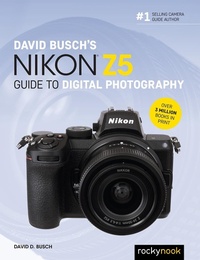
David Busch's Nikon Z5 Guide to Digital Photography
Published on 16. November 2020
528 pages
978-1-68198-712-5 (ISBN)
Description

David Busch''s Nikon Z5 Guide to Digital Photography is your all-in-one comprehensive resource and reference for getting the most out of your Nikon Z5 mirrorless camera. Nikon's most affordable full-frame mirrorless model boasts up-scale features, including dual memory card slots, five-axis image stabilization for sharp images even when using slow shutter speeds, and an advanced hybrid autofocus system with face/eye detection and 273 AF points. The Z5's 24MP sensor supports 4K and Full HD movie shooting, and an innovative Focus Shift mode that produces stunning deep-focus images. With this book in hand, you'll master all the camera's impressive features, and fine tune your camera skills as develop your creativity taking great photographs with your new Z5.Filled with detailed how-to steps and full-color illustrations, David Busch''s Nikon Z5 Guide to Digital Photography covers all the camera''s capabilities in depth, from taking your first photos through advanced details of setup, exposure, lens selection, lighting, and more, and relates each feature to specific photographic techniques and situations. Also included is the handy visual guide to the Z5, with close-up photos and descriptions of the camera''s essential features and controls. Learn when to use each option and, more importantly, when not to use them, by following the author's recommended settings for every menu entry. With best-selling photographer and mentor David Busch as your guide, you''ll quickly have full creative mastery of your camera's capabilities, whether you''re shooting on the job, as an advanced enthusiast, or are just out for fun. Start building your knowledge and confidence, while bringing your vision to light with the Nikon Z5 today.
More details
Other editions
Additional editions
Book
09/2021
Rocky Nook
€41.00
Shipment within 3-4 weeks
David D. Busch
David Busch's Nikon Z5 Guide to Digital Photography
E-Book
11/2020
Rocky Nook
€34.99
Available for download
Content
- Cover
- Contents
- Preface
- Introduction
- CHAPTER 1: Thinking Outside the Box
- First Things First
- In the Box
- Optional and Non-Optional Add-Ons
- Initial Setup
- Mastering the Multi Selector and Command Dials
- Setting the Clock
- Battery Included
- Final Steps
- CHAPTER 2: Nikon Z5 Quick Start
- Selecting a Release Mode
- Selecting an Exposure Mode
- Choosing a Metering Mode
- Choosing a Focus Mode
- Choosing the Focus Area Mode
- Adjusting White Balance and ISO
- Reviewing the Images You've Taken
- Transferring Photos to Your Computer
- Changing Default Settings
- Resetting the Nikon Z5
- Recommended Default Changes
- Shooting Tips
- Photo Shooting Menu Recommendations
- Custom Settings Menu Recommendations
- CHAPTER 3: Nikon Z5 Roadmap
- Nikon Z5: Up Front
- The Nikon Z5's Business End
- Playing Back Images
- Zooming the Nikon Z5 Playback Display
- Viewing Thumbnails
- Working with Calendar View
- Using the Photo Data Displays
- Going Topside
- Lens Components
- Underneath Your Nikon Z5
- The Viewfinder/Monitor Displays
- CHAPTER 4: Nailing the Right Exposure
- Getting a Handle on Exposure
- Equivalent Exposure
- How the Z5 Calculates Exposure
- Correctly Exposed
- Overexposed
- Underexposed
- Metering Mid-Tones
- Choosing a Metering Method
- Matrix Metering
- Center-weighted Metering
- Spot Metering
- Highlight-weighted Metering
- Choosing an Exposure Method
- Aperture-Priority
- Shutter-Priority
- Program Mode
- Manual Exposure
- Adjusting Exposure with ISO Settings
- Dealing with Noise
- Bracketing
- White Balance Bracketing
- ADL Bracketing
- Working with HDR
- Auto HDR
- Bracketing and Merge to HDR
- Fixing Exposures with Histograms
- Tonal Range
- Histogram Basics
- Understanding Histograms
- Fine-Tuning Exposure
- CHAPTER 5: Mastering the Mysteries of Focus
- Auto or Manual Focus?
- How Focus Works
- Contrast Detection
- Phase Detection
- Adding Circles of Confusion
- Using Autofocus with the Nikon Z5
- Bringing the Z5's AF System into Focus
- Focus Mode and Priority
- Autofocus Mode
- Focus-Priority versus Release-Priority
- Choosing an Autofocus Area Mode
- Face/Eye Detection and Subject Tracking
- Face/Eye Detection
- Subject Tracking
- Store by Orientation
- Autofocus Activation. and More
- Manual Focus
- Using the Focus/Control Ring
- Trap (Auto) Focus
- Back-Button Focus
- Activating Back-Button Focus
- Fine-Tuning the Focus of Your Lenses
- Lens Tune-up Options
- Evaluating Current Focus
- Changing the Fine-Tuning Setting
- CHAPTER 6: Advanced Techniques
- Continuous Shooting
- A Tiny Slice of Time
- Working with Short Exposures
- Long Exposures
- Three Ways to Take Long Exposures
- Working with Long Exposures
- Delayed Exposures
- Self-Timer
- Interval/Time-Lapse Photography
- Using Interval Photography
- Time-Lapse Movies
- Star Trails
- Multiple Exposures
- Geotagging with the Nikon GP-1a
- Focus Shift Shooting
- Connecting to Your Smart Device or Computer
- Linking Camera to Smart Device
- Using the SnapBridge App
- Camera Screen
- Other Connection Options
- CHAPTER 7: Focus on Lenses
- Sensor Sensibilities
- Choosing Native Z-mount Lenses
- Nikon Lens Overview
- Ingredients of Nikon's Alphanumeric Soup
- Wide-to-Normal Zoom Lenses
- Nikkor Z 24-50mm f/4-6.3
- Nikkor Z 14-30mm f/4 S
- Nikkor Z 14-24mm f/2.8 S
- Nikkor Z 24-70mm f/4 S
- Nikkor Z 24-70mm f/2.8 S
- Wide-Angle/Normal Prime Lenses
- Nikkor Z 20mm f/1.8 S
- Nikkor Z 24mm f/1.8 S
- Nikkor Z 35mm f/1.8 S
- Nikkor Z 50mm f/1.8 S
- Nikkor Z 50mm f/1.2 S
- Nikkor Z 58mm f/0.95 S Noct
- Telephoto Lenses
- Nikkor 85mm f/1.8 S
- Nikkor Z 70-200mm f/2.8 S VR
- Nikkor Z 24-200mm f4-6.3 VR
- DX Lenses
- Nikkor Z 16-50mm DX f/3.5-6.3 VR
- Nikkor Z 50-250mm DX f/4.5-6.3 VR
- Nikkor Z Teleconverter TC-1.4x/TC-2.0x
- Lenses to Come
- Universal VR
- How It Works
- Using the FTZ Adapter
- Other Adapters
- Categories of Lenses
- Using Wide-Angle and Wide-Zoom Lenses
- Avoiding Potential Wide-Angle Problems
- Using Telephoto and Tele-Zoom Lenses
- Avoiding Telephoto Lens Problems
- Telephotos and Bokeh
- Using F-Mount Lenses
- Macro Lenses
- The F-Mount Magic Three
- Wide Angles
- Wide-to-Medium/Long Zooms
- Telephoto and Normal Lenses
- CHAPTER 8: Mastering Light
- Light That's Available
- Continuous Lighting Basics
- Living with Color Temperature
- Daylight
- Incandescent/Tungsten/Halogen Light
- Fluorescent Light/LEDs
- Other Lighting Accessories
- CHAPTER 9: Electronic Flash with the Nikon Z5
- Electronic Flash Basics
- The Moment of Exposure
- A Tale of Two Exposures
- Measuring Exposure
- Guide Numbers
- Choosing a Flash Sync Mode
- Ghost Images
- High-Speed Sync
- Using External Flash
- Using Flash Exposure Compensation
- Specifying Flash Shutter Speed
- Previewing Your Flash Effect
- Flash Control
- Working with Nikon Flash External Units
- Nikon SB-300
- Nikon SB-400
- Nikon SB-500
- Nikon SB-700
- Nikon SB-R200
- Nikon SB-910
- Nikon SB-5000
- Light Modifiers
- Using Zoom Heads
- Flash Modes
- Repeating Flash
- CHAPTER 10: Wireless and Multiple Flash
- Elements of Wireless Flash
- Master Flash
- Remote Flashes
- Channels
- Groups
- Lighting Ratios
- Setting Your Master Flash
- Setting Commander Mode for the SB-5000
- Setting Commander Modes for the SB-910 or SB-900
- Setting Commander Modes for the SB-700
- Setting Commander Modes for the SB-500
- Setting Remote Modes
- Radio Control
- CHAPTER 11: Playback, Photo Shooting, and Movie Shooting Menus
- Anatomy of the Nikon Z5's Menus
- Playback Menu Options
- Delete
- Playback Folder
- Playback Display Options
- Dual-Format Recording PB Slot
- Image Review
- After Delete
- Rotate Tall
- Copy Image(s)
- Slide Show
- Rating
- Photo Shooting Menu Options
- Reset Photo Shooting Menu
- Storage Folder
- File Naming
- Role Played by Card in Slot 2
- Choose Image Area
- Image Quality
- Image Size
- NEF (RAW) Recording
- ISO Sensitivity Settings
- White Balance
- Set Picture Control
- Manage Picture Control
- Color Space
- Active D-Lighting
- Long Exposure NR
- High ISO NR
- Vignette Control
- Diffraction Compensation
- Auto Distortion Control
- Flicker Reduction Shooting
- Metering
- Flash Control
- Flash Mode
- Flash Compensation
- Focus Mode
- AF-Area Mode
- Vibration Reduction
- Auto Bracketing
- Multiple Exposure
- HDR (High Dynamic Range)
- Interval Timer Shooting
- Time-Lapse Movie
- Focus Shift Shooting
- Silent Photography
- Movie Shooting Menu
- Reset Movie Shooting Menu
- File Naming
- Destination
- Choose Image Area
- Frame Size/Frame Rate
- Movie Quality
- Movie File Type
- ISO Sensitivity Settings
- White Balance
- Set Picture Control
- Manage Picture Control
- Active D-Lighting
- High ISO NR
- Vignette Control
- Diffraction Compensation
- Auto Distortion Control
- Flicker Reduction
- Metering
- Focus Mode
- AF-Area Mode
- Vibration Reduction
- Electronic VR
- Microphone Sensitivity
- Attenuator
- Frequency Response
- Wind Noise Reduction
- Headphone Volume
- Timecode
- CHAPTER 12: The Custom Settings Menu
- Custom Settings Menu Layout
- Reset Custom Settings
- a. Autofocus
- a1 AF-C Priority Selection
- a2 AF-S Priority Selection
- a3 Focus Tracking with Lock-on
- a4 Auto-Area AF Face/Eye Detection
- a5 Focus Points Used
- a6 Store Points by Orientation
- a7 AF Activation
- a8 Limit AF-Area Mode Selection
- a9 Focus Point Wrap-Around
- a10 Focus Point Options
- a11 Low-Light AF
- a12 Built-in AF-Assist Illuminator
- a13 Manual Focus Ring in AF Mode
- b. Metering/Exposure
- b1 EV Steps for Exposure Cntrl.
- b2 Easy Exposure Compensation
- b3 Center-Weighted Area
- b4 Fine-Tune Optimal Exposure
- c. Timers/AE Lock
- c1 Shutter-Release Button AE-L
- c2 Self-Timer
- c3 Power Off Delay
- d. Shooting/Display
- d1 CL Mode Shooting Speed
- d2 Max. Continuous Release
- d3 Sync. Release Mode Options
- d4 Exposure Delay Mode
- d5 Shutter Type
- d6 File Number Sequence
- d7 Apply Settings to Live View
- d8 Framing Grid Display
- d9 Peaking Highlights
- d10 View All in Continuous Mode
- e. Bracketing/Flash
- e1 Flash Sync Speed
- e2 Flash Shutter Speed
- e3 Exposure Compensation for Flash
- e4 Auto Flash ISO Sensitivity Control
- e5 Modeling Flash
- e6 Auto Bracketing (Mode M)
- e7 Bracketing Order
- f. Controls
- f1 Customize i Menu
- f2 Custom Controls
- f3 OK Button
- f4 Shutter Spd & Aperture Lock
- f5 Customize Command Dials
- f6 Release Button to Use Dial
- f7 Reverse Indicators
- g. Movie
- g1 Customize i Menu
- g2 Custom Controls
- g3 OK Button
- g4 AF Speed
- g5 AF Tracking Sensitivity
- g6 Highlight Display
- CHAPTER 13: The Setup Menu, Retouch Menu, and My Menu
- Setup Menu Options
- Format Memory Card
- Save User Settings
- Reset User Settings
- Language
- Time Zone and Date
- Monitor Brightness
- Monitor Color Balance
- Viewfinder Brightness
- Viewfinder Color Balance
- Limit Monitor Mode Selection
- Information Display
- AF Fine-Tuning Options
- Non-CPU Lens Data
- Clean Image Sensor
- Image Dust Off Ref Photo
- Pixel Mapping
- Image Comment
- Copyright Information
- Beep Options
- Touch Controls
- HDMI
- Location Data
- Wireless Remote (WR) Options
- Assign Remote (WR) Fn Button
- Airplane Mode
- Connect to Smart Device
- Connect to PC
- Conformity Marking
- Battery Info
- USB Power Delivery
- Energy Saving
- Slot Empty Release Lock
- Save/Load Menu Settings
- Reset All Settings
- Firmware Version
- Retouch Menu
- NEF (RAW) Processing
- Trim
- Resize
- D-Lighting
- Red-Eye Correction
- Straighten
- Distortion Control
- Perspective Control
- Monochrome
- Image Overlay
- Trim Movie
- Side-by-Side Comparison
- Using My Menu
- CHAPTER 14: Capturing Video with the Z5
- Quick Start Checklist
- Lean, Mean, Movie Machine
- Capturing Video
- Shooting Your Movie
- Using the i Button
- Stop That!
- Viewing Your Movies
- Trimming Your Movies
- Saving a Frame
- CHAPTER 15: Tips for Shooting Better Video
- Using an External Recorder
- Refocusing on Focus
- Lens Craft
- Depth-of-Field and Video
- Zooming and Video
- Keeping Things Stable and on the Level
- Shooting Script
- Storyboards
- Storytelling in Video
- Composition
- Lighting for Video
- Illumination
- Creative Lighting
- Lighting Styles
- Audio
- Tips for Better Audio
- External Microphones
- Special Features
- CHAPTER 16: Troubleshooting and Prevention
- Upgrading Your Firmware
- How It Works
- Why Multiple Firmware Modules?
- Getting Ready
- Updating from a Card Reader
- Starting the Update
- Protecting Your LCD
- Troubleshooting Memory Cards
- All Your Eggs in One Basket?
- Preventive Measures
- What Can Go Wrong?
- What Can You Do?
- Cleaning Your Sensor
- Dust the FAQs, Ma'am
- Identifying and Dealing with Dust
- Avoiding Dust
- Sensor Cleaning
- Index
- A
- B
- C
- D
- E
- F
- G
- H
- I
- J
- K
- L
- M
- N
- O
- P
- R
- S
- T
- U
- V
- W
- Y
- Z
