

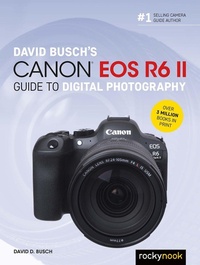
David Busch's Canon EOS R6 II Guide to Digital Photography
Published on 12. April 2023
464 pages
979-8-88814-026-0 (ISBN)
Description

David Busch's Canon EOS R6 II Guide to Digital Photography is your all-in-one comprehensive resource and reference for the exciting new Canon EOS R6 II full-frame mirrorless camera. The EOS R6 II boasts continuous shooting up to 40 frames per second, in-body image stabilization, and a 24 MP sensor. Its upgraded autofocus subject recognition now provides lightning-fast tracking of people, animals, motor sports vehicles, aircraft, and trains. Three available adapters make it easy to supplement your R-mount lenses with a broad selection of legacy Canon EF and EF-S optics. The EOS R6 II has wireless connectivity to allow linking the camera to a computer and iOS or Android smart devices, high-definition 4K and Full HD movie-making capabilities, and a versatile swiveling touch screen LCD. With this book in hand, you can quickly apply all these advanced features to your digital photography, while boosting your creativity to take great photographs with your Canon EOS R6 II.Filled with detailed how-to steps and full-color illustrations, David Busch's Canon EOS R6 II Guide to Digital Photography covers all this upscale camera's features in depth, from taking your first photos through advanced details of setup, exposure, lens selection, lighting, and more, and relates each feature to specific photographic techniques and situations. Also included is the handy EOS R6 II "e;roadmap"e; chapter, an easy-to-use visual guide to the camera's features and controls. Learn when to use each option and, more importantly, when not to use them, by following the author's recommended settings for every menu entry. With best-selling photographer and mentor David Busch as your guide, you'll quickly have full creative mastery of your camera's capabilities, whether you're shooting on the job, as an advanced enthusiast, or are just out for fun. Start building your knowledge and confidence, while bringing your vision to light with the Canon EOS R6 II today.
More details
Other editions
Additional editions
Book
09/2023
Rocky Nook
€47.50
Available immediately
David D. Busch
David Busch's Canon EOS R6 II Guide to Digital Photography
E-Book
04/2023
Rocky Nook
€39.99
Available for download
Content
- Cover
- Title Page
- Copyright
- Dedication
- Acknowledgments
- About the Author
- Contents
- Preface
- Introduction
- Chapter1: Meet Your Canon EOS R6 II
- First Things First
- Initial Setup
- Power Options
- Mounting a Lens
- Adjusting Diopter Correction
- Inserting a Memory Card
- Learning Basic Navigation
- Formatting a Memory Card
- Setting the Time and Date
- Selecting a Shooting Mode
- Making Key Settings with the Quick Control Screen
- Choosing a Metering Mode
- Choosing a Focus Mode (AF Operation)
- Selecting AF Area
- Other Settings
- Adjusting White Balance and ISO
- Using Drive Modes and Self-Timer/Remote
- Taking a Picture
- Reviewing the Images You've Taken
- Cruising through Index Views
- Transferring Photos to Your Computer
- Quick Control: Playback
- Chapter2: Your Visual Roadmap
- Front View
- The Business End
- Right-Side Controls
- Mastering the Touch Screen
- Flexible View
- Touch Operation
- Going Topside
- Underneath Your Camera
- Chapter3: Recommended Settings
- Changing Default Settings
- Resetting to Factory Defaults
- Recommended Default Changes
- Chapter4: Nailing the Right Exposure
- Getting a Handle on Exposure
- Correctly Exposed
- Overexposed
- Underexposed
- Choosing a Metering Mode
- Choosing a Shooting Mode
- Aperture-Priority Mode
- Shutter-Priority Mode
- Program AE Mode
- Flexible-Priority Mode
- Manual Exposure Mode
- Adjusting Exposure with ISO Settings
- Dealing with Visual Noise
- Making EV Changes
- Bracketing Parameters
- Number of Exposures
- Bracketing Sequence
- Bracketing Auto Cancel
- Increment Between Exposures
- Creating a Bracketed Set
- Working with HDR
- Using HDR Mode
- Bracketing and Merge to HDR
- Fixing Exposures with Histograms
- Tonal Range
- Histogram Basics
- Understanding Histograms
- Discovering Basic Zone Modes
- Scene Intelligent Auto Mode
- Special Scene Mode
- Creative Filters
- Chapter5: Mastering the Mysteries of Focus
- Auto or Manual Focus?
- How Focus Works
- Contrast Detection
- Phase Detection
- AF Pixel Layout
- Dual Pixel CMOS AF
- Dual Pixel RAW Focus Adjustments
- Circles of Confusion and Focus
- Working with the AF System
- AF Operation
- AF Area
- Spot AF
- 1-Point AF
- Expand AF Area
- Expand AF Area: Around
- Flexible Zone AF 1
- Flexible Zone AF 2 (Vertical)/Flexible Zone AF 3 (Horizontal)
- Whole Area AF
- Orientation Linked AF Point
- Subject Tracking
- Manual Focus
- Magnified View
- Focus Peaking
- Focus Guide
- Fine-Tuning Your Autofocus
- Back-Button Focus
- Activating Back-Button Focus
- Chapter6: Advanced Techniques
- Continuous Shooting
- More Exposure Options
- A Tiny Slice of Time
- Working with Short Exposures
- Long Exposures
- Three Ways to Take Long Exposures
- Working with Long Exposures
- Delayed Exposures
- Self-Timer
- Time Lapse and Interval Photography
- Star Trails
- Shooting Panoramas
- Left /Right vs. Up/Down Panning
- Chapter7: Choosing Your Lens Arsenal
- Your First Lenses
- Canon RF-Mount Lenses
- Using Adapted Lenses
- Canon RF-Mount Adapters
- Image Stabilization and You
- How It Works
- What Lenses Can Do for You
- Using Wide-Angle Lenses
- Avoiding Potential Wide-Angle Problems
- Using Telephoto and Tele-Zoom Lenses
- Avoiding Telephoto Lens Problems
- Chapter8: Mastering Light
- Light at's Available
- Continuous Lighting Basics
- Living with Color Temperature
- Daylight
- Incandescent/Tungsten/Halogen Light
- Fluorescent Light/LEDs
- Chapter9: Electronic Flash Basics
- How Electronic Flash Works
- Ghost Images
- Avoiding Sync-Speed Problems
- Determining Exposure
- Guide Numbers
- Getting Started with Electronic Flash
- Flash Exposure Compensation and FE Lock
- Flash Range
- External Speedlite Control
- Flash Firing
- E-TTL Balance
- E-TTL II Metering
- Continuous Flash Control
- Slow Synchro
- Flash Function Settings
- Flash C.Fn Settings
- Clear Settings
- Using Flash Settings
- When to Disable Flash Firing
- More on Flash Modes
- Using External Electronic Flash
- Speedlite EL-1
- Speedlite 600EX-RT/600EX II-RT
- Speedlite 580EX II
- Speedlite EL-5
- Speedlite 470EX-AI
- Speedlite 430EX III-RT
- Speedlite 320EX
- Speedlite EL-100
- Speedlite 270EX II
- Close-Up Lites
- Chapter10: Working with Wireless Flash
- Wireless Evolution
- Elements of Wireless Flash
- Flash Combinations
- Controlling Flash Units
- Why Use Wireless Flash?
- Key Wireless Concepts
- Which Flashes Can Be Operated Wirelessly?
- Setting Up a Sender/Controller Flash
- Using a Speedlite as an Optical Sender
- Using the ST-E2 Transmitter as Sender
- Using the Speedlite EL-1 as Radio Sender
- Using the Speedlite 600EX-RT/600EX II-RT as Radio Sender
- Using the Speedlite 430EX III-RT as Radio Sender
- Using the ST-E3-RT or ST-E10 as a Radio Sender
- Setting Up a Receiver Flash
- Choosing a Channel
- Working with Groups
- Ratio Control
- Remote Release Function/Linked Shooting
- Chapter11: Customizing with the Shooting Menu
- Anatomy of the Menus
- Shooting Menu Options
- Image Quality
- Dual Pixel RAW
- Cropping/Aspect Ratio
- Digital Tele-converter
- Exposure Compensation/Automatic Exposure Bracketing
- ISO Speed Settings
- HDR Shooting [HDR PQ]
- HDR Mode
- Auto Lighting Optimizer
- Highlight Tone Priority
- Anti-Flicker Shooting
- High-Frequency Anti-Flicker Shooting
- External Speedlite Control
- Metering Mode
- White Balance
- Custom White Balance
- White Balance Shi /Bracketing
- Color Space
- Picture Style
- Clarity
- Digest Type (Hybrid Auto Mode Only)
- Retain Creative Assist Data (Scene Intelligent Auto Mode Only)
- Shooting Creative Filters
- Lens Aberration Correction
- Long Exposure Noise Reduction
- High ISO Speed Noise Reduction
- Dust Delete Data
- Multiple Exposure
- RAW Burst Mode
- Focus Bracketing
- Drive Mode
- Interval Timer
- Bulb Timer
- Silent Shutter Function
- Shutter Mode
- Release Shutter without Card
- IS (Image Stabilizer) Mode
- Customize Quick Controls
- Touch Shutter
- Image Review
- High-Speed Display
- Metering Timer
- Display Simulation
- OVF Sim View Assist
- Shooting Information Display
- View nder Display Format
- Display Performance
- Chapter12: Customizing with the Autofocus Menu
- AF Menu Options
- AF Operation
- AF Area
- Whole Area Tracking Servo AF
- Subject to Detect
- Eye Detection
- Switching Tracked Subjects
- Focus Mode
- Servo AF Characteristics
- One-Shot AF Release-Priority
- Preview AF
- Lens Drive when AF Impossible
- AF-Assist Beam Firing
- Touch & Drag AF Settings
- Limit AF Areas
- AF Area Selection Control
- Multi-Controller Sensitivity/AF Point Select
- Orientation Linked AF Point
- Limit Subject to Detect
- Le /Right Eye Detection
- MF Peaking Settings
- Focus Guide
- Movie Servo AF
- Electronic Full-Time MF
- Lens Electronic MF
- Focus/Control Ring
- Focus Ring Rotation
- RF Lens MF Focus Ring Sensitivity
- Chapter13: The Playback and Wireless Menus
- Playback Menu Options
- Protect Images
- Erase Images
- Rotate Stills
- Change Movie Rotate Info.
- Rating
- Image Copy
- Print Order
- Photobook Set-up
- RAW Processing (RAW/DPRAW)
- Creative Assist
- Quick Control RAW Processing
- DPRAW Processing
- Cloud RAW Image Processing
- Playback Creative Filters
- Resize
- Cropping
- HEIF JPEG Conversion
- Slide Show
- Set Image Search Conditions
- View From Last Seen
- Magni cation
- Image Jump with Main Dial
- Image Jump with Rate Button+Quick Control Dial 1
- Switch Main Dial/Quick Control Dial 2
- Rate Button Function
- Playback Information Display
- Highlight Alert
- AF Point Disp.
- Playback Grid
- Movie Play Count
- HDMI HDR Output
- Communications Functions Menu
- Connecting to a Smartphone via Bluetooth
- Other Connection Options
- Ready to Go
- Chapter14: Set-up Menu
- Set-up Menu Options
- Record Functions+Card/Folder Sel.
- File Numbering
- File Name
- Format Card
- Auto Rotate
- Add Movie Rotate Information
- Date/Time/Zone
- Language
- Video System
- Help Text Size
- Mode Guide
- Feature Guide
- Beep
- Volume
- Headphones
- Power Saving
- Screen/View nder Display
- Screen Brightness/View nder Brightness
- Screen/View nder Color Tone
- Fine-Tune View nder Color Tone
- UI Magni cation
- HDMI Resolution
- Touch Control
- Multi-Function Lock
- Shutter at Shutdown
- Sensor Cleaning
- Choose USB Connection App
- Reset Camera
- Custom Shooting Mode (C1-C3)
- Battery Information
- Copyright Information
- Manual/So ware URL
- Certi cation Logo Display
- Firmware
- Chapter15: The Custom Functions and My Menus
- Custom Function Settings
- Exposure Level Increments
- ISO Speed Setting Increments
- Speed From Metering/ISO Auto
- Bracketing Auto Cancel
- Bracketing Sequence
- Number of Bracketed Shots
- Safety Shi
- Same Exposure for New Aperture
- AE Lock Metering Mode After Focus
- Set Shutter Speed Range
- Set Aperture Range
- Dial Direction to set Tv/Av
- Control Ring Direction to Set Tv/Av
- Switch Main Dial/Quick Control Dial 2 When Shooting
- Customize Buttons
- Customize Dials
- Clear Customized Settings
- Add Cropping Information
- Audio Compression
- Default Erase Option
- Release Shutter without Lens
- Retract Lens on Power Off
- Add IPTC Information
- Clear All Custom Func. (C.Fn)
- My Menu
- Chapter16: Capturing Video
- Using the Movie Shooting Menus
- Movie Recording Size
- High Frame Rate
- Movie Cropping
- Digital Zoom
- Sound Recording
- Movie ISO Speed Settings
- HDR Movie Recording
- Av 1/8-stop Increments
- Movie Auto Slow Shutter
- Canon Log Settings
- Pre-recording Settings
- Time-lapse Movie
- Movie Self-timer
- IS (Image Stabilizer Mode)
- Shutter Button Function for Movies
- False Color Settings
- Zebra Settings
- Shooting Information Display
- Standby: Low Resolution
- HDMI Display
- HDMI RAW Output
- Time Code
- Movie Autofocus Menus
- Movie Servo AF
- Movie Servo AF Speed
- Movie Servo AF Tracking Sensitivity
- Compression, Resolution, and Frame Rates
- Compression
- Resolution
- Frame Rate
- HDR Movies
- Exposure Options
- More on Shutter Speeds
- Creating Digest Movies
- Playback and Editing
- Using an External Recorder/Monitor
- Lens Craft
- Keep Things Stable and on the Level
- Shooting Script
- Storyboards
- Composition
- Lighting for Video
- Audio
- Index
