

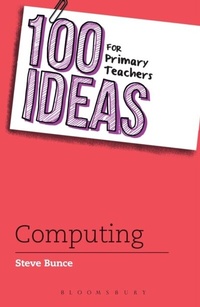
100 Ideas for Primary Teachers: Computing
1st Edition
Published on 27. August 2015
144 pages
978-1-4729-1501-6 (ISBN)
Description

No matter what you teach, there is a 100 Ideas title for you!
The 100 Ideas series offers teachers practical, easy-to-implement strategies and activities for the classroom. Each author is an expert in their field and is passionate about sharing best practice with their peers.
Each title includes at least ten additional extra-creative Bonus Ideas that won't fail to inspire and engage all learners.
Are you looking for exciting ways to get your students interested in computing? Do you need a break down of the basics to get your confidence up before teaching it? Don't worry - help is at hand in this book written by computing whizz Steve Bunce. All areas of the curriculum are introduced, and easy to implement and engaging activities are provided to get you and your students started!
Steve covers all the major elements: algorithms, programming, data management, e-safety and more. He answers questions like 'How do computers work?' and introduces ways for you to develop computational thinking and digital literacy in your students. Really accessible 'ways in' which may or may not use a computer make this book something that can be picked up and used in the classroom tomorrow, whatever your level and whatever resources you have to hand. 'Tablet tips' throughout the book provide extra ideas for how to use tablets in the classroom.
This book is a must-read for all primary teachers who want to implement a full, engaging computing curriculum in their classroom. Get debugging and coding today!
The 100 Ideas series offers teachers practical, easy-to-implement strategies and activities for the classroom. Each author is an expert in their field and is passionate about sharing best practice with their peers.
Each title includes at least ten additional extra-creative Bonus Ideas that won't fail to inspire and engage all learners.
Are you looking for exciting ways to get your students interested in computing? Do you need a break down of the basics to get your confidence up before teaching it? Don't worry - help is at hand in this book written by computing whizz Steve Bunce. All areas of the curriculum are introduced, and easy to implement and engaging activities are provided to get you and your students started!
Steve covers all the major elements: algorithms, programming, data management, e-safety and more. He answers questions like 'How do computers work?' and introduces ways for you to develop computational thinking and digital literacy in your students. Really accessible 'ways in' which may or may not use a computer make this book something that can be picked up and used in the classroom tomorrow, whatever your level and whatever resources you have to hand. 'Tablet tips' throughout the book provide extra ideas for how to use tablets in the classroom.
This book is a must-read for all primary teachers who want to implement a full, engaging computing curriculum in their classroom. Get debugging and coding today!
More details
Series
Edition
1. Auflage
Language
English
Place of publication
London
United Kingdom
Publishing group
Bloomsbury Publishing PLC (Digital)
Target group
Professional and scholarly
ISBN-13
978-1-4729-1501-6 (9781472915016)
Copyright in bibliographic data and cover images is held by Nielsen Book Services Limited or by the publishers or by their respective licensors: all rights reserved.
Schweitzer Classification
Other editions
Additional editions
Steve Bunce
100 Ideas for Primary Teachers: Computing
Book
08/2015
Bloomsbury Education
€38.60
Article exhausted; check different version
Person
Steve is an experienced teacher who has taught in primary, middle and secondary schools and in many roles including ICT co-ordinator, head of year and senior leader. He has advised schools across the UK on their use of technology through Open University. He is also a part-time lecturer at Durham University where he shares his learning experiences with the undergraduate teachers.
Content
Part 1: Introduction 'What is Computing?'/ Part 2: The National Curriculum for Computing/ Part 3: Progression through Computing/ Part 4: Algorithms, Instructions and recipes/ Part 5: The computer says 'Yes' - programming ideas/Part 6: Staying safe/ Part 7: Data, data, data/ Part 8: How do computers work?/Part 9: Communicating together/ Part 10: Technology around us
