

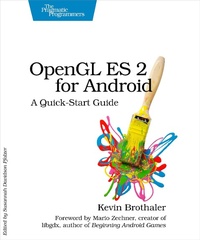
OpenGL ES 2 for Android
Description

Printed in full color. Android is booming like never before, with millions of devices shipping every day. It''s never been a better time to learn how to create your own 3D games and live wallpaper for Android. You''ll find out all about shaders and the OpenGL pipeline, and discover the power of OpenGL ES 2.0, which is much more feature-rich than its predecessor. If you can program in Java and you have a creative vision that you''d like to share with the world, then this is the book for you. This book will teach you everything you need to know to create compelling graphics on Android. You''ll learn the basics of OpenGL by building a simple game of air hockey, and along the way, you''ll see how to initialize OpenGL and program the graphics pipeline using shaders. Each lesson builds upon the one before it, as you add colors, shading, 3D projections, touch interaction, and more. Then, you''ll find out how to turn your idea into a live wallpaper that can run on the home screen. You''ll learn about more advanced effects involving particles, lighting models, and the depth buffer. You''ll understand what to look for when debugging your program, and what to watch out for when deploying to the market. OpenGL can be somewhat of a dark art to the uninitiated. As you read this book, you''ll learn each new concept from first principles. You won''t just learn about a feature; you''ll also understand how it works, and why it works the way it does. Everything you learn is forward-compatible with the just-released OpenGL ES 3, and you can even apply these techniques to other platforms, such as iOS or HTML5 WebGL.
More details
Other editions
Additional editions
Content
- Cover
- Table of Contents
- Foreword
- Acknowledgments
- Welcome to OpenGL ES for Android!
- What Will We Cover?
- Who Should Read This book?
- How to Read This Book
- Conventions
- Online Resources
- Let's Get Started!
- 1. Getting Started
- Installing the Tools
- Creating Our First Program
- Initializing OpenGL
- Creating a Renderer Class
- Using Static Imports
- A Review
- Part I-A Simple Game of Air Hockey
- 2. Defining Vertices and Shaders
- Why Air Hockey?
- Don't Start from Scratch
- Defining the Structure of Our Air Hockey Table
- Making the Data Accessible to OpenGL
- Introducing the OpenGL Pipeline
- The OpenGL Color Model
- A Review
- 3. Compiling Shaders and Drawing to the Screen
- Loading Shaders
- Compiling Shaders
- Linking Shaders Together into an OpenGL Program
- Making the Final Connections
- Drawing to the Screen
- A Review
- Exercises
- 4. Adding Color and Shade
- Smooth Shading
- Introducing Triangle Fans
- Adding a New Color Attribute
- Rendering with the New Color Attribute
- A Review
- Exercises
- 5. Adjusting to the Screen's Aspect Ratio
- We Have an Aspect Ratio Problem
- Working with a Virtual Coordinate Space
- Linear Algebra 101
- Defining an Orthographic Projection
- Adding an Orthographic Projection
- A Review
- Exercises
- 6. Entering the Third Dimension
- The Art of 3D
- Transforming a Coordinate from the Shader to the Screen
- Adding the W Component to Create Perspective
- Moving to a Perspective Projection
- Defining a Perspective Projection
- Creating a Projection Matrix in Our Code
- Switching to a Projection Matrix
- Adding Rotation
- A Review
- Exercises
- 7. Adding Detail with Textures
- Understanding Textures
- Loading Textures into OpenGL
- Creating a New Set of Shaders
- Creating a New Class Structure for Our Vertex Data
- Adding Classes for Our Shader Programs
- Drawing Our Texture
- A Review
- Exercises
- 8. Building Simple Objects
- Combining Triangle Strips and Triangle Fans
- Adding a Geometry Class
- Adding an Object Builder
- Updating Our Objects
- Updating Shaders
- Integrating Our Changes
- A Review
- Exercises
- 9. Adding Touch Feedback: Interacting with Our Air Hockey Game
- Adding Touch Support to Our Activity
- Adding Intersection Tests
- Moving Around an Object by Dragging
- Adding Collision Detection
- A Review and Wrap-Up
- Exercises
- Part II-Building a 3D World
- 10. Spicing Things Up with Particles
- Creating a Set of Shaders for a Simple Particle System
- Adding the Particle System
- Drawing the Particle System
- Spreading Out the Particles
- Adding Gravity
- Mixing the Particles with Additive Blending
- Customizing the Appearance of Our Points
- Drawing Each Point as a Sprite
- A Review
- Exercises
- 11. Adding a Skybox
- Creating a Skybox
- Loading a Cube Map into OpenGL
- Creating a Cube
- Adding a Skybox Shader Program
- Adding the Skybox to Our Scene
- Panning the Camera Around the Scene
- A Review
- Exercises
- 12. Adding Terrain
- Creating a Height Map
- Creating Vertex and Index Buffer Objects
- Loading in the Height Map
- Drawing the Height Map
- Occluding Hidden Objects
- A Review
- Exercises
- 13. Lighting Up the World
- Simulating the Effects of Light
- Implementing a Directional Light with Lambertian Reflectance
- Adding Point Lights
- A Review
- Exercises
- 14. Creating a Live Wallpaper
- Implementing the Live Wallpaper Service
- Playing Nicely with the Rest of the System
- A Review
- Exercises
- 15. Taking the Next Step
- Looking Toward Other Platforms
- Learning About More Advanced Techniques
- Sharing Your Artistic Vision with the World
- A1. The Matrix Math Behind the Projections
- The Math Behind Orthographic Projections
- The Math Behind Perspective Projections
- A2. Debugging
- Debugging with glGetError
- Using Tracer for OpenGL ES
- Pitfalls to Watch Out For
- Bibliography
- Index
- - SYMBOLS -
- - DIGITS -
- - A -
- - B -
- - C -
- - D -
- - E -
- - F -
- - G -
- - H -
- - I -
- - J -
- - L -
- - M -
- - N -
- - O -
- - P -
- - Q -
- - R -
- - S -
- - T -
- - U -
- - V -
- - W -
- - X -
- - Z -
