

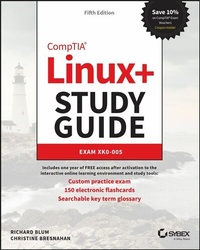
CompTIA Linux+ Study Guide
Description

In the newly updated Fifth Edition of CompTIA Linux+ Study Guide: Exam XK0-005, IT industry veterans and tech education gurus Richard Blum and Christine Bresnahan deliver a concise and practical blueprint to success on the CompTIA Linux+ exam and in your first role as a Linux network or system administrator.
In the book, you'll find concrete strategies and proven techniques to master Linux system management, security, scripting, containers, automation, and troubleshooting. Every competency tested on the Linux+ exam is discussed here. You'll also get:
* Hands-on Linux advice that ensures you're job-ready on the first day of your new network or sysadmin role
* Test-taking tips and tactics that decrease exam anxiety and get you ready for the challenging Linux+ exam
* Complimentary access to the Sybex learning environment, complete with online test bank, bonus practice exams, electronic flashcards, and a searchable glossary
Perfect for practicing network and system admins seeking an in-demand and valuable credential for working with Linux servers and computers, CompTIA Linux+ Study Guide: Exam XK0-005, Fifth Edition, will also earn a place in the libraries of people looking to change careers and start down an exciting new path in tech.
And save 10% when you purchase your CompTIA exam voucher with our exclusive WILEY10 coupon code.
More details
Other editions
New editions
Additional editions
Persons
CHRISTINE BRESNAHAN has over 35 years of experience working in the IT industry. She is an Adjunct Professor at Ivy Tech Community College where she teaches Linux certification and Python programming classes. She is co-author with Richard Blum of CompTIA Linux+ Study Guide, Linux Essentials, Mastering Linux System Administration, and the Linux Command Line and Shell Scripting Bible.
Content
Assessment Test xliv
Answers to Assessment Test lv
Part I Gathering Your Tools 1
Chapter 1 Preparing Your Environment 3
Chapter 2 Introduction to Services 17
Chapter 3 Managing Files, Directories, and Text 43
Chapter 4 Searching and Analyzing Text 89
Part II Starting Up and Configuring Your System 131
Chapter 5 Explaining the Boot Process 133
Chapter 6 Maintaining System Startup and Services 157
Chapter 7 Configuring Network Connections 199
Chapter 8 Comparing GUIs 235
Chapter 9 Adjusting Localization Options 269
Part III Managing Your System 289
Chapter 10 Administering Users and Groups 291
Chapter 11 Handling Storage 329
Chapter 12 Protecting Files 363
Chapter 13 Governing Software 393
Chapter 14 Tending Kernel Modules 423
Part IV Securing Your System 437
Chapter 15 Applying Ownership and Permissions 439
Chapter 16 Looking at File and Directory Permissions 440
Chapter 17 Implementing Logging Services 503
Chapter 18 Overseeing Linux Firewalls 517
Chapter 19 Embracing Best Security Practices 547
Part V Troubleshooting Your System 571
Chapter 20 Analyzing System Properties and Remediation 573
Chapter 21 Optimizing Performance 607
Chapter 22 Investigating User Issues 623
Chapter 23 Dealing with Linux Devices 643
Chapter 24 Troubleshooting Application and Hardware Issues 667
Part VI Automating Your System 697
Chapter 25 Deploying Bash Scripts 699
Chapter 26 Automating Jobs 727
Chapter 27 Controlling Versions with Git 749
Part VII Realizing Virtual and Cloud Environments 771
Chapter 28 Understanding Cloud and Virtualization Concepts 773
Chapter 29 Inspecting Cloud and Virtualization Services 791
Chapter 30 Orchestrating the Environment 813
Index 897
Introduction
Linux has become one of the fastest-growing operating systems used in server environments. Most companies utilize some type of Linux system within their infrastructure, and Linux is one of the major players in the cloud computing world. The ability to build and manage Linux systems is a skill that many companies are now looking for. The more you know about Linux, the more marketable you'll become in today's computer industry.
The purpose of this book is to provide you with the knowledge and skills you need to succeed in the Linux world.
What Is Linux+?
The CompTIA Linux+ exam has become a benchmark in the computer industry as a method of demonstrating skills with the Linux operating system. Obtaining CompTIA Linux+ certification means that you're comfortable working in a Linux environment and have the skills necessary to install and maintain Linux systems.
Previously, CompTIA had partnered with the Linux Professional Institute (LPI) to produce the Linux+ certification exams. However, with the release of exam XK0-004 in 2019 CompTIA moved to creating its own exam, and has continued that with the updated XK0-005 exam. The updated Linux+ certification is still a single exam that covers hands-on components of operating a Linux system. The updated Linux+ exam focuses on four areas of Linux:
- System management
- Security
- Scripting, containers, and automation
- Troubleshooting
The XK0-005 exam uses performance-based, multiple-choice, and multiple-answer questions to identify employees who can perform the job of Linux system administrator. The exam covers tasks associated with all major Linux distributions, not focusing on any one specific distribution. It consists of 90 questions, and you will have 90 minutes to complete it.
Why Become Linux Certified?
With the growing popularity of Linux (and the increase in Linux-related jobs) comes hype. With all of the hype that surrounds Linux, it's become hard for employers to distinguish employees who are competent Linux administrators from those who just know the buzzwords. This is where Linux+ certification comes in.
With a Linux+ certification, you will establish yourself as a Linux administrator who is familiar with the Linux platform and can install, maintain, and troubleshoot any type of Linux system. By changing the exam to be more performance based, CompTIA has established the new Linux+ exam as a way for employers to have confidence in knowing their employees who pass the exam will have the skills necessary to get the job done.
How to Become Certified
The Linux+ certification is available for anyone who passes the XK0-005 exam. There are no prerequisites to taking the exam, but CompTIA recommends having either the A+ and Network+ certifications or a similar amount of experience, along with at least 12 months of hands-on Linux administrator experience.
Pearson VUE administers the exam. The exam can be taken at any Pearson VUE testing center. To register for the exam, call Pearson VUE at (877) 619-2096, or register online at http://home.pearsonvue.com/comptia.
After you take the exam, you will be immediately notified of your score. If you pass, you will get a certificate in the mail showing your Linux+ certification credentials along with a verification number that employers can use to verify your credentials online.
The Linux+ exam is part of CompTIA's Continuing Education (CE) track of exams. It's valid for three years, but it can be renewed by acquiring an appropriate number of continuing education units (CEUs) and paying a yearly fee.
Who Should Buy This Book
While anyone who wants to pass the Linux+ certification exams would benefit from this book, that's not the only reason for purchasing it. This book covers all the material someone new to the Linux world would need to know to start out in Linux. After you've become familiar with the basics of Linux, the book will serve as an excellent reference for quickly finding answers to everyday Linux questions.
The book is written with the assumption that you have a familiarity with basic computer and networking principles. No experience with Linux is required to benefit from this book, but it will help if you know your way around a computer in either the Windows or macOS world, such as how to use a keyboard, use optical disks, and work with USB thumb drives.
It will also help to have a Linux system available to follow along with. Many chapters contain a simple exercise that will walk you through the basic concepts presented in the chapter. This provides the crucial hands-on experience that you'll need to both pass the exam and do well in the Linux world.
While the CompTIA Linux+ exam is Linux distribution neutral, it's impossible to write exercises that work in all Linux distributions. That said, the exercises in this book assume you have either Ubuntu 20.04 LTS or Rocky Linux 8 available. You can install either or both of these Linux distributions in a virtual environment using the Oracle VirtualBox software, available at https://virtualbox.org.
How This Book Is Organized
This book consists of 30 chapters organized around the different objective areas of the Linux+ exam:
- Chapter 1, "Preparing Your Environment," helps you with finding and installing a Linux distribution to use for experimenting with Linux and working on the exercises in the book.
- Chapter 2, "Introduction to Services," introduces you to the different server applications and uses you'll commonly see in Linux.
- Chapter 3, "Managing Files, Directories, and Text," covers the basic Linux commands for working with files and directories from the command line.
- Chapter 4, "Searching and Analyzing Text," discusses the different tools Linux provides for working with text files.
- Chapter 5, "Explaining the Boot Process," takes you into the inner processes of how the Linux operating system starts, showing you how to customize the Linux boot process.
- Chapter 6, "Maintaining System Startup and Services," walks you through how the Linux system starts applications at boot time by discussing the two methods used for controlling program startups.
- Chapter 7, "Configuring Network Connections," shows how to get your Linux system working on a local area network, along with the tools available to help troubleshoot network problems on your Linux system.
- Chapter 8, "Comparing GUIs," discusses the graphical desktop environments available in Linux.
- Chapter 9, "Adjusting Localization Options," shows how to change the character set and date/time formats for your Linux system to accommodate the different formats used in various countries.
- Chapter 10, "Administering Users and Groups," explores how Linux handles user accounts and how you can assign users to groups to manage access to files and directories.
- Chapter 11, "Handling Storage," examines the storage methods and formats available in the Linux system.
- Chapter 12, "Protecting Files," dives into the world of data backups, archiving, and restoring.
- Chapter 13, "Governing Software," explains how Linux manages software applications and how to install software packages on the various Linux distribution types.
- Chapter 14, "Tending Kernel Modules," discusses how Linux uses kernel modules to support hardware and how you can manage the kernel modules on your Linux system.
- Chapter 15, "Applying Ownership and Permissions," explores the multiple methods available for protecting files and directories on a Linux system. It discusses the standard Linux-style permissions as well as the more advanced SELinux and AppArmor applications used to provide more advanced security for Linux systems.
- Chapter 16, "Looking at Access and Authentication Methods," explores the methods Linux can use to authenticate user accounts, both locally and in network environments.
- Chapter 17, "Implementing Logging Services," shows how Linux logs system events and how you can use the Linux system logs for troubleshooting problems on your Linux system.
- Chapter 18, "Overseeing Linux Firewalls," walks you through how to protect your Linux system in a network environment.
- Chapter 19, "Embracing Best Security Practices," discusses various common methods you can implement to make your Linux environment more secure.
- Chapter 20, "Analyzing System Properties and Remediation," explores the methods you have available to troubleshoot different types of Linux problems. This includes network issues, storage issues, and operating system issues.
- Chapter 21, "Optimizing Performance," discusses how Linux handles running applications and the tools you have available to control how those applications behave.
- Chapter 22, "Investigating User Issues," explores how to troubleshoot and fix common user-related issues, such as the inability to access specific files or directories on the system.
- Chapter 23, "Dealing with Linux Devices," walks you through the types of hardware devices...
