

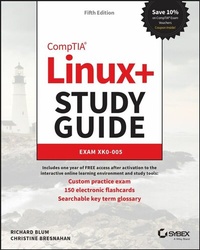
CompTIA Linux+ Study Guide
Exam XK0-005
5th Edition
Published on 4. July 2022
992 pages
978-1-119-87895-7 (ISBN)
Description

The best-selling, hands-on roadmap to acing the new Linux+ exam
In the newly updated Fifth Edition of CompTIA Linux+ Study Guide: Exam XK0-005, IT industry veterans and tech education gurus Richard Blum and Christine Bresnahan deliver a concise and practical blueprint to success on the CompTIA Linux+ exam and in your first role as a Linux network or system administrator.
In the book, you'll find concrete strategies and proven techniques to master Linux system management, security, scripting, containers, automation, and troubleshooting. Every competency tested on the Linux+ exam is discussed here. You'll also get:
* Hands-on Linux advice that ensures you're job-ready on the first day of your new network or sysadmin role
* Test-taking tips and tactics that decrease exam anxiety and get you ready for the challenging Linux+ exam
* Complimentary access to the Sybex learning environment, complete with online test bank, bonus practice exams, electronic flashcards, and a searchable glossary
Perfect for practicing network and system admins seeking an in-demand and valuable credential for working with Linux servers and computers, CompTIA Linux+ Study Guide: Exam XK0-005, Fifth Edition, will also earn a place in the libraries of people looking to change careers and start down an exciting new path in tech.
And save 10% when you purchase your CompTIA exam voucher with our exclusive WILEY10 coupon code.
In the newly updated Fifth Edition of CompTIA Linux+ Study Guide: Exam XK0-005, IT industry veterans and tech education gurus Richard Blum and Christine Bresnahan deliver a concise and practical blueprint to success on the CompTIA Linux+ exam and in your first role as a Linux network or system administrator.
In the book, you'll find concrete strategies and proven techniques to master Linux system management, security, scripting, containers, automation, and troubleshooting. Every competency tested on the Linux+ exam is discussed here. You'll also get:
* Hands-on Linux advice that ensures you're job-ready on the first day of your new network or sysadmin role
* Test-taking tips and tactics that decrease exam anxiety and get you ready for the challenging Linux+ exam
* Complimentary access to the Sybex learning environment, complete with online test bank, bonus practice exams, electronic flashcards, and a searchable glossary
Perfect for practicing network and system admins seeking an in-demand and valuable credential for working with Linux servers and computers, CompTIA Linux+ Study Guide: Exam XK0-005, Fifth Edition, will also earn a place in the libraries of people looking to change careers and start down an exciting new path in tech.
And save 10% when you purchase your CompTIA exam voucher with our exclusive WILEY10 coupon code.
More details
Other editions
Additional editions
Book
09/2022
Sybex Inc.,U.S.
€56.00
Shipment within 15-20 days
Persons
RICHARD BLUM has over 35 years of experience working as a system and network administrator. He teaches online courses in Linux and Web programming and is co-author with Christine Bresnahan of several Linux titles, including CompTIA Linux+ Study Guide, Linux Essentials, Mastering Linux System Administration, and the Linux Command Line and Shell Scripting Bible.
CHRISTINE BRESNAHAN has over 35 years of experience working in the IT industry. She is an Adjunct Professor at Ivy Tech Community College where she teaches Linux certification and Python programming classes. She is co-author with Richard Blum of CompTIA Linux+ Study Guide, Linux Essentials, Mastering Linux System Administration, and the Linux Command Line and Shell Scripting Bible.
CHRISTINE BRESNAHAN has over 35 years of experience working in the IT industry. She is an Adjunct Professor at Ivy Tech Community College where she teaches Linux certification and Python programming classes. She is co-author with Richard Blum of CompTIA Linux+ Study Guide, Linux Essentials, Mastering Linux System Administration, and the Linux Command Line and Shell Scripting Bible.
Content
Introduction xxxi
Assessment Test xliv
Answers to Assessment Test lv
Part I Gathering Your Tools 1
Chapter 1 Preparing Your Environment 3
Chapter 2 Introduction to Services 17
Chapter 3 Managing Files, Directories, and Text 43
Chapter 4 Searching and Analyzing Text 89
Part II Starting Up and Configuring Your System 131
Chapter 5 Explaining the Boot Process 133
Chapter 6 Maintaining System Startup and Services 157
Chapter 7 Configuring Network Connections 199
Chapter 8 Comparing GUIs 235
Chapter 9 Adjusting Localization Options 269
Part III Managing Your System 289
Chapter 10 Administering Users and Groups 291
Chapter 11 Handling Storage 329
Chapter 12 Protecting Files 363
Chapter 13 Governing Software 393
Chapter 14 Tending Kernel Modules 423
Part IV Securing Your System 437
Chapter 15 Applying Ownership and Permissions 439
Chapter 16 Looking at File and Directory Permissions 440
Chapter 17 Implementing Logging Services 503
Chapter 18 Overseeing Linux Firewalls 517
Chapter 19 Embracing Best Security Practices 547
Part V Troubleshooting Your System 571
Chapter 20 Analyzing System Properties and Remediation 573
Chapter 21 Optimizing Performance 607
Chapter 22 Investigating User Issues 623
Chapter 23 Dealing with Linux Devices 643
Chapter 24 Troubleshooting Application and Hardware Issues 667
Part VI Automating Your System 697
Chapter 25 Deploying Bash Scripts 699
Chapter 26 Automating Jobs 727
Chapter 27 Controlling Versions with Git 749
Part VII Realizing Virtual and Cloud Environments 771
Chapter 28 Understanding Cloud and Virtualization Concepts 773
Chapter 29 Inspecting Cloud and Virtualization Services 791
Chapter 30 Orchestrating the Environment 813
Index 897
Assessment Test xliv
Answers to Assessment Test lv
Part I Gathering Your Tools 1
Chapter 1 Preparing Your Environment 3
Chapter 2 Introduction to Services 17
Chapter 3 Managing Files, Directories, and Text 43
Chapter 4 Searching and Analyzing Text 89
Part II Starting Up and Configuring Your System 131
Chapter 5 Explaining the Boot Process 133
Chapter 6 Maintaining System Startup and Services 157
Chapter 7 Configuring Network Connections 199
Chapter 8 Comparing GUIs 235
Chapter 9 Adjusting Localization Options 269
Part III Managing Your System 289
Chapter 10 Administering Users and Groups 291
Chapter 11 Handling Storage 329
Chapter 12 Protecting Files 363
Chapter 13 Governing Software 393
Chapter 14 Tending Kernel Modules 423
Part IV Securing Your System 437
Chapter 15 Applying Ownership and Permissions 439
Chapter 16 Looking at File and Directory Permissions 440
Chapter 17 Implementing Logging Services 503
Chapter 18 Overseeing Linux Firewalls 517
Chapter 19 Embracing Best Security Practices 547
Part V Troubleshooting Your System 571
Chapter 20 Analyzing System Properties and Remediation 573
Chapter 21 Optimizing Performance 607
Chapter 22 Investigating User Issues 623
Chapter 23 Dealing with Linux Devices 643
Chapter 24 Troubleshooting Application and Hardware Issues 667
Part VI Automating Your System 697
Chapter 25 Deploying Bash Scripts 699
Chapter 26 Automating Jobs 727
Chapter 27 Controlling Versions with Git 749
Part VII Realizing Virtual and Cloud Environments 771
Chapter 28 Understanding Cloud and Virtualization Concepts 773
Chapter 29 Inspecting Cloud and Virtualization Services 791
Chapter 30 Orchestrating the Environment 813
Index 897
