

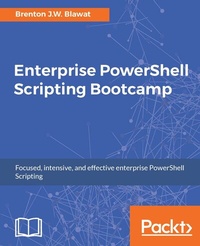
Enterprise PowerShell Scripting Bootcamp
The fastest way to learn PowerShell scripting
Published on 8. July 2025
238 pages
978-1-78728-115-8 (ISBN)
Description

The quick start guide for an advanced enterprise PowerShell framework
Key Features
[*]Introduces industry-proven techniques that improve script efficiency and reliability
[*] Example-rich guide based on real-world scenarios
[*]Facilitates building a script that can fully scan a Windows server and identify components
Book DescriptionEnterprise PowerShell Scripting Bootcamp explains how to create your own repeatable PowerShell scripting framework. This framework contains script logging methodologies, answer file interactions, and string encryption and decryption strategies. This book focuses on evaluating individual components to identify the system's function, role, and unique characteristics. To do this, you will leverage built-in CMDlets and Windows Management Instrumentation (WMI) to explore Windows services, Windows processes, Windows features, scheduled tasks, and disk statistics. You will also create custom functions to perform a deep search for specific strings in files and evaluate installed software through executable properties. We will then discuss different scripting techniques to improve the efficiency of scripts. By leveraging several small changes to your code, you can increase the execution performance by over 130%. By the end of this book, you will be able to tie all of the concepts together in a PowerShell-based Windows server scanning script. This discovery script will be able to scan a Windows server to identify a multitude of components.What you will learn
[*]Create an advanced PowerShell scripting template that provides repeatable code to jumpstart all of your scripting projects
[*]Learn how to securely encrypt and store usernames, passwords, and other sensitive data in PowerShell scripts and answer files
[*]Understand how to optimize the performance of scripts to help process large datasets quickly and avoid time-consuming mistakes
[*] Develop a script to scan for non-standard Windows Server configurations and identify
service accounts used on Windows Servers
[*] Gather a large list of data from a Windows server without locally or remotely logging in
interactively
Who this book is forThis book is for IT professionals and Windows administrators who would like to gain intensive, hands-on knowledge and skills on PowerShell without spending hours and hours in learning. If you have been struggling to find the time to gain proficiency and confidence with PowerShell and everyday scripting tasks
Key Features
[*]Introduces industry-proven techniques that improve script efficiency and reliability
[*] Example-rich guide based on real-world scenarios
[*]Facilitates building a script that can fully scan a Windows server and identify components
Book DescriptionEnterprise PowerShell Scripting Bootcamp explains how to create your own repeatable PowerShell scripting framework. This framework contains script logging methodologies, answer file interactions, and string encryption and decryption strategies. This book focuses on evaluating individual components to identify the system's function, role, and unique characteristics. To do this, you will leverage built-in CMDlets and Windows Management Instrumentation (WMI) to explore Windows services, Windows processes, Windows features, scheduled tasks, and disk statistics. You will also create custom functions to perform a deep search for specific strings in files and evaluate installed software through executable properties. We will then discuss different scripting techniques to improve the efficiency of scripts. By leveraging several small changes to your code, you can increase the execution performance by over 130%. By the end of this book, you will be able to tie all of the concepts together in a PowerShell-based Windows server scanning script. This discovery script will be able to scan a Windows server to identify a multitude of components.What you will learn
[*]Create an advanced PowerShell scripting template that provides repeatable code to jumpstart all of your scripting projects
[*]Learn how to securely encrypt and store usernames, passwords, and other sensitive data in PowerShell scripts and answer files
[*]Understand how to optimize the performance of scripts to help process large datasets quickly and avoid time-consuming mistakes
[*] Develop a script to scan for non-standard Windows Server configurations and identify
service accounts used on Windows Servers
[*] Gather a large list of data from a Windows server without locally or remotely logging in
interactively
Who this book is forThis book is for IT professionals and Windows administrators who would like to gain intensive, hands-on knowledge and skills on PowerShell without spending hours and hours in learning. If you have been struggling to find the time to gain proficiency and confidence with PowerShell and everyday scripting tasks
All prices
More details
Edition
Digital original
Language
English
Place of publication
Birmingham
United Kingdom
Target group
Professional and scholarly
US School Grade: College Graduate Student
Edition type
Digital original
File size
3,61 MB
ISBN-13
978-1-78728-115-8 (9781787281158)
Copyright in bibliographic data and cover images is held by Nielsen Book Services Limited or by the publishers or by their respective licensors: all rights reserved.
Schweitzer Classification
Other editions
Additional editions
Brenton J. W. Blawat
Enterprise PowerShell Scripting Bootcamp
Book
05/2017
Packt Publishing
€55.40
Shipment within 3-4 weeks
Person
J.W. Blawat Brenton :
Brenton J.W. Blawat is an entrepreneur, strategic technical advisor, author, and enterprise architect, who has a passion for the procurement of technology in profit-based organizations. He is business-centric and technology-minded. Brenton has many years of experience in bridging the gap between technical staff and decision-makers in several organizations. He takes pride in his ability to effectively communicate with a diverse audience and provide strategic direction for large and small organizations alike. In 2013, Brenton authored his first book, PowerShell 3.0 WMI Starter, Packt Publishing. In March 2015, he authored his second book Mastering Windows PowerShell Scripting, Packt Publishing. Brenton currently works at CDW as an Enterprise Architect in strategic solutions and services. CDW is a leading multibrand technology solutions provider in the fields of business, government, education, and healthcare.A Fortune 500 company, it was founded in 1984 and employs approximately 7,200 coworkers. In 2016, the company generated net sales of more than $13.0 billion. His current specialisation sits on top of 15 years experience spread across (predominantly Microsoft) systems, (Juniper and Cisco) networking, and security.
Brenton J.W. Blawat is an entrepreneur, strategic technical advisor, author, and enterprise architect, who has a passion for the procurement of technology in profit-based organizations. He is business-centric and technology-minded. Brenton has many years of experience in bridging the gap between technical staff and decision-makers in several organizations. He takes pride in his ability to effectively communicate with a diverse audience and provide strategic direction for large and small organizations alike. In 2013, Brenton authored his first book, PowerShell 3.0 WMI Starter, Packt Publishing. In March 2015, he authored his second book Mastering Windows PowerShell Scripting, Packt Publishing. Brenton currently works at CDW as an Enterprise Architect in strategic solutions and services. CDW is a leading multibrand technology solutions provider in the fields of business, government, education, and healthcare.A Fortune 500 company, it was founded in 1984 and employs approximately 7,200 coworkers. In 2016, the company generated net sales of more than $13.0 billion. His current specialisation sits on top of 15 years experience spread across (predominantly Microsoft) systems, (Juniper and Cisco) networking, and security.
Content
Table of Contents
Getting Started with PowerShell Scripting
Synopsis and Script Logging creation
Working with Answer Files and Exclusion Lists
String Encryption and Decryption
Interacting with Services, Processes, Profiles, and Logged on Users
Scheduled Tasks
Determining Disk Statistics
Windows Features and Installed Software Detection
File Scanning
Optimizing Script Execution Speed
Improving performance by using Regular Expressions
Creating the Windows Server Scanning Script
Merging Data Results, creating a Termination File, and Script Cleanup
Getting Started with PowerShell Scripting
Synopsis and Script Logging creation
Working with Answer Files and Exclusion Lists
String Encryption and Decryption
Interacting with Services, Processes, Profiles, and Logged on Users
Scheduled Tasks
Determining Disk Statistics
Windows Features and Installed Software Detection
File Scanning
Optimizing Script Execution Speed
Improving performance by using Regular Expressions
Creating the Windows Server Scanning Script
Merging Data Results, creating a Termination File, and Script Cleanup

