

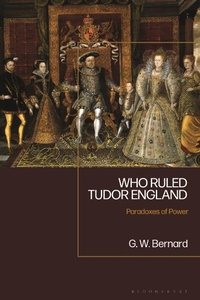
Who Ruled Tudor England
Paradoxes of Power
1st Edition
Published on 12. August 2021
240 pages
978-1-350-17691-1 (ISBN)
Description

Henry VIII's wives, his watershed break with Rome, Mary's 'bloody' persecution of Protestants and Elizabeth's fearless reign have been immortalised in history books and the public consciousness. This book widens the scope of established historiography by examining the dynamics of Tudor power and assessing where power really lay. By considering the roles of the monarch, church and individuals it sheds a fascinating light on the study of government in 16th century England.
Addressing different aspects of how Tudor England was governed, the twelve chapters discuss who participated in that government, and the extent of their power and governance. Paying close attention to the scholars who have shaped perceptions of major Tudor political figures, this book re-situates the dynamics of Tudor power and its historiography.
Addressing different aspects of how Tudor England was governed, the twelve chapters discuss who participated in that government, and the extent of their power and governance. Paying close attention to the scholars who have shaped perceptions of major Tudor political figures, this book re-situates the dynamics of Tudor power and its historiography.
More details
Edition
1. Auflage
Language
English
Place of publication
London
United Kingdom
Publishing group
Bloomsbury Publishing PLC
Target group
Professional and scholarly
Illustrations
5 bw illus
ISBN-13
978-1-350-17691-1 (9781350176911)
Copyright in bibliographic data and cover images is held by Nielsen Book Services Limited or by the publishers or by their respective licensors: all rights reserved.
Schweitzer Classification
Other editions
Additional editions
Book
03/2023
Bloomsbury Academic
€55.89
Shipment within 15-20 days
Book
09/2021
Bloomsbury Academic
€141.13
Shipment within 15-20 days
Person
Content
Preface
Introduction
Part I: Historians
Historians of Tudor Government:
Sir Geoffrey Elton
R.B. Wernham
Penry Williams
Gerald Harriss
C.S.L. Davies
Jennifer Loach
Peter Gwyn
Part II: History
1a. Monarchy: legitimacy and personality
1b. Monarchy: ceremony, the arts, tyranny?
2. The power of the nobility
3. Parliament: the political nation
4. Finance
5. Military organisation
6. A 'Tudor revolution in government'?
7. The personal
8. Enforcement, dissent and rebellion
9a. Poverty and policy
9b. The crown and religion in Tudor England
9c. The exception of Ireland
Conclusion: Paradoxes of Power
Epilogue: the influence and legacy of Sir Geoffrey Elton
Bibliography
Index
Introduction
Part I: Historians
Historians of Tudor Government:
Sir Geoffrey Elton
R.B. Wernham
Penry Williams
Gerald Harriss
C.S.L. Davies
Jennifer Loach
Peter Gwyn
Part II: History
1a. Monarchy: legitimacy and personality
1b. Monarchy: ceremony, the arts, tyranny?
2. The power of the nobility
3. Parliament: the political nation
4. Finance
5. Military organisation
6. A 'Tudor revolution in government'?
7. The personal
8. Enforcement, dissent and rebellion
9a. Poverty and policy
9b. The crown and religion in Tudor England
9c. The exception of Ireland
Conclusion: Paradoxes of Power
Epilogue: the influence and legacy of Sir Geoffrey Elton
Bibliography
Index
