

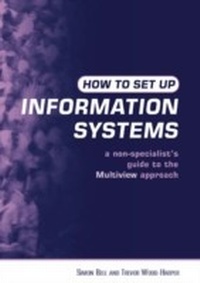
How to Set Up Information Systems
A Non-specialist's Guide to the Multiview Approach
2nd Edition
Published on 17. June 2013
217 pages
978-1-136-56393-5 (ISBN)
Description

This introductory user's guide to systems analysis and systems design focuses on building sustainable information systems to meet tomorrow's needs. It shows how practitioners can apply multiple participatory perspectives in development, so as to avoid future problems. As a practical guide, it is presented to be readily comprehensible and is organized to enable users to concentrate on their goals efficiently, and with minimum theoretical elaboration. The chapters follow the sequence involved in planning an information system, explaining key words, the time involved in each step, ending with a tutorial or exercises.
Reviews / Votes
[An] excellent book.'Guy Fitzgerald, , Professor of Information Systems, Brunel University
'The book stands out in its field through the intelligent and constructive use of the soft systems methodology to develop the themes'
Peter Roberts, former Visiting Professor, Open University and City University
'A useful text for teachers and practitioners of a Multiview approach to information analysis and design. It has matured and gained focus in this new edition'
Gilbert Mansell, Head of Department of Multimedia and Information Systems, University of Huddersfield
'A textbook for people intending to practice information systems analysis and design.'
SciTech Book News
More details
Edition
2nd edition
Language
English
Place of publication
London
United Kingdom
Publishing group
Taylor & Francis Ltd
Target group
Professional and scholarly
Edition type
Revised edition
File size
2,69 MB
ISBN-13
978-1-136-56393-5 (9781136563935)
Copyright in bibliographic data and cover images is held by Nielsen Book Services Limited or by the publishers or by their respective licensors: all rights reserved.
Schweitzer Classification
Other editions
Additional editions
Simon Bell | Trevor Wood-Harper
How to Set Up Information Systems
A Non-specialist's Guide to the Multiview Approach
Book
06/2003
2nd Edition
Earthscan Ltd
€93.03
Shipment within 3-4 weeks
Simon Bell | Trevor Wood-Harper
How to Set Up Information Systems
A Non-specialist's Guide to the Multiview Approach
Book
06/2003
2nd Edition
Earthscan Ltd
€207.97
Shipment within 3-4 weeks
Persons
Simon Bell is Senior Lecturer in Information Systems at the Open University and lead author of Sustainability Indicators and its sequel, Measuring Sustainability.
Trevor Wood-Harper is Professor of Information Systems at the University of Manchester Institute of Science and Technology (UMIST), a Professor at the University of South Australia, Adelaide, and author and editor of 15 books and reports.
Trevor Wood-Harper is Professor of Information Systems at the University of Manchester Institute of Science and Technology (UMIST), a Professor at the University of South Australia, Adelaide, and author and editor of 15 books and reports.
Content
Information Systems and Organization * What is Systems Analysis and Systems Design? * The Role of the Systems Planner or Systems Analyst * Selecting Planning and Development Tools * The Human Activity System: Making a Model * Information Modelling: Making a Workable System * Technical and Social Needs: The Balance * The Human-Computer Interface * Technical Aspects: What is Needed? * Total Design, Training, Hardware, Software and Implementation * Glossary, Appendices, Further Reading, Index
