

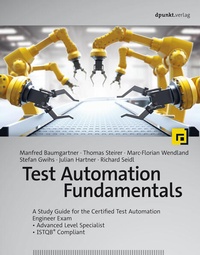
Test Automation Fundamentals
A Study Guide for the Certified Test Automation Engineer Exam - Advanced Level Specialist - ISTQB® Compliant
Published on 30. August 2022
330 pages
978-3-96910-870-3 (ISBN)
Available for download
Description

Concepts, methods, and techniques-supported with practical, real-world examples
The first book to cover the ISTQB® Certified Test Automation Engineer syllabus
With real-world project examples
- Suitable as a textbook, as a reference book for ISTQB® training courses, and for self-study
This book provides a complete overview of how to design test automation processes and integrate them into your organization or existing projects. It describes functional and technical strategies and goes into detail on the relevant concepts and best practices. The book's main focus is on functional system testing. Important new aspects of test automation, such as automated testing for mobile applications and service virtualization, are also addressed as prerequisites for creating complex but stable test processes. The text also covers the increase in quality and potential savings that test automation delivers.
The book is fully compliant with the ISTQB® syllabus and, with its many explanatory examples, is equally suitable for preparation for certification, as a concise reference book for anyone who wants to acquire this essential skill, or for university-level study.
More details
Other editions
Additional editions
Manfred Baumgartner | Thomas Steirer | Marc-Florian Wendland
Test Automation Fundamentals
A Study Guide for the Certified Test Automation Engineer Exam - Advanced Level Specialist - ISTQB® Compliant
Book
09/2022
1st Edition
dpunkt
€39.90
Available immediately
Manfred Baumgartner | Thomas Steirer | Marc-Florian Wendland
Test Automation Fundamentals
A Study Guide for the Certified Test Automation Engineer Exam - Advanced Level Specialist - ISTQB® Compliant
Book
08/2022
dpunkt
€44.90
Article exhausted; check different version
Persons
Manfred Baumgartner has more than 30 years of experience in software testing and quality assurance. Since 2001, he has established and expanded the QA consulting and training services of Nagarro GmbH, one of the leading service companies in the field of software testing. He is a board member of the Association for Software Quality and Further Education (ASQF)) and the Association for Software Quality Management Austria (STEV) as well as a member of the Austrian Testing Board (ATB). He shares his extensive experience in numerous presentations at conferences and in articles and books on software testing. Stefan Gwihs is an enthusiastic software developer, software tester and test automation architect for Nagarro GmbH, where he currently focuses on topics related to test automation for Agile software development and DevOps. Richard Seidl has seen and tested a lot of software in his professional career: good and bad, big and small, old and new, chocolate and groats. His credo: Quality is an attitude. If you want to create excellent software today, you have to think holistically about the development process: people, methods, tools, and mindset. As a consultant and coach, he supports companies in living agility and quality and anchoring them in the corporate DNA. Thomas Steirer leads Nagarro's global test automation practice as a test automation architect, test manager and trainer. Since 2010 he is certified as ISTQB® Certified Tester - Full Advanced Level. He is a lecturer for test automation in the master program Software Engineering at the UAS Technikum Vienna and researches the use of artificial intelligence with the goal of making test automation even more efficient. Marc-Florian Wendland is a research associate at the Fraunhofer Institute FOKUS in Berlin. For more than 10 years he has been involved in national and international, cross-domain research and industry projects on topics of test automation in design and execution. He is a member of the German Testing Board (GTB) and a trainer for the various ISTQB® programs. Julian Hartner is an ISTQB® certified quality engineer for Nagarro based in New York City and a passionate software developer and Test Automation Engineer. He currently focuses on streamlining manual and automated testing for CRM applications.
Content
- Cover
- About the Authors
- Title
- Copyright
- Preface
- Acknowledgements
- Foreword by Armin Metzger
- Overview
- Contents
- 1 An Introduction to Test Automation and Its Goals
- 1.1 Introduction
- 1.1.1 Standards and Norms
- 1.1.2 The Use of Machines
- 1.1.3 Quantities and Volumes
- 1.2 What is Test Automation?
- 1.3 Test Automation Goals
- 1.4 Success Factors in Test Automation
- 1.4.1 Test Automation Strategy
- 1.4.2 Test Automation Architecture (TAA)
- 1.4.3 Testability of the SUT
- 1.4.4 Test Automation Framework
- 1.5 Excursus: Test Levels and Project Types
- 1.5.1 Test Automation on Different Test Levels
- 1.5.2 Test Automation Approaches for Different Types of Projects
- 2 Preparing for Test Automation
- 2.1 SUT Factors that influence Test Automation
- 2.2 Tool Evaluation and Selection
- 2.2.1 Responsibilities
- 2.2.2 Typical Challenges
- 2.2.3 Excursus: Evaluating Automation Tools
- 2.2.4 Excursus: Evaluation made easy
- 2.3 Testability and Automatability
- 3 Generic Test Automation Architecture
- 3.1 Introducing Generic Test Automation Architecture (gTAA)
- 3.1.1 Why is a Sustainable Test Automation Architecture important?
- 3.1.2 Developing Test Automation Solutions
- 3.1.3 The Layers in the gTAA
- 3.1.4 Project Managing a TAS
- 3.1.5 Configuration Management in a TAS
- 3.1.6 Support for Test Management and other Target Groups
- 3.2 Designing a TAA
- 3.2.1 Fundamental Questions
- 3.2.2 Which Approach to Test Case Automation Should Be Supported?
- 3.2.3 Technical Considerations for the SUT
- 3.2.4 Considerations for Development and QA Processes
- 3.3 TAS Development
- 3.3.1 Compatibility between the TAS and the SUT
- 3.3.2 Synchronization between the TAS and the SUT
- 3.3.3 Building Reusability into the TAS
- 3.3.4 Support for Multiple Target Systems
- 3.3.5 Excursus: Implementation Using Different Approaches and Methods
- 4 Deployment Risks and Contingencies
- 4.1 Selecting a Test Automation Approach and Planning Deployment/Rollout
- 4.1.1 Pilot Project
- 4.1.2 Deployment
- 4.2 Risk Assessment and Mitigation Strategies
- 4.2.1 Specific Risks During the Initial Rollout
- 4.2.2 Specific Risks during Maintenance Deployment
- 4.3 Test Automation Maintenance
- 4.3.1 Types of Maintenance Activities and What Triggers Them
- 4.3.2 Considerations when Documenting Automated Testware
- 4.3.3 The Scope of Maintenance Activities
- 4.3.4 Maintenance of Third-Party Components
- 4.3.5 Maintaining Training Materials
- 4.3.6 Improving maintainability
- 4.4 Excursus: Application Areas According to System Types
- 4.4.1 Desktop Applications
- 4.4.2 Client-Server Systems
- 4.4.3 Web Applications
- 4.4.4 Mobile Applications
- 4.4.5 Web Services
- 4.4.6 Data Warehouses
- 4.4.7 Dynamic GUIs: Form Solutions
- 4.4.8 Cloud-Based Systems
- 4.4.9 Artificial Intelligence and Machine Learning
- 5 Reporting and Metrics
- 5.1 Metrics and Validity
- 5.2 Metrics Examples
- 5.3 Precise Implementation and Feasibility Within a TAS
- 5.3.1 TAS and SUT as Sources for Logs
- 5.3.2 Centralized Log Management and Evaluation
- 5.3.3 Implementing Logging in a TAS
- 5.4 Test Automation Reporting
- 5.4.1 Quality Criteria for Reports
- 6 Transitioning Manual Testing to an Automated Environment
- 6.1 Criteria for Automation
- 6.1.1 Suitability Criteria for the Transition to Automated Testing
- 6.1.2 Preparing for the Transition to Automated Testing
- 6.2 Steps Required to Automate Regression Testing
- 6.3 Factors to Consider when Automating Testing for New or Changed Functionality
- 6.4 Factors to Consider when Automating Confirmation Testing
- 7 Verifying the Test Automation Solution
- 7.1 Why Quality Assurance Is Important for a TAS
- 7.2 Verifying Automated Test Environment Components
- 7.3 Verifying the Automated Test Suite
- 8 Continuous Improvement
- 8.1 Ways to Improve Test Automation
- 8.2 Planning the Implementation of Test Automation Improvement
- 9 Excursus: Looking Ahead
- 9.1 Challenges Facing Test Automation
- 9.1.1 Omnipresent Connectivity
- 9.1.2 Test Automation in IT Security
- 9.1.3 Test Automation in Autonomous Systems
- 9.2 Trends and Potential Developments
- 9.2.1 Agile Software Development Is Inconceivable without Test Automation
- 9.2.2 New Outsourcing Scenarios for Automation
- 9.2.3 Automating Automation
- 9.2.4 Training and Standardization
- 9.3 Innovation and Refinement
- APPENDICES
- A Software Quality Characteristics
- A.1 Functional Suitability
- A.2 Performance Efficiency
- A.3 Compatibility
- A.4 Usability
- A.5 Reliability
- A.6 Security
- A.7 Maintainability
- A.8 Portability
- B Load and Performance Testing
- B.1 Types of Load and Performance Tests
- B.2 Load and Performance Testing Activities
- B.3 Defining Performance Goals
- B.4 Identifying Transactions and/or Scenarios
- B.5 Creating Test Data
- B.6 Creating Test Scenarios
- B.7 Executing Load And Performance Tests
- B.8 Monitoring
- B.9 Typical Components of Performance/Load Testing Tools
- B.10 Checklists
- C Criteria Catalog for Test Tool Selection
- D Glossary
- E Abbreviations
- F References
- F.1 Literature
- F.2 Norms and Standards
- F.3 URLs
- Footnotes
- Index
