

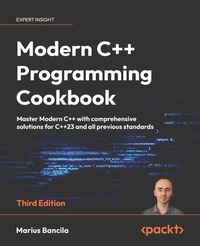
Modern C++ Programming Cookbook
Master Modern C++ with comprehensive solutions for C++23 and all previous standards
3rd Edition
Published on 23. September 2024
816 pages
978-1-83508-484-7 (ISBN)
Description

No detailed description available for "Modern C++ Programming Cookbook".
All prices
More details
Edition
3rd Revised edition
Language
English
Place of publication
Birmingham
United Kingdom
Target group
Professional and scholarly
US School Grade: College Graduate Student
Edition type
Revised edition
Product notice
Reflowable
File size
4,50 MB
ISBN-13
978-1-83508-484-7 (9781835084847)
Copyright in bibliographic data and cover images is held by Nielsen Book Services Limited or by the publishers or by their respective licensors: all rights reserved.
Schweitzer Classification
Other editions
Additional editions
Marius Bancila
Modern C++ Programming Cookbook
Master Modern C++ with comprehensive solutions for C++23 and all previous standards
Book
02/2024
3rd Edition
Packt Publishing
€64.60
Shipment within 3-4 weeks
Previous edition
Marius Bancila
Modern C++ Programming Cookbook
Master C++ core language and standard library features, with over 100 recipes, updated to C++20
E-Book
06/2024
2nd Edition
Packt Publishing Limited
€32.99
Available for download
Person
Bancila Marius :
Marius Bancila is a software engineer with two decades of experience in developing solutions for line of business applications and more. He is the author of The Modern C++ Challenge and Template Metaprogramming with C++. He works as a software architect and is focused on Microsoft technologies, mainly developing desktop applications with C++ and C#. He is passionate about sharing his technical expertise with others and, for that reason, he has been recognized as a Microsoft MVP for C++ and later developer technologies since 2006. Marius lives in Romania and is active in various online communities.
Marius Bancila is a software engineer with two decades of experience in developing solutions for line of business applications and more. He is the author of The Modern C++ Challenge and Template Metaprogramming with C++. He works as a software architect and is focused on Microsoft technologies, mainly developing desktop applications with C++ and C#. He is passionate about sharing his technical expertise with others and, for that reason, he has been recognized as a Microsoft MVP for C++ and later developer technologies since 2006. Marius lives in Romania and is active in various online communities.
Content
Table of Contents
Learning Modern Core Language Features
Working with Numbers and Strings
Exploring Functions
Preprocessing and Compilation
Standard Library Containers, Algorithms, and Iterators
General-Purpose Utilities
Working with Files and Streams
Leveraging Threading and Concurrency
Robustness and Performance
Implementing Patterns and Idioms
Exploring Testing Frameworks
C++23 Features
Learning Modern Core Language Features
Working with Numbers and Strings
Exploring Functions
Preprocessing and Compilation
Standard Library Containers, Algorithms, and Iterators
General-Purpose Utilities
Working with Files and Streams
Leveraging Threading and Concurrency
Robustness and Performance
Implementing Patterns and Idioms
Exploring Testing Frameworks
C++23 Features
