

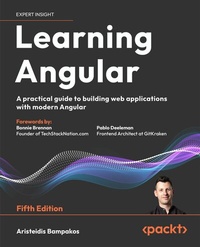
Learning Angular
Description

- Get up to speed with the new paradigms modern Angular brings, including standalone APIs, new control flow syntax, Signals, and server-side rendering (SSR)
- Discover best practices for building, deploying, debugging, and testing Angular applications
Book DescriptionDive into Angular Development - With the Most Trusted Guide in the Industry Angular is one of the most powerful and widely adopted JavaScript frameworks, and Learning Angular is your go-to guide for building real-world, production-ready web applications. Written by a seasoned Angular developer and Google Developer Expert, this hands-on book takes you through every step of modern frontend development. This edition reflects the latest "Angular Renaissance," covering standalone components, Angular Signals, and the new control flow syntax, while showing you how to integrate with legacy code. A new chapter also explores boosting performance with server-side rendering (SSR) and hydration. More than just a tutorial, Learning Angular builds your confidence chapter by chapter from scaffolding your first project to deploying it, with TypeScript best practices throughout. Whether you're new to Angular or sharpening your skills, this book provides a complete path to becoming a productive, future-ready Angular developer. By the end, you'll be able to build Angular apps from scratch, with clarity, structure, and confidence. *Email sign-up and proof of purchase requiredWhat you will learn - Use the Angular CLI to scaffold, build, and deploy new Angular applications
- Create Angular applications using standalone APIs
- Build rich components with Angular template syntax
- Apply reactivity patterns with the RxJS library and Signals
- Craft beautiful user interfaces using Angular Material
- Create HTTP data services to access APIs and provide data to components
- Improve your debugging and error handling skills during runtime and development
- Optimize application performance with SSR and hydration techniques
Who this book is forThis book is for JavaScript developers and web developers dipping their feet for the first time in the world of frontend development with Angular, as well as those migrating to the Angular framework to build professional web applications. Current Angular developers looking to catch up with modern Angular will also find this book useful. You'll need prior exposure to JavaScript and a solid foundation in the basics of web programming before you get started with this book.
All prices
More details
Other editions
Additional editions
Previous edition
Persons
Aristeidis Bampakos is a Web Development Team Lead at Plex-Earth who specializes in the development of web applications with Angular. He has been an Angular Google Developer Expert (GDE) since 2020 and works as an Angular Senior Tech Instructor at Code.Hub, a private educational institute, where he nurtures aspiring Angular developers and professionals. He is also the author of Angular Projects with Packt.
Content
- Cover
- Copyright
- Contributors
- Forewords
- Table of Contents
- Preface
- Chapter 1: Building Your First Angular Application
- Getting the most out of this book - get to know your free benefits
- Technical requirements
- What is Angular?
- Why choose Angular?
- Cross-platform
- Tooling
- Onboarding
- The usage of Angular worldwide
- Setting up the Angular CLI workspace
- Prerequisites
- Node.js
- npm
- Git
- Installing the Angular CLI
- CLI commands
- Creating a new project
- The structure of an Angular application
- Components
- Bootstrapping
- Template syntax
- Angular tooling
- Angular DevTools
- VSCode Debugger
- VSCode Profiles
- Angular Language Service
- Material Icon Theme
- EditorConfig
- Summary
- Chapter 2: Introduction to TypeScript
- Technical requirements
- JavaScript essentials
- Variable declaration
- Function parameters
- Arrow functions
- Optional chaining
- Nullish coalescing
- Classes
- Modules
- What is TypeScript?
- Getting started with TypeScript
- Types
- String
- Boolean
- Number
- Array
- any
- Custom types
- Functions
- Classes
- Interfaces
- Generics
- Utility types
- Summary
- Chapter 3: Structuring User Interfaces with Components
- Technical requirements
- Creating our first component
- The structure of an Angular component
- Creating components with the Angular CLI
- Interacting with the template
- Loading the component template
- Displaying data from the component class
- Controlling data representation
- Class binding
- Style binding
- Getting data from the template
- Component inter-communication
- Passing data using an input binding
- Listening for events using an output binding
- Emitting data through custom events
- Local reference variables in templates
- Encapsulating CSS styling
- Deciding on a change detection strategy
- Introducing the component lifecycle
- Performing component initialization
- Cleaning up component resources
- Detecting input binding changes
- Accessing child components
- Summary
- Chapter 4: Enriching Applications Using Pipes and Directives
- Technical requirements
- Manipulating data with pipes
- Building pipes
- Sorting data using pipes
- Passing parameters to pipes
- Change detection with pipes
- Building directives
- Displaying dynamic data
- Property binding and responding to events
- Summary
- Chapter 5: Managing Complex Tasks with Services
- Technical requirements
- Introducing Angular DI
- Creating our first Angular service
- Injecting services in the constructor
- The inject keyword
- Providing dependencies across the application
- Injecting services in the component tree
- Sharing dependencies through components
- Root and component injectors
- Sandboxing components with multiple instances
- Restricting provider lookup
- Overriding providers in the injector hierarchy
- Overriding service implementation
- Providing services conditionally
- Transforming objects in Angular services
- Summary
- Chapter 6: Reactive Patterns in Angular
- Technical requirements
- Strategies for handling asynchronous information
- Shifting from callback hell to promises
- Observables in a nutshell
- Reactive programming in Angular
- The RxJS library
- Creating observables
- Transforming observables
- Subscribing to observables
- Unsubscribing from observables
- Destroying a component
- Using the async pipe
- Summary
- Chapter 7: Tracking Application State with Signals
- Technical requirements
- Understanding signals
- Reading and writing signals
- Computed signals
- Cooperating with RxJS
- Summary
- Chapter 8: Communicating with Data Services over HTTP
- Technical requirements
- Communicating data over HTTP
- Introducing the Angular HTTP client
- Setting up a backend API
- Handling CRUD data in Angular
- Fetching data through HTTP
- Modifying data through HTTP
- Adding new products
- Updating product price
- Removing a product
- Authentication and authorization with HTTP
- Authenticating with a backend API
- Authorizing user access
- Authorizing HTTP requests
- Summary
- Chapter 9: Navigating through Applications with Routing
- Technical requirements
- Introducing the Angular router
- Specifying a base path
- Enabling routing in Angular applications
- Configuring the router
- Rendering components
- Configuring the main routes
- Organizing application routes
- Navigating imperatively to a route
- Using built-in route paths
- Styling router links
- Passing parameters to routes
- Building a detail page using route parameters
- Reusing components using child routes
- Taking a snapshot of route parameters
- Filtering data using query parameters
- Binding input properties to routes
- Enhancing navigation with advanced features
- Controlling route access
- Preventing navigation away from a route
- Prefetching route data
- Lazy-loading parts of the application
- Protecting a lazy-loaded route
- Summary
- Chapter 10: Collecting User Data with Forms
- Technical requirements
- Introducing web forms
- Building template-driven forms
- Building reactive forms
- Interacting with reactive forms
- Creating nesting form hierarchies
- Modifying forms dynamically
- Using a form builder
- Validating input in forms
- Global validation with CSS
- Validation in template-driven forms
- Validation in reactive forms
- Building custom validators
- Manipulating form state
- Updating form state
- Reacting to state changes
- Summary
- Chapter 11: Handling Application Errors
- Technical requirements
- Handling runtime errors
- Catching HTTP request errors
- Creating a global error handler
- Responding to the 401 Unauthorized error
- Demystifying framework errors
- Summary
- Chapter 12: Introduction to Angular Material
- Technical requirements
- Introducing Material Design
- Introducing Angular Material
- Installing Angular Material
- Adding UI components
- Theming UI components
- Integrating UI components
- Form controls
- Input
- Select
- Chips
- Navigation
- Layout
- Card
- Data table
- Popups and overlays
- Creating a confirmation dialog
- Configuring dialogs
- Getting data from dialogs
- Displaying user notifications
- Summary
- Chapter 13: Unit Testing Angular Applications
- Technical requirements
- Why do we need unit tests?
- The anatomy of a unit test
- Introducing unit tests in Angular
- Testing components
- Testing with dependencies
- Replacing the dependency with a stub
- Spying on the dependency method
- Testing asynchronous services
- Testing with inputs and outputs
- Testing with a component harness
- Testing services
- Testing synchronous/asynchronous methods
- Testing services with dependencies
- Testing pipes
- Testing directives
- Testing forms
- Testing the router
- Routed and routing components
- Guards
- Resolvers
- Summary
- Chapter 14: Bringing Applications to Production
- Technical requirements
- Building an Angular application
- Building for different environments
- Building for the window object
- Limiting the application bundle size
- Optimizing the application bundle
- Deploying an Angular application
- Summary
- Chapter 15: Optimizing Application Performance
- Technical requirements
- Introducing Core Web Vitals
- Rendering SSR applications
- Overriding SSR in Angular applications
- Optimizing image loading
- Deferring components
- Introducing deferrable views
- Using deferrable blocks
- Loading patterns in @defer blocks
- Prerendering SSG applications
- Summary
- Chapter 16: Unlock Your Book's Exclusive Benefits
- How to unlock these benefits in three easy steps
- Need help?
- Other Books You May Enjoy
- Index
Preface
As Angular continues to reign as one of the top JavaScript frameworks, more developers are seeking out the best way to get started with this extraordinarily flexible and secure framework. Learning Angular, now in its fifth edition, will show you how you can use Angular to achieve cross-platform high performance with the latest web techniques, extensive integration with modern web standards, and integrated development environments (IDEs).
This book is especially useful for those new to Angular and will help you to get to grips with the bare bones of the framework needed to start developing Angular apps. You'll learn how to develop apps by harnessing the power of the Angular command-line interface (CLI), write unit tests, style your apps by following the Material Design guidelines, and finally, build them for production.
Updated for Angular 19, this new edition covers lots of new features and practices that address the current frontend web development challenges. You'll find new dedicated chapters on signals and optimization, as well as more on error handling and debugging in Angular, and new real-life examples. By the end of this book, you'll not only be able to create Angular applications with TypeScript from scratch, but also enhance your coding skills with best practices.
Who this book is for
This book is for web developers that want to get started with frontend development, and frontend developers that want to expand their knowledge of JavaScript frameworks. You'll need prior exposure to JavaScript, basic knowledge of the command line, and to be comfortable with using IDEs to get started with this book.
What this book covers
Chapter 1, Building Your First Angular Application
In this chapter, we set up the development environment by installing the Angular CLI and learn how to use schematics (commands) to automate tasks such as code generation and application building. We create a new simple application using the Angular CLI and build it. We also learn about some of the most useful Angular tools that are available in Visual Studio Code.
Chapter 2, Introduction to TypeScript
In this chapter, we learn what TypeScript is, the language that is used when creating Angular applications, and what the most basic building blocks are, such as types and classes. We take a look at some of the advanced types available and the latest features of the language.
Chapter 3, Structuring User Interfaces with Components
In this chapter, we learn how a component is connected to its template and use a decorator to configure it. We take a look at how components communicate with each other by passing data from one component to another using input and output bindings and learn about the different strategies to detect changes in a component. We also learn how to execute custom logic during the component lifecycle.
Chapter 4, Enriching Applications Using Pipes and Directives
In this chapter, we take a look at Angular's built-in pipes and we build our own custom pipe. We learn how to create directives and leverage them through an Angular application that demonstrates their use.
Chapter 5, Managing Complex Tasks with Services
In this chapter, we learn how the dependency injection mechanism works, create and use services in components into components, and how to create providers in an Angular application.
Chapter 6, Reactive Patterns in Angular
In this chapter, we learn what reactive programming is and how we can use observables in the context of an Angular application through the RxJS library. We also take a tour of all the common RxJS operators that are used in an Angular application.
Chapter 7, Tracking Application State with Signals
In this chapter, we learn the basic concepts of the Signals API and the rationale behind its use. We explore how to use signals for tracking the state of an Angular application. We also take a look at signals interoperability with RxJS and how they can play nicely together in a sample application.
Chapter 8, Communicating with Data Services over HTTP
In this chapter, we learn how to interact with a remote backend API and perform CRUD operations with data in Angular. We also investigate how to set additional headers to an HTTP request and intercept it before sending the request or upon completion.
Chapter 9, Navigating through Applications with Routing
In this chapter, we learn how to use the Angular router in order to activate different parts of an Angular application. We find out how to pass parameters through the URL and how to break an application into child routes that can be lazy loaded. We then learn how to guard against our components and how to prepare data prior to initialization of the component.
Chapter 10, Collecting User Data with Forms
In this chapter, we learn how to use Angular forms in order to integrate HTML forms into an application and how to set them up using FormGroup and FormControl. We track the interaction of the user in the form and validate input fields.
Chapter 11, Handling Application Errors
In this chapter, we learn how to handle different types of errors in an Angular application and learn about errors that come from the framework itself.
Chapter 12, Introduction to Angular Material
In this chapter, we learn how to integrate Google Material Design guidelines in to an Angular application using a library called Angular Material, developed by the Angular team. We take a look at some of the core components of the library and how to use them. We discuss the themes that are bundled with the library and how to install them.
Chapter 13, Unit Testing Angular Applications
In this chapter, we learn how to test Angular artifacts and override them in a test, what the different parts of a test are, and which parts of a component should be tested.
Chapter 14, Bringing Applications to Production
In this chapter, we learn how to use the Angular CLI to build and deploy an Angular application. We take a look at how to pass environment variables during the build and how to perform build optimizations prior to deployment.
Chapter 15, Optimizing Application Performance
In this chapter, we learn what Core Web Vitals (CWV) are and how they affect the performance of an Angular application. We explore three different ways to improve CWV metrics: how to render an application server-side, how to benefit from hydration, and how to optimize our images.
To get the most out of this book
You will need a version of Angular 19 installed on your computer, preferably the latest one. All code examples have been tested using Angular 19.0.0 on Windows, but they should work with any future release of Angular 19 as well.
We advise you to type the code for this book yourself or access the code via the GitHub repository (the link is in the next section). Doing so will help you avoid any potential errors related to the copying and pasting of code.
Download the example code files
You can download the example code files for this book from your account at http://www.packtpub.com. If you purchased this book elsewhere, you can visit http://www.packtpub.com/support and register to have the files emailed directly to you.
You can download the code files by following these steps:
- Log in or register at http://www.packtpub.com.
- Select the SUPPORT tab.
- Click on Code Downloads & Errata.
- Enter the name of the book in the Search box and follow the on-screen instructions.
Once the file is downloaded, please make sure that you unzip or extract the folder using the latest version of:
- WinRAR/7-Zip for Windows
- Zipeg/iZip/UnRarX for Mac
- 7-Zip/PeaZip for Linux
The code bundle for the book is also hosted on GitHub at https://github.com/PacktPublishing/Learning-Angular-Fifth-Edition. We also have other code bundles from our rich catalog of books and videos available at https://github.com/PacktPublishing/. Check them out!
Download the color images
We also provide a PDF file that has color images of the screenshots/diagrams used in this book. You can download it here: https://packt.link/gbp/9781835087480.
Conventions used
There are a number of text conventions used throughout this book.
CodeInText: Indicates code words in text, database table names, folder names, filenames, file extensions, pathnames, dummy URLs, user input, and social media handles. For example; "Mount the downloaded WebStorm-10*.dmg disk image file as another disk in your system."
A block of code is set as follows:
[default] exten => s,1,Dial(Zap/1|30) exten => s,2,Voicemail(u100) exten => s,102,Voicemail(b100) exten...
