

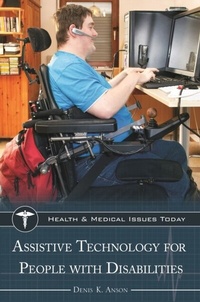
Assistive Technology for People with Disabilities
1st Edition
Published on 9. August 2018
248 pages
978-1-4408-3512-4 (ISBN)
Available for download
Description

How would you make a phone call or send email if you couldn't hear, see, or use your hands? This book shows how assistive technology helps individuals with disabilities perform tasks that people without disabilities may take for granted.
Assistive technology can be used in two ways: to help people with disabilities to do things that people without disabilities can do without technology, and to improve access to everyday technology that is not designed for people with disabilities. In both cases, the focus is on matching individuals with the tools best suited to fill their needs.
A part of Greenwood's Health and Medical Issues Today series, Assistive Technology for People with Disabilities explores what technologies are available to individuals with disabilities, what they can help them to accomplish, and potential hurdles to their use that must be overcome. It explores this exciting field broadly and in depth while still keeping the "people-first" mindset that is the hallmark of assistive technology. In addition, it provides guidance and resources for individuals seeking assistive technology for themselves or for a loved one.
Assistive technology can be used in two ways: to help people with disabilities to do things that people without disabilities can do without technology, and to improve access to everyday technology that is not designed for people with disabilities. In both cases, the focus is on matching individuals with the tools best suited to fill their needs.
A part of Greenwood's Health and Medical Issues Today series, Assistive Technology for People with Disabilities explores what technologies are available to individuals with disabilities, what they can help them to accomplish, and potential hurdles to their use that must be overcome. It explores this exciting field broadly and in depth while still keeping the "people-first" mindset that is the hallmark of assistive technology. In addition, it provides guidance and resources for individuals seeking assistive technology for themselves or for a loved one.
More details
Series
Language
English
Place of publication
United States
Publishing group
Bloomsbury Publishing Plc
ISBN-13
978-1-4408-3512-4 (9781440835124)
Copyright in bibliographic data and cover images is held by Nielsen Book Services Limited or by the publishers or by their respective licensors: all rights reserved.
Schweitzer Classification
Other editions
Additional editions
Denis K. Anson
Assistive Technology for People with Disabilities
Book
08/2018
Greenwood Press
€48.70
Shipment within 10-20 days
Person
Denis K. Anson is Director of Research and Development at the Assistive Technology Research Institute at Misericordia University.
Content
Series Foreword
Preface
Acknowledgments
Part I: Overview
1 What Is Assistive Technology?
2 Technology for Controlling the Environment
3 Technology for Sensory Deficits
4 Technology for Communication with Others
5 Input Technologies
6 Output Technologies
7 Technology for Cognitive Limits
8 Improving Performance
Part II: Controversies and Issues
9 Funding Issues
10 Interoperability Issues
11 Security Issues
12 Portability Issues
Part III: Scenarios
Case Studies
Timeline
Sources for Further Information
Glossary
Index
About the Author
Preface
Acknowledgments
Part I: Overview
1 What Is Assistive Technology?
2 Technology for Controlling the Environment
3 Technology for Sensory Deficits
4 Technology for Communication with Others
5 Input Technologies
6 Output Technologies
7 Technology for Cognitive Limits
8 Improving Performance
Part II: Controversies and Issues
9 Funding Issues
10 Interoperability Issues
11 Security Issues
12 Portability Issues
Part III: Scenarios
Case Studies
Timeline
Sources for Further Information
Glossary
Index
About the Author

