
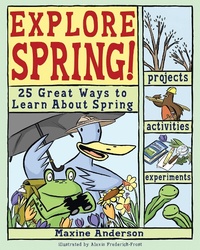
Explore Spring
Description
Alles über E-Books | Antworten auf Fragen rund um E-Books, Kopierschutz und Dateiformate finden Sie in unserem Info- & Hilfebereich.
From tracking spring peepers and raising tadpoles to learning about seeds and recording plant growth, Explore Spring! 25 Great Ways to Learn About Spring invites young readers to explore the wonders of spring by becoming scientists in the field. Combining hands-on learning with solid science, trivia, riddles, and terrific illustrations, projects investigate "the reason for the season" and include identifying trees and measuring their growth, recording soil temperature, and observing the forest floor. Bird migration and nest building are covered, and the movement of air and water is studied with experiments in capillary action and in such activities as "Making Parachutes," Making Kites," and "Mapping Air Currents with Bubbles."
More details
Other editions
Additional editions
System requirements
File format: PDF
Copy-Protection: Adobe-DRM (Digital Rights Management)
System requirements:
- Computer (Windows; MacOS X; Linux): Install the free reader Adobe Digital Editions prior to download (see eBook Help).
- Tablet/smartphone (Android; iOS): Install the free app Adobe Digital Editions or the app PocketBook before downloading (see eBook Help).
- E-reader: Bookeen, Kobo, Pocketbook, Sony, Tolino and many more (only limited: Kindle).
The file format PDF always displays a book page identically on any hardware. This makes PDF suitable for complex layouts such as those used in textbooks and reference books (images, tables, columns, footnotes). Unfortunately, on the small screens of e-readers or smartphones, PDFs are rather annoying, requiring too much scrolling.
This eBook uses Adobe-DRM, a „hard” copy protection. If the necessary requirements are not met, unfortunately you will not be able to open the eBook. You will therefore need to prepare your reading hardware before downloading.
Please note: We strongly recommend that you authorise using your personal Adobe ID after installation of any reading software.
For more information, see our eBook Help page.
