

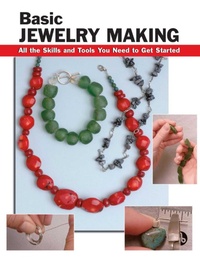
Basic Jewelry Making
Published on 20. February 2006
116 pages
978-0-8117-4540-6 (ISBN)
Description

The basics of using beads and wire to create custom pieces. Each technique carefully described and illustrated. Create pieces for yourself and friends, or to sell.
More details
Language
English
Place of publication
PA
United States
Illustrations
490 Color Photos
File size
44,30 MB
ISBN-13
978-0-8117-4540-6 (9780811745406)
Copyright in bibliographic data and cover images is held by Nielsen Book Services Limited or by the publishers or by their respective licensors: all rights reserved.
Schweitzer Classification
Other editions
Additional editions
Book
03/2006
Stackpole Books
€19.00
No shipping information available
Persons
Sandy Allison is a writer and editor who lives in New Cumberland, Pennsylvania. Ted Walker is a juried member of the Pennsylvania Guild of Craftsmen and the owner of a handcrafted jewelry company based in central Pennsylvania. Alan Wycheck is a concrete specialist and former partner in The SO Factory, a concrete design company. He is also an award-winning photographer and lives in central Pennsylvania.
Content
- Intro
- Front Matter
- Contents
- Introduction
- 1. Working with Beads
- Tools and Materials
- Selecting Beads
- Making Crimps
- Making a Necklace with a Clasp
- Making a Bracelet with a Toggle
- Making a Triple-Strand Necklace
- Making a Floating Crimp
- Working with Elastic Cord
- Crimping Onto Cord
- Making Your Own Polymer Clay Beads
- 2. Beads with Wire
- Making a Loop in a Headpin
- Making a Drop Earring
- Making a Loop with Wraps
- Making Headpins and Dangles
- Making a Wire Dangle Necklace
- Putting It All Together
- Bending and Shaping Metallic Wire
- 3. Bending Silver and Gold Wire
- Tools and Materials
- Making a Simple Loop Design and Forging
- Making an Alternating Loop Design
- Making a Zigzag Design
- Making a Square Coil Design Bracelet
- Texturing and Bending Pendants
- Resources
- Copyright
- Acknowledgments
- Back Cover
- Discover more
