

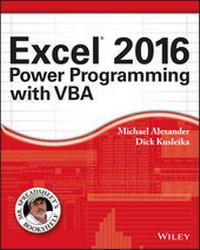
Excel 2016 Power Programming with VBA
Published on 21. January 2016
768 pages
978-1-119-06756-6 (ISBN)
Description

Maximize your Excel experience with VBA
Excel 2016 Power Programming with VBA is fully updated to cover all the latest tools and tricks of Excel 2016. Encompassing an analysis of Excel application development and a complete introduction to Visual Basic for Applications (VBA), this comprehensive book presents all of the techniques you need to develop both large and small Excel applications. Over 800 pages of tips, tricks, and best practices shed light on key topics, such as the Excel interface, file formats, enhanced interactivity with other Office applications, and improved collaboration features. In addition to the procedures, tips, and ideas that will expand your capabilities, this resource provides you with access to over 100 online example Excel workbooks and the Power Utility Pak, found on the Mr. Spreadsheet website.
Understanding how to leverage VBA to improve your Excel programming skills can enhance the quality of deliverables that you produce--and can help you take your career to the next level.
* Explore fully updated content that offers comprehensive coverage through over 900 pages of tips, tricks, and techniques
* Leverage templates and worksheets that put your new knowledge in action, and reinforce the skills introduced in the text
* Access online resources, including the Power Utility Pak, that supplement the content
* Improve your capabilities regarding Excel programming with VBA, unlocking more of your potential in the office
Excel 2016 Power Programming with VBA is a fundamental resource for intermediate to advanced users who want to polish their skills regarding spreadsheet applications using VBA.
More details
Other editions
Additional editions
Michael Alexander | Richard Kusleika
Excel 2016 Power Programming with VBA
Book
03/2016
Wiley
€43.90
Shipment within 15-20 days
Persons
Michael Alexander is a Microsoft Certified Application Developer and author of several books on Microsoft Access and Excel. He runs a free tutorial site at datapigtechnologies.com.
Dick Kusleika has been helping users get the most out of Microsoft Office products for more than fifteen years through online forums, blogging, books, and conferences.
John Walkenbach is arguably the foremost authority on Excel. He has written more than 30 books and maintains the popular Spreadsheet Page at http://spreadsheetpage.com
Content
- Intro
- Title Page
- Copyright
- About the Authors
- About the Technical Editor
- Credits
- Introduction
- Topics Covered
- What You Need to Know
- What You Need to Have
- Conventions in This Book
- What the Icons Mean
- How This Book Is Organized
- About This Book's Website
- About the Power Utility Pak Offer
- Part I: Introduction to Excel VBA
- Chapter 1: Essentials of Spreadsheet Application Development
- What Is a Spreadsheet Application?
- Steps for Application Development
- Determining User Needs
- Planning an Application That Meets User Needs
- Determining the Most Appropriate User Interface
- Concerning Yourself with the End User
- Other Development Issues
- Chapter 2: Introducing Visual Basic for Applications
- Getting a Head Start with the Macro Recorder
- Working with the Visual Basic Editor
- VBA Fundamentals
- Deep Dive: Working with Range Objects
- Essential Concepts to Remember
- Don't Panic - You Are Not Alone
- Chapter 3: VBA Programming Fundamentals
- VBA Language Elements: An Overview
- Comments
- Variables, Data Types, and Constants
- Assignment Statements
- Arrays
- Object Variables
- User-Defined Data Types
- Built-In Functions
- Manipulating Objects and Collections
- Controlling Code Execution
- Chapter 4: Working with VBA Sub Procedures
- About Procedures
- Executing Sub Procedures
- Passing Arguments to Procedures
- Error-Handling Techniques
- A Realistic Example That Uses Sub Procedures
- Chapter 5: Creating Function Procedures
- Sub Procedures versus Function Procedures
- Why Create Custom Functions?
- An Introductory Function Example
- Function Procedures
- Function Arguments
- Function Examples
- Emulating Excel's SUM Function
- Extended Date Functions
- Debugging Functions
- Dealing with the Insert Function Dialog Box
- Using Add-Ins to Store Custom Functions
- Using the Windows API
- Chapter 6: Understanding Excel's Events
- What You Should Know about Events
- Getting Acquainted with Workbook-Level Events
- Examining Worksheet Events
- Monitoring with Application Events
- Accessing Events Not Associated with an Object
- Chapter 7: VBA Programming Examples and Techniques
- Learning by Example
- Working with Ranges
- Working with Workbooks and Sheets
- VBA Techniques
- Some Useful Functions for Use in Your Code
- Some Useful Worksheet Functions
- Windows API Calls
- Part II: Advanced VBA Techniques
- Chapter 8: Working with Pivot Tables
- An Introductory Pivot Table Example
- Creating a More Complex Pivot Table
- Creating Multiple Pivot Tables
- Creating a Reverse Pivot Table
- Chapter 9: Working with Charts
- Getting the Inside Scoop on Charts
- Creating an Embedded Chart
- Creating a Chart on a Chart Sheet
- Modifying Charts
- Using VBA to Activate a Chart
- Moving a Chart
- Using VBA to Deactivate a Chart
- Determining Whether a Chart Is Activated
- Deleting from the ChartObjects or Charts Collection
- Looping through All Charts
- Sizing and Aligning ChartObjects
- Creating Lots of Charts
- Exporting a Chart
- Changing the Data Used in a Chart
- Using VBA to Display Arbitrary Data Labels on a Chart
- Displaying a Chart in a UserForm
- Understanding Chart Events
- Discovering VBA Charting Tricks
- Working with Sparkline Charts
- Chapter 10: Interacting with Other Applications
- Understanding Microsoft Office Automation
- Automating Access from Excel
- Automating Word from Excel
- Automating PowerPoint from Excel
- Automating Outlook from Excel
- Starting Other Applications from Excel
- Chapter 11: Working with External Data and Files
- Working with External Data Connections
- Using ADO and VBA to Pull External Data
- Working with Text Files
- Text File Manipulation Examples
- Performing Common File Operations
- Zipping and Unzipping Files
- Part III: Working with UserForms
- Chapter 12: Leveraging Custom Dialog Boxes
- Before You Create That UserForm . . .
- Using an Input Box
- The VBA MsgBox Function
- The Excel GetOpenFilename Method
- The Excel GetSaveAsFilename Method
- Prompting for a Directory
- Displaying Excel's Built-In Dialog Boxes
- Displaying a Data Form
- Chapter 13: Introducing UserForms
- How Excel Handles Custom Dialog Boxes
- Inserting a New UserForm
- Adding Controls to a UserForm
- Toolbox Controls
- Adjusting UserForm Controls
- Adjusting a Control's Properties
- Displaying a UserForm
- Closing a UserForm
- Creating a UserForm: An Example
- Understanding UserForm Events
- Referencing UserForm Controls
- Customizing the Toolbox
- Creating UserForm Templates
- A UserForm Checklist
- Chapter 14: UserForm Examples
- Creating a UserForm "Menu"
- Selecting Ranges from a UserForm
- Creating a Splash Screen
- Disabling a UserForm's Close Button
- Changing a UserForm's Size
- Zooming and Scrolling a Sheet from a UserForm
- ListBox Techniques
- Using the MultiPage Control in a UserForm
- Using an External Control
- Animating a Label
- Chapter 15: Advanced UserForm Techniques
- A Modeless Dialog Box
- Displaying a Progress Indicator
- Creating Wizards
- Emulating the MsgBox Function
- A UserForm with Movable Controls
- A UserForm with No Title Bar
- Simulating a Toolbar with a UserForm
- Emulating a Task Pane with a UserForm
- A Resizable UserForm
- Handling Multiple UserForm Controls with One Event Handler
- Selecting a Color in a UserForm
- Displaying a Chart in a UserForm
- Making a UserForm Semitransparent
- A Puzzle on a UserForm
- Video Poker on a UserForm
- Part IV: Developing Excel Applications
- Chapter 16: Creating and Using Add-Ins
- What Is an Add-In?
- Understanding Excel's Add-In Manager
- Creating an Add-In
- An Add-In Example
- Comparing XLAM and XLSM Files
- Manipulating Add-Ins with VBA
- Optimizing the Performance of Add-Ins
- Special Problems with Add-Ins
- Chapter 17: Working with the Ribbon
- Ribbon Basics
- Customizing the Ribbon
- Creating a Custom Ribbon
- Using VBA with the Ribbon
- Creating an Old-Style Toolbar
- Chapter 18: Working with Shortcut Menus
- CommandBar Overview
- Using VBA to Customize Shortcut Menus
- Shortcut Menus and Events
- Chapter 19: Providing Help for Your Applications
- Help for Your Excel Applications
- Help Systems That Use Excel Components
- Displaying Help in a Web Browser
- Using the HTML Help System
- Chapter 20: Leveraging Class Modules
- What Is a Class Module?
- Creating a NumLock Class
- Coding Properties, Methods, and Events
- Exposing a QueryTable Event
- Creating a Class to Hold Classes
- Chapter 21: Understanding Compatibility Issues
- What Is Compatibility?
- Types of Compatibility Problems
- Avoid Using New Features
- But Will It Work on a Mac?
- Dealing with 64-Bit Excel
- Creating an International Application
- Part V: Appendix
- Appendix A: VBA Statements and Function Reference
- Invoking Excel Functions in VBA Instructions
- Advert
- EULA
