

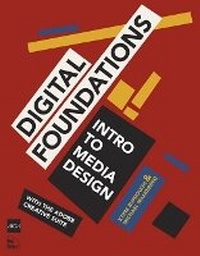
Digital Foundations
Intro to Media Design with the Adobe Creative Suite
Published on 22. December 2008
Book
Paperback/Softback
344 pages
978-0-321-55598-4 (ISBN)
Description
Fuses design fundamentals and software training into one cohesive book!
The only book to teach Bauhaus design principles alongside basic digital tools of Adobe's Creative Suite, including the recently released Adobe CS4
Addresses the growing trend of compressing design fundamentals and design software into the same course in universities and design trade schools.
Lessons are timed to be used in 50-minute class sessions.
Digital Foundations uses formal exercises of the Bauhaus to teach the Adobe Creative Suite. All students of digital design and production-whether learning in a classroom or on their own-need to understand the basic principles of design in order to implement them using current software. Far too often design is left out of books that teach software. Consequently, the design software training exercise is often a lost opportunity for visual learning. Digital Foundations reinvigorates software training by integrating Bauhaus design exercises into tutorials fusing design fundamentals and core Adobe Creative Suite methodologies. The result is a cohesive learning experience.
Design topics and principles include: Composition; Symmetry and Asymmetry; Gestalt; Appropriation; The Bauhaus Basic Course Approach; Color Theory; The Grid; Scale, Hierarchy and Collage; Tonal Range; Elements of Motion.
Digital Foundations is an AIGA Design Press book, published under Peachpit's New Riders imprint in partnership with AIGA, the professional association for design.
The only book to teach Bauhaus design principles alongside basic digital tools of Adobe's Creative Suite, including the recently released Adobe CS4
Addresses the growing trend of compressing design fundamentals and design software into the same course in universities and design trade schools.
Lessons are timed to be used in 50-minute class sessions.
Digital Foundations uses formal exercises of the Bauhaus to teach the Adobe Creative Suite. All students of digital design and production-whether learning in a classroom or on their own-need to understand the basic principles of design in order to implement them using current software. Far too often design is left out of books that teach software. Consequently, the design software training exercise is often a lost opportunity for visual learning. Digital Foundations reinvigorates software training by integrating Bauhaus design exercises into tutorials fusing design fundamentals and core Adobe Creative Suite methodologies. The result is a cohesive learning experience.
Design topics and principles include: Composition; Symmetry and Asymmetry; Gestalt; Appropriation; The Bauhaus Basic Course Approach; Color Theory; The Grid; Scale, Hierarchy and Collage; Tonal Range; Elements of Motion.
Digital Foundations is an AIGA Design Press book, published under Peachpit's New Riders imprint in partnership with AIGA, the professional association for design.
Reviews / Votes
"This ambitious book teaches visual thinking and software skills together. The text leads readers step-by-step through the process of creating dynamic images using a range of powerful applications. The engaging, experimental exercises take this project well beyond the typical software guide."Ellen Lupton, co-author of Graphic Design: The New Basics
"This groundbreaking text applies the classical Modernist pedagogy of the Bauhaus to digital media. It's a must-have for every art student, design student, and new media maven."
Mark Tribe, Brown University, Founder of Rhizome.org
"This book is the perfect fusion of technical and formal instruction. It gives the lie to those who think you can learn to use the Adobe Suite of computer applications effectively without an art education, and opens the door to a more practical understanding of the importance of artistic practice in our culture."
Lee Montgomery, Founder of Neighborhood Public Radio / New Media Educator
"This book is an unprecedented bridge between how visual design was once taught and how it needs to be taught today. It decodes digital tools and culture while explaining fundamental visual design principles within a historical context."
Casey Reas, Co-Founder of Processing.org
"This book is critically important for the arts. Far too few artists are sophisticated enough to be aware of the stealthily growing problem at hand: Corporate, cookie-cutter tools-and their manuals-that standardize and cramp creativity threaten to become the greatest shapers of late 20th & 21st century art, just as architecture's greatest influence this past century has unfortunately been neither a renowned school of architecture, nor even a great architect, but the catalog of standardized options: door frames, windows, and other prefab parts, from which 99 percent of structures are now built. Artists will remain stuck with old patterns and limited options, unless we create viable open source alternatives and brilliant interventions like this book!"
John S. Johnson, Chairman of the Pacific Foundation / Founder of the Screenwriters Colony, The Filmmakers Collaborative and Eyebeam, Art + Technology center
More details
Language
English
Place of publication
United States
Publishing group
Pearson Education (US)
Target group
College/higher education
Dimensions
Height: 176 mm
Width: 229 mm
Thickness: 15 mm
Weight
614 gr
ISBN-13
978-0-321-55598-4 (9780321555984)
Copyright in bibliographic data and cover images is held by Nielsen Book Services Limited or by the publishers or by their respective licensors: all rights reserved.
Schweitzer Classification
Other editions
New editions
Book
08/2013
New Riders
€55.07
Article exhausted; check for reprint
Persons
Michael Mandiberg is known for selling all of his possessions online (Mandiberg.com/shop), and making perfect copies of copies (AfterSherrieLevine.com). He is a Senior Fellow at Eyebeam, and an Assistant Professor at the College of Staten Island/CUNY. His work lives at Mandiberg.com.
xtine burrough created Delocator.net and MechanicalOlympics.org, websites that empower online users in the analog world and promote autonomy and interpretation. She is an Assistant Professor of Visual Communications at California State University, Fullerton. See a complete portfolio at missconceptions.net.
xtine burrough created Delocator.net and MechanicalOlympics.org, websites that empower online users in the analog world and promote autonomy and interpretation. She is an Assistant Professor of Visual Communications at California State University, Fullerton. See a complete portfolio at missconceptions.net.
Content
Introduction
Chapter 1: The Metaphor of Using Graphics Applications
Chapter 2: Searching and Sampling - Becoming an Expert Web User
Illustrator
Chapter 3: Color Theory and Basic Shapes
Chapter 4: Using the Grid
Chapter 5: Symmetry
Chapter 6: Flat Graphics and Line Art
PhotoShop
Chapter 7: Scanning and Digital Cameras
Chapter 8: Tonal Scale
Chapter 9: Layering and Collage
Chapter 10: Typography
Chapter 11: Getting It Out: Digital Output for web
Chapter 12: Non-Destructive Editing
InDesign
Chapter 13: Creating Unity within a System
Chapter 14: Creating Tension within a System
Dreamweaver
Chapter 15: Hello World
Chapter 16: Files and Servers
Chapter 17: Hyperlinks
Flash
Chapter 18: Elements of Motion
Chapter 19: Pacing
Chapter 20: Commanding the Timeline: ActionScript
Chapter 1: The Metaphor of Using Graphics Applications
Chapter 2: Searching and Sampling - Becoming an Expert Web User
Illustrator
Chapter 3: Color Theory and Basic Shapes
Chapter 4: Using the Grid
Chapter 5: Symmetry
Chapter 6: Flat Graphics and Line Art
PhotoShop
Chapter 7: Scanning and Digital Cameras
Chapter 8: Tonal Scale
Chapter 9: Layering and Collage
Chapter 10: Typography
Chapter 11: Getting It Out: Digital Output for web
Chapter 12: Non-Destructive Editing
InDesign
Chapter 13: Creating Unity within a System
Chapter 14: Creating Tension within a System
Dreamweaver
Chapter 15: Hello World
Chapter 16: Files and Servers
Chapter 17: Hyperlinks
Flash
Chapter 18: Elements of Motion
Chapter 19: Pacing
Chapter 20: Commanding the Timeline: ActionScript