

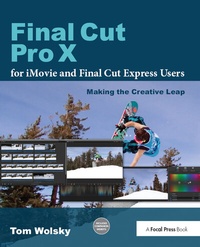
Final Cut Pro X for iMovie and Final Cut Express Users
Making the Creative Leap
1st Edition
Published on 18. September 2018
Book
Hardback
408 pages
978-1-138-37222-1 (ISBN)
Description
Updates and addendum for the new version of FCPX (10.0.3) are available on the companion website, fcpxbook.com.
Are you an iMovie or Final Cut Express user ready to make the jump to Final Cut Pro? If so, look no further.
Take your movies to the next level with this easy-to-follow, hand-on guide from one of the preeminent Apple trainers in the world today. Author Tom Wolsky starts with the basics of Final Cut Pro X, allowing you to easily make the leap from Final Cut Express or iMovie, then gradually introduces you to more complex techniques with step-by-step tutorials. Tom specifically shows you how certain techniques and concepts you utilized in iMovie and Final Cut Express translate to Final Cut Pro.
More than a button-pushing manual, this editing workshop gives your firsthand experience with the art and technique of editing with Final Cut Pro. It includes in-depth information on the application's features, interface elements, and tools. You will develop a working knowledge of the principles and methods taught in film schools with tutorials that covers the essentials:
. Nuances of system set-up to ensure smooth operation
. Getting your tape-based and file-based AVCHD and DSLR media into Final Cut Pro and getting it organized
. Editing to build and trim a sequence of shots
. Working with audio, split edits, back-timing and level control
. Adding transitions
. Final Cut Pro titling tools
. Color correction, image animation, and special effects
. Compositing to enhance your projects
. Outputting your material
Are you an iMovie or Final Cut Express user ready to make the jump to Final Cut Pro? If so, look no further.
Take your movies to the next level with this easy-to-follow, hand-on guide from one of the preeminent Apple trainers in the world today. Author Tom Wolsky starts with the basics of Final Cut Pro X, allowing you to easily make the leap from Final Cut Express or iMovie, then gradually introduces you to more complex techniques with step-by-step tutorials. Tom specifically shows you how certain techniques and concepts you utilized in iMovie and Final Cut Express translate to Final Cut Pro.
More than a button-pushing manual, this editing workshop gives your firsthand experience with the art and technique of editing with Final Cut Pro. It includes in-depth information on the application's features, interface elements, and tools. You will develop a working knowledge of the principles and methods taught in film schools with tutorials that covers the essentials:
. Nuances of system set-up to ensure smooth operation
. Getting your tape-based and file-based AVCHD and DSLR media into Final Cut Pro and getting it organized
. Editing to build and trim a sequence of shots
. Working with audio, split edits, back-timing and level control
. Adding transitions
. Final Cut Pro titling tools
. Color correction, image animation, and special effects
. Compositing to enhance your projects
. Outputting your material
More details
Language
English
Place of publication
London
United Kingdom
Publishing group
Taylor & Francis Ltd
Target group
Professional and scholarly
Professional Practice & Development
Dimensions
Height: 235 mm
Width: 191 mm
Weight
453 gr
ISBN-13
978-1-138-37222-1 (9781138372221)
Copyright in bibliographic data and cover images is held by Nielsen Book Services Limited or by the publishers or by their respective licensors: all rights reserved.
Schweitzer Classification
Other editions
Additional editions
E-Book
12/2012
1st Edition
Routledge
€51.49
Available for download
E-Book
12/2012
1st Edition
Routledge
€51.49
Available for download
Book
02/2012
1st Edition
Focal Press
€50.00
Shipment within 15-20 days
Person
Tom Wolsky is an honors graduate of the London School of Film Technique with nearly 40 years of professional experience spanning film, tape, and digital production. Tom operates an independent studio, South Coast Productions. He also teaches for Apple Computer and for the Digital Media Academy and serves as a forum leader on creativecow.net
Content
LESSON 1: Getting Started
LESSON 2: The Interface
LESSON 3: Preferences & Importing
LESSON 4: Organization
LESSON 5: Editing Basics: The Edit Functions
LESSON 6: Advanced Editing: Trimming
LESSON 7: Working With Audio
LESSON 8: Adding Transitions
LESSON 9: Basic Titles
LESSON 10: Adding Effects
LESSON 11: Color Correction
LESSON 12: Animating Images
LESSON 13: Compositing
LESSON 14: Outputting from Final Cut Pro
LESSON 2: The Interface
LESSON 3: Preferences & Importing
LESSON 4: Organization
LESSON 5: Editing Basics: The Edit Functions
LESSON 6: Advanced Editing: Trimming
LESSON 7: Working With Audio
LESSON 8: Adding Transitions
LESSON 9: Basic Titles
LESSON 10: Adding Effects
LESSON 11: Color Correction
LESSON 12: Animating Images
LESSON 13: Compositing
LESSON 14: Outputting from Final Cut Pro