

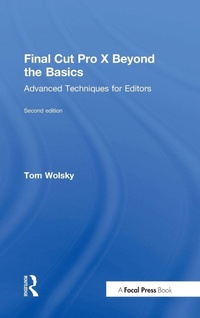
Final Cut Pro X Beyond the Basics
Advanced Techniques for Editors
2nd Edition
Published on 13. September 2017
Book
Hardback
368 pages
978-1-138-73583-5 (ISBN)
Description
Going beyond where introductory books leave off and written for experienced editors, especially those new to Final Cut Pro X, this new and revised edition of Final Cut Pro X Beyond the Basics is brimming with cutting-edge methods to bring your editing skills to the next level. Explained in jargon-free language by a seasoned teacher and digital editor, Tom Wolsky's text has been fully updated to address the new Final Cut Pro X 10.3 interface and changes to the software. This full-color workshop features tutorials that provide firsthand experience on the art and technique of editing at an advanced level with Final Cut Pro X, as well as in-depth information and time-saving tips that will allow you to master the application's interface elements, tools, and nuances. Wolsky covers all the bases, including:
Library workflows and collaboration;
Media organization and metadata customization for different genres;
Editing techniques for projects of various lengths and types;
Using markers and the timeline index;
Audio tools;
Multicam editing;
Audio and video effects;
Color correction, including secondary corrections and isolated color adjustments;
Compositing and complex animation.
An accompanying eResource features downloadable Final Cut Pro X project libraries for the tutorials discussed in the book, offering readers hands-on examples of the techniques and practices covered.
Library workflows and collaboration;
Media organization and metadata customization for different genres;
Editing techniques for projects of various lengths and types;
Using markers and the timeline index;
Audio tools;
Multicam editing;
Audio and video effects;
Color correction, including secondary corrections and isolated color adjustments;
Compositing and complex animation.
An accompanying eResource features downloadable Final Cut Pro X project libraries for the tutorials discussed in the book, offering readers hands-on examples of the techniques and practices covered.
More details
Edition
2nd edition
Language
English
Place of publication
London
United Kingdom
Publishing group
Taylor & Francis Ltd
Target group
Professional and scholarly
Illustrations
375 farbige Abbildungen
375 Illustrations, color
Dimensions
Height: 235 mm
Width: 157 mm
Thickness: 25 mm
Weight
700 gr
ISBN-13
978-1-138-73583-5 (9781138735835)
Copyright in bibliographic data and cover images is held by Nielsen Book Services Limited or by the publishers or by their respective licensors: all rights reserved.
Schweitzer Classification
Other editions
Additional editions
E-Book
09/2017
2nd Edition
Routledge
€73.99
Available for download
E-Book
09/2017
2nd Edition
Routledge
€73.99
Available for download
Book
09/2017
2nd Edition
Routledge
€108.60
Shipment within 10-20 days
Person
Tom Wolsky is a founding director of the Digital Media Academy, where he taught Final Cut Pro for many years. Tom is the author of several Final Cut and video production instructional books as well as DVDs for FCP, Final Cut Studio, and Mac OS X for Class on Demand, where his training has won multiple Telly and Horizon Interactive awards. Before teaching, he worked in the film and television industry for more than 40 years.
Content
Chapter 1 - Back to the Basics
Chapter 2 - Preferences and Importing
Chapter 3 - Organization
Chapter 4 - Editing
Chapter 5 - Working with Audio
Chapter 6 - Multicam Editing
Chapter 7 - Adding Titles and Still Images
Chapter 8 - Adding Effects
Chapter 9 - Color Correction
Chapter 10 - Animating Images
Chapter 11 - Compositing
Chapter 12 - Outputting from Final Cut Pro
Keyboard Shortcuts Index
Chapter 2 - Preferences and Importing
Chapter 3 - Organization
Chapter 4 - Editing
Chapter 5 - Working with Audio
Chapter 6 - Multicam Editing
Chapter 7 - Adding Titles and Still Images
Chapter 8 - Adding Effects
Chapter 9 - Color Correction
Chapter 10 - Animating Images
Chapter 11 - Compositing
Chapter 12 - Outputting from Final Cut Pro
Keyboard Shortcuts Index