

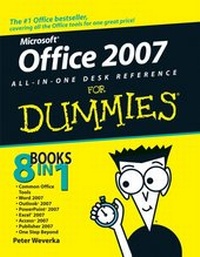
Office 2007 All-in-One Desk Reference For Dummies
Published on 1. December 2006
Book
Paperback/Softback
816 pages
978-0-471-78279-7 (ISBN)
Unfortunately, price unknown
Article exhausted; check different version
Description
8 books in 1 -- your key to Office 2007 success!
Your one-stop guide to solving Office problems and getting work accomplished.
Office 2207 gives you a set of tools for managing documents and data, analyzing numbers, organizing your e-mail and schedule, building presentations, and designing publications - and this book covers them all! Get the scoop on all the Office programs, find out how to supercharge your productivity by using them together, and much more.
Discover how to:
* Proofread text in Word
* Crunch numbers in Excel
* Corral data with Access
* Subdue junk mail with Outlook
* Pack punch into your presentations
* Publish brochures and newsletters
Your one-stop guide to solving Office problems and getting work accomplished.
Office 2207 gives you a set of tools for managing documents and data, analyzing numbers, organizing your e-mail and schedule, building presentations, and designing publications - and this book covers them all! Get the scoop on all the Office programs, find out how to supercharge your productivity by using them together, and much more.
Discover how to:
* Proofread text in Word
* Crunch numbers in Excel
* Corral data with Access
* Subdue junk mail with Outlook
* Pack punch into your presentations
* Publish brochures and newsletters
More details
Product info
Paperback
Edition
1. Auflage
Language
English
Place of publication
New York
United States
Publishing group
John Wiley and Sons Ltd
Target group
Professional and scholarly
Dimensions
Height: 23.2 cm
Width: 18.9 cm
Thickness: 4.5 cm
Weight
1250 gr
ISBN-13
978-0-471-78279-7 (9780471782797)
Schweitzer Classification
Other editions
Additional editions
Peter Weverka
Office 2007 All-in-One Desk Reference For Dummies
E-Book
03/2011
Wiley
€20.99
Available for download
Peter Weverka
Office 2007 All-in-One Desk Reference For Dummies
E-Book
07/2007
Wiley
€20.99
Available for download
Person
Peter Weverka is the bestselling author of several For Dummies books, including PowerPoint 2007 All-in-One Desk Reference For Dummies and Microsoft Money For Dummies, as well as 30 other computer books about various topics. Peter's humorous articles and stories -- none related to computers, thankfully -- have appeared in Harper's, SPY, The Argonaut, and other magazines for grown-ups.
Content
Introduction.
Book I: Common Office Tools.
Chapter 1: Office Nuts and Bolts.
Chapter 2: Wrestling with the Text.
Chapter 3: Speed Techniques Worth Knowing About.
Chapter 4: Taking Advantage of the Proofing Tools.
Chapter 5: Creating a Table.
Chapter 6: Creating a Chart.
Chapter 7: Making a SmartArt Diagram.
Chapter 8: Drawing and Manipulating Lines, Shapes, and Other Objects.
Book II: Word 2007.
Chapter 1: Speed Techniques for Using Word.
Chapter 2: Laying Out Text and Pages.
Chapter 3: Word Styles.
Chapter 4: Desktop Publishing with Word.
Chapter 5: Getting Word's Help with Office Chores.
Chapter 6: Tools for Reports and Scholarly Papers.
Book III: Outlook 2007.
Chapter 1: Getting Acquainted with Outlook.
Chapter 2: Maintaining the Contacts Folder.
Chapter 3: Handling Your E-Mail.
Chapter 4: Managing Your Time and Schedule.
Chapter 5: Tasks, Reminders, and Notes.
Book IV: PowerPoint 2007.
Chapter 1: Getting Started in PowerPoint.
Chapter 2: Fashioning a Look for Your Presentation.
Chapter 3: Entering the Text.
Chapter 4: Making Your Presentations Livelier.
Chapter 5: Delivering a Presentation.
Book V: Excel 2007.
Chapter 1: Up and Running with Excel.
Chapter 2: Refining Your Worksheet.
Chapter 3: Formulas and Functions for Crunching Numbers.
Chapter 4: Making a Worksheet Easier to Read and Understand.
Chapter 5: Analyzing Data.
Book VI: Access 2007.
Chapter 1: Introducing Access.
Chapter 2: Building Your Database Tables.
Chapter 3: Entering the Data.
Chapter 4: Sorting, Querying, and Filtering for Data.
Chapter 5: Presenting Data in a Report.
Book VII: Publisher 2007.
Chapter 1: Introducing Publisher.
Chapter 2: Refining a Publication.
Chapter 3: Putting On the Finishing Touches.
Book VIII: Office 2007 -- One Step Beyond.
Chapter 1: Customizing an Office Program.
Chapter 2: Ways of Distributing Your Work.
Chapter 3: Handling Graphics.
Chapter 4: Decorating Files with Clip Art.
Chapter 5: Note Taking with OneNote.
Chapter 6: Collaborating with SharePoint Services.
Chapter 7: Automating Tasks with Macros.
Chapter 8: Linking and Embedding in Compound Files.
Index.
Book I: Common Office Tools.
Chapter 1: Office Nuts and Bolts.
Chapter 2: Wrestling with the Text.
Chapter 3: Speed Techniques Worth Knowing About.
Chapter 4: Taking Advantage of the Proofing Tools.
Chapter 5: Creating a Table.
Chapter 6: Creating a Chart.
Chapter 7: Making a SmartArt Diagram.
Chapter 8: Drawing and Manipulating Lines, Shapes, and Other Objects.
Book II: Word 2007.
Chapter 1: Speed Techniques for Using Word.
Chapter 2: Laying Out Text and Pages.
Chapter 3: Word Styles.
Chapter 4: Desktop Publishing with Word.
Chapter 5: Getting Word's Help with Office Chores.
Chapter 6: Tools for Reports and Scholarly Papers.
Book III: Outlook 2007.
Chapter 1: Getting Acquainted with Outlook.
Chapter 2: Maintaining the Contacts Folder.
Chapter 3: Handling Your E-Mail.
Chapter 4: Managing Your Time and Schedule.
Chapter 5: Tasks, Reminders, and Notes.
Book IV: PowerPoint 2007.
Chapter 1: Getting Started in PowerPoint.
Chapter 2: Fashioning a Look for Your Presentation.
Chapter 3: Entering the Text.
Chapter 4: Making Your Presentations Livelier.
Chapter 5: Delivering a Presentation.
Book V: Excel 2007.
Chapter 1: Up and Running with Excel.
Chapter 2: Refining Your Worksheet.
Chapter 3: Formulas and Functions for Crunching Numbers.
Chapter 4: Making a Worksheet Easier to Read and Understand.
Chapter 5: Analyzing Data.
Book VI: Access 2007.
Chapter 1: Introducing Access.
Chapter 2: Building Your Database Tables.
Chapter 3: Entering the Data.
Chapter 4: Sorting, Querying, and Filtering for Data.
Chapter 5: Presenting Data in a Report.
Book VII: Publisher 2007.
Chapter 1: Introducing Publisher.
Chapter 2: Refining a Publication.
Chapter 3: Putting On the Finishing Touches.
Book VIII: Office 2007 -- One Step Beyond.
Chapter 1: Customizing an Office Program.
Chapter 2: Ways of Distributing Your Work.
Chapter 3: Handling Graphics.
Chapter 4: Decorating Files with Clip Art.
Chapter 5: Note Taking with OneNote.
Chapter 6: Collaborating with SharePoint Services.
Chapter 7: Automating Tasks with Macros.
Chapter 8: Linking and Embedding in Compound Files.
Index.