

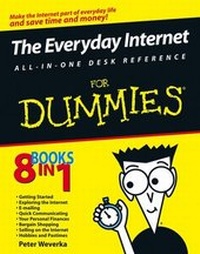
The Everyday Internet All-in-One Desk Reference For Dummies
3rd Edition
Published on 6. May 2005
Book
Paperback/Softback
624 pages
978-0-7645-8875-4 (ISBN)
Description
The Internet made its way into everyday life as a tool people used occasionally to keep in touch with friends and gather information for personal or business needs. Now, thanks to high-speed connections, wireless access, and safe and powerful Web sites, the Internet has become the main means for handling personal finance, shopping for big-ticket items, and communicating with people around the world. It's to the point where many people can't get through the day without turning to the Internet to get things accomplished.
The Everyday Internet All-in-One Desk Reference For Dummies is the complete resource for casual Internet users who are looking to make the jump to becoming experienced navigators of the wired world. Written by Internet guru Peter Weverka, this book walks readers through the basics of going online before heading into the realms of online bargain shopping, bill paying, personal finance, keeping up with hobbies, and even setting up an online business.
* The material is broken into mini-books that make it easier to find an answer and keep moving along the online highway
* This book clarifies all the mysteries of how to use the Internet to make everyday life simpler
* Covers key Internet properties like eBay, Google, and Yahoo! as well as favorite tasks like playing games, tracing family roots, and keeping a diary online
The Everyday Internet All-in-One Desk Reference For Dummies is the complete resource for casual Internet users who are looking to make the jump to becoming experienced navigators of the wired world. Written by Internet guru Peter Weverka, this book walks readers through the basics of going online before heading into the realms of online bargain shopping, bill paying, personal finance, keeping up with hobbies, and even setting up an online business.
* The material is broken into mini-books that make it easier to find an answer and keep moving along the online highway
* This book clarifies all the mysteries of how to use the Internet to make everyday life simpler
* Covers key Internet properties like eBay, Google, and Yahoo! as well as favorite tasks like playing games, tracing family roots, and keeping a diary online
More details
Other editions
Previous edition
Kelly Ewing | John Levine | Arnold Reinhold
The Internet All In One Desk Reference For Dummies
Book
05/2002
2nd Edition
Hungry Minds Inc,U.S.
€32.90
Article exhausted; check for reprint
Person
Peter Weverka is the bestselling author of several For Dummies books, including Microsoft Office 2003 All-in-One Desk Reference For Dummies and Microsoft Money 2005 For Dummies. He has written a grand total of 25 computer books. His humorous articles and stories -- none related to computers, thankfully -- have appeared in Harper's, SPY, and other magazines for grownups.
Content
Introduction.
Book I: Getting Started.
Chapter 1: Getting Acquainted with the Internet.
Chapter 2: Choosing an Internet Service.
Chapter 3: Setting Up Your Internet Connections.
Chapter 4: Protecting Your Privacy and Security.
Chapter 5: Using America Online.
Chapter 6: Getting the Plug-Ins You Need.
Chapter 7: The Internet for Children and Parents.
Book II: Exploring the Internet.
Chapter 1: Browsing around the Internet.
Chapter 2: A Look at Different Browsers.
Chapter 3: Strategies for Internet Searching.
Chapter 4: Advanced Tools for Scholars and Researchers.
Chapter 5: The Internet as a Reference Library.
Chapter 6: Read All about It.
Book III: E-Mailing.
Chapter 1: A Quick Introduction to E-Mailing.
Chapter 2: E-Mailing with Outlook.
Chapter 3: E-Mailing with Outlook Express.
Chapter 4: Yahoo! and Other Web-Based E-Mail Services.
Chapter 5: Only You Can Prevent Spam.
Book IV: Quick Communicating.
Chapter 1: Instant Messaging.
Chapter 2: Blogs and Online Journals.
Chapter 3: Mailing Lists and Message Boards.
Chapter 4: Newsgroups and the Usenet.
Chapter 5: Joining, Starting, and Managing a Yahoo! Group.
Chapter 6: Chatting Online.
Chapter 7: Free Web Sites at Yahoo! GeoCities.
Chapter 8: Making Friends and Connections Online.
Chapter 9: Using Your PC as a Telephone.
Book V: Your Personal Finances.
Chapter 1: Searching for Financial Information.
Chapter 2: Monitoring and Tracking Investments.
Chapter 3: Banking and Paying Bills Online.
Book VI: Bargain Shopping.
Chapter 1: Searching for Bargains.
Chapter 2: Buying at an Online Auction.
Chapter 3: Using PayPal.
Chapter 4: Taking a Stroll through the Cyberbazaar.
Book VII: Selling on the Internet.
Chapter 1: Selling Items on eBay.
Chapter 2: Selling Items Online.
Chapter 3: Sending It to the Buyer.
Book VIII: Hobbies and Pastimes.
Chapter 1: Playing Games Online.
Chapter 2: Planning Your Next Vacation.
Chapter 3: Let Me Entertain You.
Chapter 4: The Internet for Music Lovers.
Chapter 5: Buying and Playing Music with iTunes.
Chapter 6: Genealogy Online.1
Book IX: Appendixes.
Appendix A: Signing Up for a Yahoo! ID.
Appendix B: Getting a.NET Passport.1
Appendix C: Getting a Google Account.
Glossary of Internet Terms.
Index.
Book I: Getting Started.
Chapter 1: Getting Acquainted with the Internet.
Chapter 2: Choosing an Internet Service.
Chapter 3: Setting Up Your Internet Connections.
Chapter 4: Protecting Your Privacy and Security.
Chapter 5: Using America Online.
Chapter 6: Getting the Plug-Ins You Need.
Chapter 7: The Internet for Children and Parents.
Book II: Exploring the Internet.
Chapter 1: Browsing around the Internet.
Chapter 2: A Look at Different Browsers.
Chapter 3: Strategies for Internet Searching.
Chapter 4: Advanced Tools for Scholars and Researchers.
Chapter 5: The Internet as a Reference Library.
Chapter 6: Read All about It.
Book III: E-Mailing.
Chapter 1: A Quick Introduction to E-Mailing.
Chapter 2: E-Mailing with Outlook.
Chapter 3: E-Mailing with Outlook Express.
Chapter 4: Yahoo! and Other Web-Based E-Mail Services.
Chapter 5: Only You Can Prevent Spam.
Book IV: Quick Communicating.
Chapter 1: Instant Messaging.
Chapter 2: Blogs and Online Journals.
Chapter 3: Mailing Lists and Message Boards.
Chapter 4: Newsgroups and the Usenet.
Chapter 5: Joining, Starting, and Managing a Yahoo! Group.
Chapter 6: Chatting Online.
Chapter 7: Free Web Sites at Yahoo! GeoCities.
Chapter 8: Making Friends and Connections Online.
Chapter 9: Using Your PC as a Telephone.
Book V: Your Personal Finances.
Chapter 1: Searching for Financial Information.
Chapter 2: Monitoring and Tracking Investments.
Chapter 3: Banking and Paying Bills Online.
Book VI: Bargain Shopping.
Chapter 1: Searching for Bargains.
Chapter 2: Buying at an Online Auction.
Chapter 3: Using PayPal.
Chapter 4: Taking a Stroll through the Cyberbazaar.
Book VII: Selling on the Internet.
Chapter 1: Selling Items on eBay.
Chapter 2: Selling Items Online.
Chapter 3: Sending It to the Buyer.
Book VIII: Hobbies and Pastimes.
Chapter 1: Playing Games Online.
Chapter 2: Planning Your Next Vacation.
Chapter 3: Let Me Entertain You.
Chapter 4: The Internet for Music Lovers.
Chapter 5: Buying and Playing Music with iTunes.
Chapter 6: Genealogy Online.1
Book IX: Appendixes.
Appendix A: Signing Up for a Yahoo! ID.
Appendix B: Getting a.NET Passport.1
Appendix C: Getting a Google Account.
Glossary of Internet Terms.
Index.