

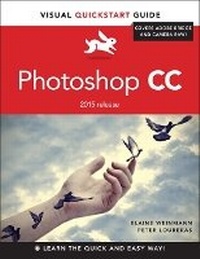
Photoshop CC
Visual QuickStart Guide (2015 release)
Published on 1. October 2015
Book
Paperback/Softback
528 pages
978-0-13-430889-0 (ISBN)
Description
This best-selling guide from authors Elaine Weinmann and Peter Lourekas has been the go-to tutorial and reference book for photography/design professionals and the textbook of choice in college classrooms for decades. This edition includes their trademark features of clear, concise, step-by-step instructions; hundreds of full-color images; screen captures of program features; and supplemental tips and sidebars in every chapter. This new edition includes an all-new material, a bonus chapter, and downloadable assets.
New and updated Photoshop CC (2015 release) features-including linked assets, multiple artboards, and new asset export-are clearly marked with bright red stars in both the table of contents and main text.
New and updated Photoshop CC (2015 release) features-including linked assets, multiple artboards, and new asset export-are clearly marked with bright red stars in both the table of contents and main text.
More details
Other editions
New editions
Nigel French | Mike Rankin
Adobe Photoshop Visual QuickStart Guide
Book
11/2022
Peachpit Press Publications
€37.44
Available immediately
Additional editions
E-Book
09/2015
1st Edition
Peachpit Press Publications
€23.99
Available for download
E-Book
08/2015
1st Edition
Peachpit Press Publications
€23.99
Available for download
Previous edition
Book
09/2014
Peachpit Press Publications
€30.94
Article exhausted; check for reprint
Content
1: Color Management
2: Creating Files
3: Bridge
4: Camera Raw
5: Workspaces
6: Panels & Presets
7: Pixel Basics
8: Layer Essentials
9: Selections & Masks
10: History
11: Using Color
12: Adjustments
13: Combining Image
14: Painting
15: Retouching
16: Refocusing
17: Fun with Layers
18: Filters
19: Type
2: Creating Files
3: Bridge
4: Camera Raw
5: Workspaces
6: Panels & Presets
7: Pixel Basics
8: Layer Essentials
9: Selections & Masks
10: History
11: Using Color
12: Adjustments
13: Combining Image
14: Painting
15: Retouching
16: Refocusing
17: Fun with Layers
18: Filters
19: Type