

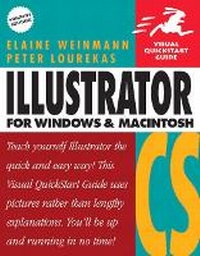
Illustrator CS for Windows and Macintosh
Visual QuickStart Guide
Published on 6. May 2004
Book
Paperback/Softback
616 pages
978-0-321-19955-3 (ISBN)
Description
Ready to use Illustrator CS' new Scribble Effect to lend a loose, hand-drawn look to your artwork? Eager to take advantage of its more than 200 professionally designed templates to jump-start your own projects? If so--or if you simply need to get up to speed on every aspect of Illustrator CS now--you need this guide! As the standard Illustrator text in many design schools, this popular task-based guide has taught a generation of users how to make the most out of Adobe's graphics powerhouse. Now it's back--revised and updated--to teach the next. Using simple step-by-step instructions, loads of screen shots, and an array of time-saving tips and tricks, this volume represents the quickest route to Illustrator cs proficiency. Clearly marked locators to new and improved features (such as enhanced type capabilities, powerful 3D graphics tools, enhanced PDF support, and more), a 24-page color section, and highly readable text create a winning combination for every level of Illustrator user.
More details
Language
English
Place of publication
Berkeley
United States
Publishing group
Pearson Education (US)
Target group
College/higher education
Dimensions
Height: 178 mm
Width: 229 mm
Thickness: 30 mm
Weight
957 gr
ISBN-13
978-0-321-19955-3 (9780321199553)
Copyright in bibliographic data and cover images is held by Nielsen Book Services Limited or by the publishers or by their respective licensors: all rights reserved.
Schweitzer Classification
Other editions
New editions
Book
10/2005
Peachpit Press Publications
€23.51
Article exhausted; check for reprint
Previous edition

Book
03/2002
Peachpit Press Publications
€23.51
Article exhausted; check for reprint
Persons
In addition to this book, Elaine Weinmann and Peter Lourekas have also written, designed, and illustrated Visual QuickStart Guides to Illustrator, Photoshop, LiveMotion, and Painter. Their books have been translated into 12 languages and have sold more than 1.3 million copies worldwide. They have also taught at Pratt Manhattan, Cooper Union School of Art, the New School Computer Instruction Center, and Parsons School of Design.
Content
1: Illustrator Interface.
2: How Illustrator Works.
3: Startup.
4: Views.
5: Objects Basics.
6: Select/Copy.
7: Transform.
8: Reshape.
9: Fill & Stroke.
10: Pen.
11: Layers.
12: Create Type.
13: Style & Edit Type.
14: Acquire.
15: Brushes.
16: Symbols.
17: Combine Paths.
18: Gradients.
19: Appearances/Styles.
20: Masks/Transparency.
21: Distort.
22: Effects and filters.
23: Precision Tools.
24: Actions.
25: Preferences.
26: Output/Export.
27: Web.
28: Separations.
Appendix A: Keyboard Shortcuts.
2: How Illustrator Works.
3: Startup.
4: Views.
5: Objects Basics.
6: Select/Copy.
7: Transform.
8: Reshape.
9: Fill & Stroke.
10: Pen.
11: Layers.
12: Create Type.
13: Style & Edit Type.
14: Acquire.
15: Brushes.
16: Symbols.
17: Combine Paths.
18: Gradients.
19: Appearances/Styles.
20: Masks/Transparency.
21: Distort.
22: Effects and filters.
23: Precision Tools.
24: Actions.
25: Preferences.
26: Output/Export.
27: Web.
28: Separations.
Appendix A: Keyboard Shortcuts.