

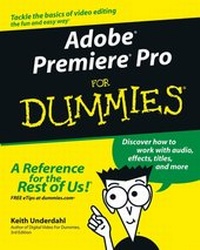
Adobe Premiere Pro For Dummies
Published on 24. October 2003
Book
Paperback/Softback
384 pages
978-0-7645-4344-9 (ISBN)
Description
* An essential resource for anyone who wants to get up and running with this popular video-editing application, from amateur and hobbyist filmmakers to professionals who want to explore the possibilities of editing on a PC
* Explains how to shoot good footage, get digital video onto a PC, set up a Premiere production studio, edit clips, add effects, work with audio, and output the finished product or share it online
* Released day and date with the new software version, the book covers the latest Premiere features and improvements
* Keith Underdahl, the author of Digital Video For Dummies (0-7645-4114-5) and other books on digital video, has broad experience as both an amateur videographer and professional video producer
More details
Edition
1. Auflage
Language
English
Place of publication
United States
Publishing group
John Wiley & Sons Inc
Target group
College/higher education
Professional and scholarly
Product notice
Paperback (trade)
Unsewn / adhesive bound
Dimensions
Height: 235 mm
Width: 191 mm
Thickness: 21 mm
Weight
719 gr
ISBN-13
978-0-7645-4344-9 (9780764543449)
Schweitzer Classification
Other editions
Additional editions
Person
Keith Underdahl is the author of several books on digital video. He is an experienced videographer and developer of kiosk and marketing videos for Ages Software.
Content
Introduction.
Part I: Introducing Adobe Premiere Pro.
Chapter 1: Getting to Know Premiere Pro.
Chapter 2: Setting Up Your Production Studio.
Chapter 3: Getting Premiere Pro Ready to Work.
Part II: Gathering Footage.
Chapter 4: A Crash Course in Video Production.
Chapter 5: Starting and Managing Your Movie Projects.
Chapter 6: Capturing, Importing, and Managing Media.
Part III: Editing in Premiere Pro.
Chapter 7: Editing Clips.
Chapter 8: Working with the Timeline.
Chapter 9: Transitioning Between Clips.
Chapter 10: Improving Your Video Images.
Chapter 11: Compositing and Animating Clips.
Chapter 12: Affecting Effects in Your Movies.
Chapter 13: Working with Audio.
Chapter 14: Giving Credit with Titles.
Part IV: Wrapping Up Your Project.
Chapter 15: Finalizing the Project.
Chapter 16: Sending Your Project to the World Wide Web.
Chapter 17: Exporting Your Movie to Tape.
Chapter 18: Recording DVDs.
Part V: The Part of Tens.
Chapter 19: Ten Movie-Making Tips and Tricks.
Chapter 20: Ten Essential Software Add-Ons for Adobe Premiere.
Chapter 21: Ten Tools (and Toys) for Your Production Studio.
Part VI: Appendix.
Appendix.
Index.