

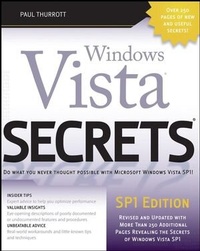
Windows Vista Secrets
SP1 Edition
1st Edition
Published on 3. October 2008
Book
Paperback/Softback
1032 pages
978-0-470-24200-1 (ISBN)
Description
Windows Vista SP1 Edition Secrets
Get ready to be amazed by numerous tips, tricks, and undocumented features that disclose unique and exciting aspects of the new Windows Vista SP1 operating system. This revised SP1 Edition is packed with over 250 additional pages revealing secrets on topics like configuring Vista, networking, Microsoft Zune, Windows Live OneCare, LIVE, Windows Home Server, and the new and exciting features included in SP1. Leading Windows authority Paul Thurrott reveals hidden Vista abilities and offers a behind-the-scenes look at everything from hardware and software compatibility to security features to keep your data safe. These priceless pieces of little-known expert advice will help you quickly grasp the many benefits of Windows Vista.
The Insider's Guide to
* Installing or upgrading to Windows Vista SP1 (see Chapter 2)
* Personalizing and configuring Windows Vista SP1 (see Chapter 7)
* Windows Vista SP1 networking (see Chapter 10)
* Using Zune(r) as a digital media alternative (see Chapter 12)
* Getting the ultimate Vista experience on Tablet PC and Ultra-Mobile PCs (see Chapter 18)
* Managing e-mail and contacts (see Chapter 20)
* Taking Vista to the next level with LIVE services (see Chapter 21)
* Master TV and digital media with Windows Media Center (see Chapter 24)
Get ready to be amazed by numerous tips, tricks, and undocumented features that disclose unique and exciting aspects of the new Windows Vista SP1 operating system. This revised SP1 Edition is packed with over 250 additional pages revealing secrets on topics like configuring Vista, networking, Microsoft Zune, Windows Live OneCare, LIVE, Windows Home Server, and the new and exciting features included in SP1. Leading Windows authority Paul Thurrott reveals hidden Vista abilities and offers a behind-the-scenes look at everything from hardware and software compatibility to security features to keep your data safe. These priceless pieces of little-known expert advice will help you quickly grasp the many benefits of Windows Vista.
The Insider's Guide to
* Installing or upgrading to Windows Vista SP1 (see Chapter 2)
* Personalizing and configuring Windows Vista SP1 (see Chapter 7)
* Windows Vista SP1 networking (see Chapter 10)
* Using Zune(r) as a digital media alternative (see Chapter 12)
* Getting the ultimate Vista experience on Tablet PC and Ultra-Mobile PCs (see Chapter 18)
* Managing e-mail and contacts (see Chapter 20)
* Taking Vista to the next level with LIVE services (see Chapter 21)
* Master TV and digital media with Windows Media Center (see Chapter 24)
More details
Other editions
Additional editions
Person
The author of over 20 books, Paul Thurrott is the news editor of Windows IT Pro Media and the editor of the SuperSite for Windows. He writes a weekly editorial for Windows IT Pro UPDATE; a daily Windows news and information newsletter called WinInfo Daily UPDATE; and a monthly column called "Need To Know" in Windows IT Pro Magazine. He blogs daily via the SuperSite Blog and appears weekly in the highly-rated Windows Weekly podcast with Leo Laporte.
Content
Preface.
Read This First.
Part I: Surviving Setup.
Chapter 1: Selecting the Right Vista Version.
Chapter 2: Installing or Upgrading to Windows Vista.
Chapter 3: Hardware and Software Compatibility.
Part II: The Windows Vista User Experience.
Chapter 4: What's New in the Windows Vista User Interface.
Chapter 5: Where's My Stuff? Finding and Organizing Files.
Chapter 6: Using Windows Sidebar.
Chapter 7: Personalizing and Confi guring Windows Vista.
Part III: Security.
Chapter 8: Vista Security Features.
Chapter 9: Users, Accounts, and UAC.
Chapter 10: Windows Vista Networking.
Part IV: Digital Media and Entertainment.
Chapter 11: Windows Media Player.
Chapter 12: Zune: A Digital Media Alternative.
Chapter 13: Enjoying Digital Photos.
Chapter 14: Digital Videos and DVD Movies.
Chapter 15: Vista in the Living Room: Windows Media Center.
Chapter 16: Having Fun: Games and Vista.
Part V: Mobility.
Chapter 17: Vista to Go: Windows Vista Mobility Features.
Chapter 18: Using Tablet PCs and Ultra-Mobile PCs.
Part VI: Internet and Networking.
Chapter 19: Browsing the Web.
Chapter 20: Managing E-mail and Contacts.
Chapter 21: Turning It Up a Notch with Microsoft's Live Services.
Part VII: Home Offi ce/Power User.
Chapter 22: Managing Your Schedule with Windows Calendar.
Chapter 23: Keeping Your Data Safe.
Chapter 24: Automating Windows Vista with Windows PowerShell.
Chapter 25: Beyond Vista: Managing Multiple PCs.
Index.
Read This First.
Part I: Surviving Setup.
Chapter 1: Selecting the Right Vista Version.
Chapter 2: Installing or Upgrading to Windows Vista.
Chapter 3: Hardware and Software Compatibility.
Part II: The Windows Vista User Experience.
Chapter 4: What's New in the Windows Vista User Interface.
Chapter 5: Where's My Stuff? Finding and Organizing Files.
Chapter 6: Using Windows Sidebar.
Chapter 7: Personalizing and Confi guring Windows Vista.
Part III: Security.
Chapter 8: Vista Security Features.
Chapter 9: Users, Accounts, and UAC.
Chapter 10: Windows Vista Networking.
Part IV: Digital Media and Entertainment.
Chapter 11: Windows Media Player.
Chapter 12: Zune: A Digital Media Alternative.
Chapter 13: Enjoying Digital Photos.
Chapter 14: Digital Videos and DVD Movies.
Chapter 15: Vista in the Living Room: Windows Media Center.
Chapter 16: Having Fun: Games and Vista.
Part V: Mobility.
Chapter 17: Vista to Go: Windows Vista Mobility Features.
Chapter 18: Using Tablet PCs and Ultra-Mobile PCs.
Part VI: Internet and Networking.
Chapter 19: Browsing the Web.
Chapter 20: Managing E-mail and Contacts.
Chapter 21: Turning It Up a Notch with Microsoft's Live Services.
Part VII: Home Offi ce/Power User.
Chapter 22: Managing Your Schedule with Windows Calendar.
Chapter 23: Keeping Your Data Safe.
Chapter 24: Automating Windows Vista with Windows PowerShell.
Chapter 25: Beyond Vista: Managing Multiple PCs.
Index.