

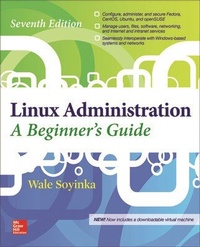
Linux Administration: A Beginner's Guide, Seventh Edition
7th Edition
Published on 16. February 2016
Book
Paperback/Softback
848 pages
978-0-07-184536-6 (ISBN)
Description
Now with a downloadable virtual machine showcasing the book's test system configuration and updated for the latest Linux kernel release, the new edition of this bestseller teaches system administrators how to set up and configure Linux quickly and easily. The seventh edition of Linux Administration: A Beginner's Guide takes a proven, step-by-step approach to teaching the fundamentals of Linux system administration, including set-up, configuration, maintenance, networking, and security. Written for all beginner-level system and network admins, this beginner's guide makes it easy for you to translate your basic admin knowledge to Linux system administration and tackle real-world Linux system administration issues.
Part I begins with instructions for Linux server and software installation. Part II details all that is necessary to manage a stand-alone system and Part III introduces Linux security and networking. The remainder of the book is divided into two parts, Part IV: Internet Services and Part V: Intranet Services. The book's step-by-step design prompts you to follow along and configure your own system. This new edition features a virtual machine showcasing the example system configuration, allowing you to test and compare your own configuration.
Covers the major distributions of Linux server for Ubuntu, Fedora, Centos, and openSUSE, and the latest Linux kernel release -- Linux 3.20Now with a virtual machine! Available for download, the virtual machine showcases the final system configuration you will achieve by working through the book Complete with instructor resource materials, featuring PowerPoint slides for classroom use and a test bank of questions that can be used for homework assignments, quizzes, or a final exam
Part I begins with instructions for Linux server and software installation. Part II details all that is necessary to manage a stand-alone system and Part III introduces Linux security and networking. The remainder of the book is divided into two parts, Part IV: Internet Services and Part V: Intranet Services. The book's step-by-step design prompts you to follow along and configure your own system. This new edition features a virtual machine showcasing the example system configuration, allowing you to test and compare your own configuration.
Covers the major distributions of Linux server for Ubuntu, Fedora, Centos, and openSUSE, and the latest Linux kernel release -- Linux 3.20Now with a virtual machine! Available for download, the virtual machine showcases the final system configuration you will achieve by working through the book Complete with instructor resource materials, featuring PowerPoint slides for classroom use and a test bank of questions that can be used for homework assignments, quizzes, or a final exam
More details
Series
Edition
7th edition
Language
English
Place of publication
United States
Publishing group
McGraw-Hill Education - Europe
Target group
Professional and scholarly
Illustrations
80 Illustrations
Dimensions
Height: 234 mm
Width: 185 mm
Thickness: 43 mm
Weight
1232 gr
ISBN-13
978-0-07-184536-6 (9780071845366)
Schweitzer Classification
Other editions
New editions
Wale Soyinka
Linux Administration: A Beginner's Guide, Eighth Edition
A Beginner's Guide, Eighth Edition
Book
04/2020
8th Edition
McGraw-Hill Education
€50.40
Shipment within 10-20 days
Additional editions
E-Book
12/2015
1st Edition
McGraw-Hill Education
€71.93
Available for download
Person
Wale Soyinka wears many hats, all fitting to varying degrees. he is a father, an author, a producer, a system administrator, an open source evangelist, a network administrator, a hacker, an entrepreneur, and a chef. Wale has written an extensive librar of Linux administration training materials, including the fifth, and sixth editions of Linux Administration: A Beginner's Guide. He is also the author or Wireless Netowrk Administration: A Beginner's Guide.
Content
Part I: Introduction, Installation, and Software Management
Chapter 1: Technical Summary of Linux Distributions
Chapter 2: Installing Linux in a Server Configuration
Chapter 3: The Command Line
Chapter 4: Managing Software
Part II: Single-Host Administration
Chapter 5: Managing Users and Groups
Chapter 6: Booting and Shutting Down
Chapter 7: File Systems
Chapter 8: Core System Services
Chapter 9: The Linux Kernel
Chapter 10: Knobs and Dials: Virtual File Systems
Part III: Networking and Security
Chapter 11: TCP/IP for System Administrators
Chapter 12: Network Configuration
Chapter 13: Linux Firewall
Chapter 14: Local Security
Chapter 15: Network Security
Part IV: Internet Services
Chapter 16: DNS
Chapter 17: File Transfer Protocol (FTP)
Chapter 18: Apache Web Server
Chapter 19: SMTP
Chapter 20: POP and IMAP
Chapter 21: Voice Over IP
Chapter 22: The Secure Shell
Part V: Intranet Services
Chapter 23: Network File System
Chapter 24: Samba
Chapter 25: Distributed File Systems
Chapter 26: Network Information Service
Chapter 27: LDAP
Chapter 28: Printing
Chapter 29: DHCP
Chapter 30: Virtualization
Chapter 31: Backups
Part VI: Appendixes
Appendix A: Creating a Linux Installer on Flash/USB Devices
Appendix B: Demo Virtual Machine
Chapter 1: Technical Summary of Linux Distributions
Chapter 2: Installing Linux in a Server Configuration
Chapter 3: The Command Line
Chapter 4: Managing Software
Part II: Single-Host Administration
Chapter 5: Managing Users and Groups
Chapter 6: Booting and Shutting Down
Chapter 7: File Systems
Chapter 8: Core System Services
Chapter 9: The Linux Kernel
Chapter 10: Knobs and Dials: Virtual File Systems
Part III: Networking and Security
Chapter 11: TCP/IP for System Administrators
Chapter 12: Network Configuration
Chapter 13: Linux Firewall
Chapter 14: Local Security
Chapter 15: Network Security
Part IV: Internet Services
Chapter 16: DNS
Chapter 17: File Transfer Protocol (FTP)
Chapter 18: Apache Web Server
Chapter 19: SMTP
Chapter 20: POP and IMAP
Chapter 21: Voice Over IP
Chapter 22: The Secure Shell
Part V: Intranet Services
Chapter 23: Network File System
Chapter 24: Samba
Chapter 25: Distributed File Systems
Chapter 26: Network Information Service
Chapter 27: LDAP
Chapter 28: Printing
Chapter 29: DHCP
Chapter 30: Virtualization
Chapter 31: Backups
Part VI: Appendixes
Appendix A: Creating a Linux Installer on Flash/USB Devices
Appendix B: Demo Virtual Machine