

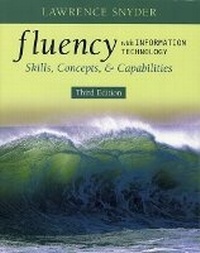
Fluency with Information Technology
Skills, Concepts, and Capabilities
3rd Edition
Published on 22. November 2007
Book
Paperback/Softback
784 pages
978-0-321-51239-0 (ISBN)
Description
Fluency with Information Technology: Skills, Concepts, and Capabilities, Third Edition, equips readers who are already familiar with computers, the Internet, and the World Wide Web with a deeper understanding of the broad capabilities of technology. Through a project-oriented learning approach that uses examples and realistic problem-solving scenarios, Larry Snyder teaches readers to navigate information technology independently and become effective users of today's resources, forming a foundation of skills they can adapt to their personal and career goals as future technologies emerge.
More details
Edition
3rd edition
Language
English
Place of publication
United States
Publishing group
Pearson Education (US)
Target group
College/higher education
Dimensions
Width: 254 mm
Thickness: 25 mm
Weight
1348 gr
ISBN-13
978-0-321-51239-0 (9780321512390)
Copyright in bibliographic data and cover images is held by Nielsen Book Services Limited or by the publishers or by their respective licensors: all rights reserved.
Schweitzer Classification
Other editions
New editions
Lawrence Snyder
Fluency with Information Technology
Skills, Concepts, and Capabilities: International Edition
Book
02/2010
4th Edition
Pearson
€66.84
Article is exhausted; no reprint
Previous edition
Book
08/2005
2nd Edition
Pearson
€54.46
Article exhausted; check for reprint
Person
Larry Snyder was the chairman of the National Research Council's (NRC) committee that issued the report, "Being Fluent with Information Technology." It is this NRC committee funded by the National Science Foundation that identified the three types of knowledge needed in Fluency. Larry received his BA in 1968 from the University of Iowa and his Ph.D. in 1973 at Carnegie Mellon. He taught at schools such as Yale, MIT, Harvard, and Syndey University before settling down at the University of Washington in 1983, where he is currently a professor of computer science and engineering.
Content
Part 1. BECOMING SKILLED AT INFORMATION TECHNOLOGY
1. Terms of Endearment: Defining Information Technology
2. What the Digerati Know: Exploring the Human-Computer Interface
3. Making the Connection: The Basics of Networking
4. Marking Up with HTML: A Hypertext Markup Language Primer
5. Searching for Truth: Locating Information on the WWW
6. Searching for Guinea Pig B: Case Study in Online Research
Part 2. ALGORITHMS AND DIGITIZING INFORMATION
7. To Err Is Human: An Introduction to Debugging
8. Bits and the "Why" of Bytes: Representing Information Digitally
9. Following Instructions: Principles of Computer Operation
10. What's the Plan? Algorithmic Thinking
11. Light, Sound, Magic: Representing Multimedia Digitally
Part 3. DATA AND INFORMATION
12. Computers in Polite Society: Social Implications of IT
13. Shhh, It's a Secret: Privacy and Digital Security
14. Fill-in-the-Blank Computing: Basics of Spreadsheets
15. `What If' Thinking Helps: Advanced Spreadsheets for Planning
16. A Table with a View: Database Queries
17. iDiary: A Case Study in Database Design
Part 4. PROBLEM SOLVING
18. Get with the Program: Fundamental Concepts Expressed in JavaScript
19. The Bean Counter: A JavaScript Program
20. Thinking Big: Programming Functions
21. Once Is Not Enough: Iteration Principles
22. The Smooth Motion: Case Study in Algorithmic Problem Solving
23. Computers Can Do Almost {Everything, Nothing}: Limits to Computation
24. A Fluency Summary: Click to Close
Appendixes
Appendix A: HTML Reference
Appendix B: iDiary Database
Appendix C: JavaScript Programming Rules
Appendix D: Bean Counter Program
Appendix E: Memory Bank Program
Appendix F: Smooth Motion Program
Glossary
Answers to Selected Questions
Index
1. Terms of Endearment: Defining Information Technology
2. What the Digerati Know: Exploring the Human-Computer Interface
3. Making the Connection: The Basics of Networking
4. Marking Up with HTML: A Hypertext Markup Language Primer
5. Searching for Truth: Locating Information on the WWW
6. Searching for Guinea Pig B: Case Study in Online Research
Part 2. ALGORITHMS AND DIGITIZING INFORMATION
7. To Err Is Human: An Introduction to Debugging
8. Bits and the "Why" of Bytes: Representing Information Digitally
9. Following Instructions: Principles of Computer Operation
10. What's the Plan? Algorithmic Thinking
11. Light, Sound, Magic: Representing Multimedia Digitally
Part 3. DATA AND INFORMATION
12. Computers in Polite Society: Social Implications of IT
13. Shhh, It's a Secret: Privacy and Digital Security
14. Fill-in-the-Blank Computing: Basics of Spreadsheets
15. `What If' Thinking Helps: Advanced Spreadsheets for Planning
16. A Table with a View: Database Queries
17. iDiary: A Case Study in Database Design
Part 4. PROBLEM SOLVING
18. Get with the Program: Fundamental Concepts Expressed in JavaScript
19. The Bean Counter: A JavaScript Program
20. Thinking Big: Programming Functions
21. Once Is Not Enough: Iteration Principles
22. The Smooth Motion: Case Study in Algorithmic Problem Solving
23. Computers Can Do Almost {Everything, Nothing}: Limits to Computation
24. A Fluency Summary: Click to Close
Appendixes
Appendix A: HTML Reference
Appendix B: iDiary Database
Appendix C: JavaScript Programming Rules
Appendix D: Bean Counter Program
Appendix E: Memory Bank Program
Appendix F: Smooth Motion Program
Glossary
Answers to Selected Questions
Index