

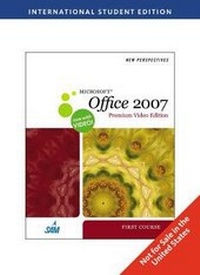
New Perspectives on MicrosoftA (R) Office 2007 First Course Premium Video Edition, International Edition
Will be published approx. on 9. March 2009
Book
Paperback/Softback
1168 pages
978-1-4390-4033-1 (ISBN)
Description
Give your students a comprehensive, hands-on, and engaging learning experience with the NEW PERSPECTIVES ON MICROSOFT OFFICE 2007, FIRST COURSE, PREMIUM VIDEO EDITION. This Premium Video Edition includes a Video Companion containing 75 videos of challenging skills, 10 Capstone Projects and SAM Projects instruction files to help "Bring Learning To Life"
The New Perspectives Series challenges students to apply what they are learning to real-life tasks, preparing them to easily transfer skills to new situations. With the New Perspectives Series' case-based, critical thinking approach, students understand why they're learning what they're learning, and are better situated to retain skills and concepts beyond the classroom.
The New Perspectives Series challenges students to apply what they are learning to real-life tasks, preparing them to easily transfer skills to new situations. With the New Perspectives Series' case-based, critical thinking approach, students understand why they're learning what they're learning, and are better situated to retain skills and concepts beyond the classroom.
Reviews / Votes
CONCEPTS. Essential Computer Concepts. WINDOWS VISTA. Exploring the Basics of Microsoft Windows Vista. Managing Your Files with Windows Vista. INTERNET. Browser and E-mail Basics. OFFICE. Getting Started with Microsoft Office 2007. WORD 2007. Tutorial 1: Creating a Document. Tutorial 2: Editing and Formatting a Document. Tutorial 3: Creating a Multiple-Page Report. Tutorial 4: Desktop Publishing and Mail Merge. EXCEL 2007. Tutorial 1: Getting Started with Excel. Tutorial 2: Formatting a Workbook. Tutorial 3: Working with Formulas and Functions. Tutorial 4: Working with Charts and Graphics. INTEGRATION. Tutorial 1: Integrating Word and Excel. ACCESS 2007. Tutorial 1: Creating a Database. Tutorial 2: Building a Database and Defining Table Relationships. Tutorial 3: Maintaing and Querying a Database. Tutorial 4: Creating Forms and Reports. INTEGRATION. Tutorial 2: Integrating Word, Excel, and Access. POWERPOINT 2007. Tutorial 1: Creating a Presentation. Tutorial 2: Applying and Modifying Text and Graphic Objects. INTEGRATION. Tutorial 3: Integrating Word, Excel, Access, and PowerPoint. INTERNET. Creating Web Pages with Microsoft Office 2007. Appendix A. Tutorial 1: Exploring the Basics of Microsoft Windows XP. Tutorial 2: Managing Your Files with Windows XP. Appendix B. Capstone Projects. Appendix C. SAM Projects.More details
Edition
International Edition
Language
English
Place of publication
Boston, MA
United States
Publishing group
Cengage Learning, Inc
Target group
Professional and scholarly
Weight
2313 gr
ISBN-13
978-1-4390-4033-1 (9781439040331)
Copyright in bibliographic data and cover images is held by Nielsen Book Services Limited or by the publishers or by their respective licensors: all rights reserved.
Schweitzer Classification
Persons
Ms. Ann Shaffer is the author of NEW PERSPECTIVES ON MICROSOFT (R) WORD 365 and has contributed to many other Cengage publications. She has more than 30 years of experience as a developmental editor and co-author of books, journal articles and multimedia in a variety of fields, including computer science, mathematics, history, engineering and social sciences. She holds a master's degree in English from the University of Wisconsin-Madison. A leading textbook author, lecturer and instructor, Patrick Carey has authored or co-authored more than 40 popular academic and trade texts for the academic market. He has taught and written about a wide range of topics, including website design, JavaScript programming, Microsoft Office and Excel, statistics, data analysis and mathematics. Mr. Carey received his Master of Science in biostatistics from the University of Wisconsin, where he worked as a researcher designing and analyzing clinical studies. Today, he splits his time between Wisconsin and Colorado, and when he is not writing, he can be found hiking and cycling. Kathleen Finnegan is a co-author on New Perspectives on Microsoft (R) Access (R) and has edited and managed many other successful textbooks on Microsoft (R) applications for Cengage Learning's Course Technology. She has taught various computer courses for corporate training and high-tech companies and has developed courseware as both a technical writer and editor, with over 20 years of experience in this field. Kathleen Finnegan is a co-author on New Perspectives on Microsoft (R) Access (R) and has edited and managed many other successful textbooks on Microsoft (R) applications for Cengage Learning's Course Technology. She has taught various computer courses for corporate training and high-tech companies and has developed courseware as both a technical writer and editor, with over 20 years of experience in this field. Joseph J. Adamski spent 12 years as a computer professional at aerospace and financial services companies and is an Associate Professor Emeritus at Grand Valley State University. He has worked as a computer professional and educator for over 40 years with a special interest in database management and personal uses of databases. Roy Ageloff has taught courses in computer programming, database design and development, accounting information systems, and office productivity software at the University of Rhode Island and has written textbooks in programming languages, database software, and spreadsheet applications. He is a business consultant and teacher at Paradise Valley Community College, Arizona. S. Scott Zimmerman obtained a Ph.D. from Florida State University and was a postdoctoral fellow at Cornell University. He is currently a professor at Brigham Young University in Provo, Utah and has published many scientific papers, computer articles, and computer programming and applications software books. Beverly B. Zimmerman, an award-winning Associate Professor at Brigham Young University, holds a Ph.D. in instructional design. She has published several articles on the use of computer technology for teaching writing, co-authored over 30 books on computer applications software, and authored an oral presentations book.
Content
CONCEPTS.
Essential Computer Concepts.
WINDOWS VISTA.
Exploring the Basics of Microsoft Windows Vista.
Managing Your Files with Windows Vista.
INTERNET.
Browser and E-mail Basics.
OFFICE.
Getting Started with Microsoft Office 2007.
WORD 2007.
Tutorial 1: Creating a Document.
Tutorial 2: Editing and Formatting a Document.
Tutorial 3: Creating a Multiple-Page Report.
Tutorial 4: Desktop Publishing and Mail Merge.
EXCEL 2007.
Tutorial 1: Getting Started with Excel.
Tutorial 2: Formatting a Workbook.
Tutorial 3: Working with Formulas and Functions.
Tutorial 4: Working with Charts and Graphics.
INTEGRATION.
Tutorial 1: Integrating Word and Excel.
ACCESS 2007.
Tutorial 1: Creating a Database.
Tutorial 2: Building a Database and Defining Table Relationships.
Tutorial 3: Maintaing and Querying a Database.
Tutorial 4: Creating Forms and Reports.
INTEGRATION.
Tutorial 2: Integrating Word, Excel, and Access.
POWERPOINT 2007.
Tutorial 1: Creating a Presentation.
Tutorial 2: Applying and Modifying Text and Graphic Objects.
INTEGRATION.
Tutorial 3: Integrating Word, Excel, Access, and PowerPoint.
INTERNET.
Creating Web Pages with Microsoft Office 2007.
Appendix A.
Tutorial 1: Exploring the Basics of Microsoft Windows XP.
Tutorial 2: Managing Your Files with Windows XP.
Appendix B.
Capstone Projects.
Appendix C.
SAM Projects.
Essential Computer Concepts.
WINDOWS VISTA.
Exploring the Basics of Microsoft Windows Vista.
Managing Your Files with Windows Vista.
INTERNET.
Browser and E-mail Basics.
OFFICE.
Getting Started with Microsoft Office 2007.
WORD 2007.
Tutorial 1: Creating a Document.
Tutorial 2: Editing and Formatting a Document.
Tutorial 3: Creating a Multiple-Page Report.
Tutorial 4: Desktop Publishing and Mail Merge.
EXCEL 2007.
Tutorial 1: Getting Started with Excel.
Tutorial 2: Formatting a Workbook.
Tutorial 3: Working with Formulas and Functions.
Tutorial 4: Working with Charts and Graphics.
INTEGRATION.
Tutorial 1: Integrating Word and Excel.
ACCESS 2007.
Tutorial 1: Creating a Database.
Tutorial 2: Building a Database and Defining Table Relationships.
Tutorial 3: Maintaing and Querying a Database.
Tutorial 4: Creating Forms and Reports.
INTEGRATION.
Tutorial 2: Integrating Word, Excel, and Access.
POWERPOINT 2007.
Tutorial 1: Creating a Presentation.
Tutorial 2: Applying and Modifying Text and Graphic Objects.
INTEGRATION.
Tutorial 3: Integrating Word, Excel, Access, and PowerPoint.
INTERNET.
Creating Web Pages with Microsoft Office 2007.
Appendix A.
Tutorial 1: Exploring the Basics of Microsoft Windows XP.
Tutorial 2: Managing Your Files with Windows XP.
Appendix B.
Capstone Projects.
Appendix C.
SAM Projects.