

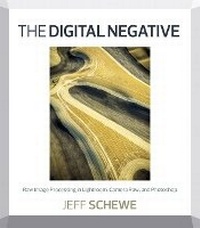
The Digital Negative
Raw Image Processing in Lightroom, Camera Raw, and Photoshop
Published on 27. September 2012
Book
Paperback/Softback
312 pages
978-0-321-83957-2 (ISBN)
Description
Shooting in the raw format gives digital photographers complete control over every aspect of image quality. The Digital Negative: Raw Image Processing in Lightroom, Camera Raw, and Photoshop is devoted exclusively to the topic and shows you how to make the most of that control. Now that raw image processing technology has matured as an essential aspect of digital photography, you need a modern book that takes a seasoned approach to the technology and explains the advantages and challenges of using Lightroom or Camera Raw to produce magnificent images.
Renowned photographer and bestselling author Jeff Schewe outlines a foolproof process for working with these digital negatives and presents his real-world expertise on optimizing raw images. You'll also learn hands-on techniques for exposing and shooting for raw image capture and developing a raw processing workflow, as well as Photoshop techniques for perfecting the master image, converting color to black and white, and processing for panoramic and HDR images.
Get the best tone and color from your digital negatives.
Use Lightroom and Camera Raw sharpening controls to maximize image quality.
Take advantage of Photoshop to do what Lightroom and Camera Raw can't.
Produce stunning black-and-white images.
Visit the book's companion website at TheDigitalNegativeBook.com for sample images and more!
Renowned photographer and bestselling author Jeff Schewe outlines a foolproof process for working with these digital negatives and presents his real-world expertise on optimizing raw images. You'll also learn hands-on techniques for exposing and shooting for raw image capture and developing a raw processing workflow, as well as Photoshop techniques for perfecting the master image, converting color to black and white, and processing for panoramic and HDR images.
Get the best tone and color from your digital negatives.
Use Lightroom and Camera Raw sharpening controls to maximize image quality.
Take advantage of Photoshop to do what Lightroom and Camera Raw can't.
Produce stunning black-and-white images.
Visit the book's companion website at TheDigitalNegativeBook.com for sample images and more!
Reviews / Votes
"Jeff played host at his studio to some of the key meetings in Lightroom's early development. With The Digital Negative, he pulls together his years of bridging traditional photography and digital photography and shares it with the broader photographic community."- Mark Hamburg
Fellow, Adobe Systems, Inc.
More details
Language
English
Place of publication
Berkeley
United States
Publishing group
Pearson Education (US)
Target group
Professional and scholarly
Dimensions
Height: 232 mm
Width: 206 mm
Thickness: 14 mm
Weight
682 gr
ISBN-13
978-0-321-83957-2 (9780321839572)
Copyright in bibliographic data and cover images is held by Nielsen Book Services Limited or by the publishers or by their respective licensors: all rights reserved.
Schweitzer Classification
Other editions
New editions
Book
09/2015
2nd Edition
Peachpit Press Publications
€45.79
Article exhausted; check different version
Additional editions
E-Book
09/2012
1st Edition
Peachpit Press Publications
€47.49
Available for download
Person
Jeff Schewe is an award-winning professional advertising photographer and digital imaging pioneer. He teaches and leads workshops and is a member of the Photoshop Hall of Fame at Photoshop World. Jeff co-authored Real World Camera Raw with Adobe Photoshop CS5 and Real World Image Sharpening with Adobe Photoshop, Camera Raw, and Lightroom. Visit the book's companion website at TheDigitalNegativeBook.com for sample images and more!
Content
Chapter 1: What is a Digital Negative
Chapter 2: Adobe Raw Image Processing Applications Overview
Chapter 3: Using Lightroom or Camera Raw for Global Processing Adjustments
Chapter 4: Using Lightroom or Camera Raw for Local Processing Adjustments
Chapter 5: Deploying Photoshop to Perfect Your Images
Chapter 6: Developing an Efficient Raw Processing Workflow
Chapter 7: Before and After Case Studies
Chapter 2: Adobe Raw Image Processing Applications Overview
Chapter 3: Using Lightroom or Camera Raw for Global Processing Adjustments
Chapter 4: Using Lightroom or Camera Raw for Local Processing Adjustments
Chapter 5: Deploying Photoshop to Perfect Your Images
Chapter 6: Developing an Efficient Raw Processing Workflow
Chapter 7: Before and After Case Studies