

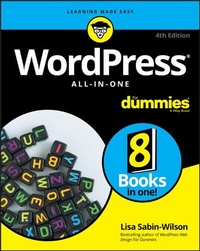
WordPress All-In-One For Dummies
4th Edition
Published on 22. March 2019
Book
Paperback/Softback
848 pages
978-1-119-55315-1 (ISBN)
Description
Set up your WordPress site today!
WordPress is a state-of-the-art blog publishing platform with a focus on aesthetics, web standards, and usability. The latest version of WordPress.org will be replaced in the fall of 2018 with WordPress 5.0. This will include a major change with the addition of new editor Gutenberg.
Take your WordPress experience to the next level with the information packed inside this All-in-One. From the basics of setting up your account, to choosing a host and theme, to managing content with editor Gutenberg, to keeping your site secure, these 8 books of expert information will help you take the WordPress community by storm.
* Build your site foundation
* Choose a server
* Become a site admin pro
* Learn how to manage content using Gutenberg
Get ready to blog all about it!
More details
Other editions
New editions
Lisa Sabin-Wilson
WordPress All-in-One For Dummies
Book
02/2024
5th Edition
Wiley
€38.50
Shipment within 15-20 days
Additional editions
Lisa Sabin-Wilson
WordPress All-in-One For Dummies
E-Book
03/2019
4th Edition
Wiley
€29.99
Available for download
Lisa Sabin-Wilson
WordPress All-in-One For Dummies
E-Book
03/2019
4th Edition
Wiley
€29.99
Available for download
Previous edition
Lisa Sabin-Wilson
WordPress All-in-One For Dummies
Book
05/2017
3rd Edition
Wiley
€32.90
Article exhausted; check for reprint
Person
LisaSabin-Wilson co-owns WebDevStudios, a development company specializing in custom WordPress plugins, themes, and deployments. She's also a popular conference speaker. Find her blog at lisasabin-wilson.com, and follow @lisasabinwilson on Twitter.
Content
Introduction 1
Book 1: WordPress Basics 5
Chapter 1: Exploring Basic WordPress Concepts 7
Chapter 2: Exploring the World of Open-Source Software 19
Chapter 3: Understanding Development and Release Cycles 29
Chapter 4: Meeting the WordPress Community 37
Chapter 5: Discovering Different Versions of WordPress 49
Book 2: Setting Up the WordPress Software 61
Chapter 1: Understanding the System Requirements 63
Chapter 2: Using Secure File Transfer Protocol 73
Chapter 3: Getting to Know PHP and MySQL 85
Chapter 4: Installing WordPress on Your Web Server 95
Chapter 5: Configuring WordPress for Optimum Security 109
Chapter 6: Updating WordPress 127
Chapter 7: Backing Up, Packing Up, and Moving to a New Host 137
Book 3: Exploring the WordPress Dashboard 155
Chapter 1: Logging In and Taking a Look Around 157
Chapter 2: Exploring Tools and Settings 169
Chapter 3: Managing Users and Multiple Authors 201
Chapter 4: Dealing with Comments and Spam 211
Chapter 5: Creating Categories and Tags 225
Book 4: Publishing Your Site with WordPress 237
Chapter 1: Writing Your First Post 239
Chapter 2: Creating a Static Page 277
Chapter 3: Uploading and Displaying Photos and Galleries 287
Chapter 4: Exploring Podcasting and Video Blogging 307
Chapter 5: Working with Custom Fields 323
Chapter 6: Using WordPress as a Content Management System 335
Book 5: Examining SEO and Social Media 355
Chapter 1: Exposing Your Content 357
Chapter 2: Creating a Social Media Listening Hub 377
Chapter 3: Understanding Analytics 389
Chapter 4: Search Engine Optimization 405
Chapter 5: Exploring Popular SEO Plugins 423
Book 6: Customizing the Look of Your Site 433
Chapter 1: Examining the Default Theme: Twenty Nineteen 435
Chapter 2: Finding and Installing WordPress Themes 457
Chapter 3: Exploring the Anatomy of a Theme 475
Chapter 4: Customizing Your Theme 511
Chapter 5: Understanding Parent and Child Themes 535
Chapter 6: Digging into Advanced Theme Development 551
Book 7: Using and Developing Plugins 587
Chapter 1: Introducing WordPress Plugins 589
Chapter 2: Installing and Managing Plugins 607
Chapter 3: Configuring and Using Plugins 621
Chapter 4: Modifying Existing Plugin Code 639
Chapter 5: Creating Simple Plugins from Scratch 647
Chapter 6: Exploring Plugin Development Best Practices 687
Chapter 7: Plugin Tips and Tricks 701
Book 8: Running Multiple Sites with WordPress 719
Chapter 1: An Introduction to Multiple Sites 721
Chapter 2: Setting Up and Configuring Network Features 731
Chapter 3: Becoming a Network Admin 739
Chapter 4: Management of Users and Access Control 759
Chapter 5: Using Network Plugins and Themes 769
Chapter 6: Using Multiple Domains within Your Network 781
Index 799