

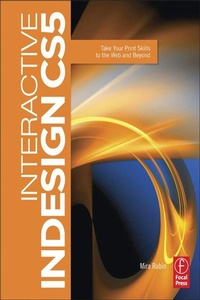
Interactive InDesign CS5
Take your Print Skills to the Web and Beyond
1st Edition
Published on 17. December 2010
Book
Paperback/Softback
398 pages
978-0-240-81511-4 (ISBN)
Description
Print designers make the transition to multimedia by mastering the interactive capabilities of InDesign with this tutorial-based guide to the new CS5 toolset that integrates with the Adobe Flash platform.
Reviews / Votes
Written in a simple, concise style, this book is for any InDesign user who wants to push the envelope on delivery without having to learn new applications. -Katherine Houghton, Adobe Certified Instructor, AmediamarkPrior to reading this book generating visually rich interactive documents was a painful and multi-application process, now with CS5 and this excellent primer, creating these documents is as easy as opening up InDesign. -Saul Rosenbaum, Visual Chutzpah
. enabled me to break through into web design more easily than imagined....provided career-transforming training and techniques by allowing a greater understanding and ability to create and implement effective web-based designs.-Lisa Adamaitis, president, Vaal Design
More details
Language
English
Place of publication
Oxford
United Kingdom
Publishing group
Taylor & Francis Ltd
Target group
Professional and scholarly
Professional Practice & Development
Product notice
Paperback (trade)
Unsewn / adhesive bound
Illustrations
450 farbige Abbildungen
450 Illustrations, color
Dimensions
Height: 245 mm
Width: 189 mm
Thickness: 27 mm
Weight
975 gr
ISBN-13
978-0-240-81511-4 (9780240815114)
Copyright in bibliographic data and cover images is held by Nielsen Book Services Limited or by the publishers or by their respective licensors: all rights reserved.
Schweitzer Classification
Other editions
Additional editions
Book
07/2017
1st Edition
Routledge
€235.50
Shipment within 10-20 days
E-Book
10/2013
Routledge
€55.49
Available for download
E-Book
10/2013
Routledge
€55.49
Available for download
Person
is an Adobe certified instructor in the Adobe Creative Suite applications and is also an eLearning specialist. As the principal of Mira Images, a Philadelphia-based Adobe Authorized Training Center and consultancy (www.miraimages.com), she has inspired reckless pursuit of all things Adobe in countless students since the dawn of the new millennium. Routinely using the full complement of CS applications in her freelance work, Mira has abundant practical experience in deploying the interactive capabilities of the suite as well as a strong foundation in animation and coding. Gifted with an ability to make even the most complex concepts understandable, she places a great emphasis on real-world skills, best practices and productivity tools.
Content
Introduction Part One: Interactive InDesign! Chapter 1: Showcase Chapter 2: Designing for Interactivity Chapter 3: The Interactive Interface Part Two: Buttons Chapter 4: About Buttons Chapter 5: Simple Image-based Buttons Chapter 6: Multi-object Buttons Chapter 7: Button Variations Part Three: Animation Chapter 8: Introducing: Animation in InDesign! Chapter 9: Getting Fancy with Animation Chapter 10: Multi-state Objects Chapter 11: Banner Ads Chapter 12: Page Transitions Part Four: Working with Media In Indesign Chapter 13: Abode Media Encoder Chapter 14: Adding Media in InDesign Part Five: Bookmarks, Hyperlinks, and Cross-references Chapter 15: Bookmarks Chapter 16: Hyperlinks and Cross-references Part Six: Layout Chapter 17: Working with Text Chapter 18: Multi-page Document Layout Chapter 19: Shapes and Color Part Seven: Output: Processes, Pitfalls, and Performance Chapter 20: Output Chapter 21: Preparing for Output