

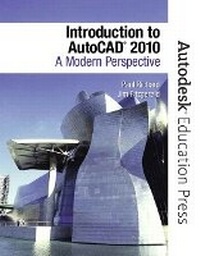
Introduction to AutoCAD 2010
A Modern Perspective
Published on 7. September 2009
Book
Paperback/Softback
928 pages
978-0-13-507159-5 (ISBN)
Description
This text is appropriate for Introductory and Intermediate AutoCAD courses.
This modern text addresses advances in technology and introduces students to 2- dimensional drawing skills and commands using the current release of AutoCAD. It continuously builds on concepts covered in previous chapters, contains exercises combined with in-text notes, and offers examples that provide the "how and why" of AutoCAD fundamentals. Projects are included at the end of each chapter and provide hands-on experience creating various types of mechanical, architectural, civil and electrical drawings.
This modern text addresses advances in technology and introduces students to 2- dimensional drawing skills and commands using the current release of AutoCAD. It continuously builds on concepts covered in previous chapters, contains exercises combined with in-text notes, and offers examples that provide the "how and why" of AutoCAD fundamentals. Projects are included at the end of each chapter and provide hands-on experience creating various types of mechanical, architectural, civil and electrical drawings.
More details
Language
English
Place of publication
Berkeley
United States
Publishing group
Pearson Education (US)
Target group
Professional and scholarly
Dimensions
Height: 277 mm
Width: 274 mm
Thickness: 33 mm
Weight
1978 gr
ISBN-13
978-0-13-507159-5 (9780135071595)
Copyright in bibliographic data and cover images is held by Nielsen Book Services Limited or by the publishers or by their respective licensors: all rights reserved.
Schweitzer Classification
Other editions
New editions
Book
07/2010
Peachpit Press Publications
€110.17
Article is exhausted; no reprint
Previous edition

Book
05/2007
Peachpit Press Publications
€55.70
Article exhausted; check for reprint
Content
PART ONE: AN INTRODUCTION TO AUTOCAD
1. Introduction to AutoCAD
2. Quick Start
PART TWO: DRAFTING SKILLS: DRAWING WITH AUTOCAD
3. Controlling the Drawing Display
4. Basic Drawing Commands
5. Drawing Tools and Drafting Settings
6. Managing Object Properties
PART THREE: UNDERSTANDING EDITING TECHNIQUES: BASICS THROUGH ADVANCED
7. Basic Editing Techniques
8. Advanced Editing Techniques
PART FOUR: WORKING WITH COMPLEX OBJECTS
9. Drawing and Editing Complex Objects
10. Pattern Fills and Hatching
PART FIVE: ANNOTATING DRAWINGS
11. Adding Text
12. Working with Tables
13. Dimensioning Drawings
PART SIX: OUTPUTTING YOUR WORK
14. Managing Paper Space Layouts
15. Plotting and Publishing
PART SEVEN: ADVANCED DRAWING AND CONSTRUCTION METHODS
16. Blocks and Block Attributes
17. Working with External References
18. File Management Tools and Object Linking and Embedding
1. Introduction to AutoCAD
2. Quick Start
PART TWO: DRAFTING SKILLS: DRAWING WITH AUTOCAD
3. Controlling the Drawing Display
4. Basic Drawing Commands
5. Drawing Tools and Drafting Settings
6. Managing Object Properties
PART THREE: UNDERSTANDING EDITING TECHNIQUES: BASICS THROUGH ADVANCED
7. Basic Editing Techniques
8. Advanced Editing Techniques
PART FOUR: WORKING WITH COMPLEX OBJECTS
9. Drawing and Editing Complex Objects
10. Pattern Fills and Hatching
PART FIVE: ANNOTATING DRAWINGS
11. Adding Text
12. Working with Tables
13. Dimensioning Drawings
PART SIX: OUTPUTTING YOUR WORK
14. Managing Paper Space Layouts
15. Plotting and Publishing
PART SEVEN: ADVANCED DRAWING AND CONSTRUCTION METHODS
16. Blocks and Block Attributes
17. Working with External References
18. File Management Tools and Object Linking and Embedding